Computers have become a regular part of education, work, and daily life. Students use them for assignments, teachers prepare lessons on them, and many professionals rely on them throughout the day. Because computers are used so widely, learning the names of their different parts can be useful for both language development and general knowledge.
In Tamil-speaking regions, computer education is introduced at an early stage in many schools. Children often learn how to identify devices such as monitors, keyboards, mice, and printers before moving on to more advanced computer skills. This makes computer-related vocabulary a practical topic for learners of all ages.
This Computer Parts Names in Tamil Worksheet helps students, parents, teachers, and beginners become familiar with commonly used computer components and their Tamil names. Since many of these devices are already part of everyday life, learners can easily connect the vocabulary with real-world objects.
Why Learning Computer Parts Names in Tamil Matters
Technology-related vocabulary is becoming increasingly important as computers continue to play a role in education, communication, and work. Learning the Tamil names of computer parts allows learners to discuss technology more comfortably and understand computer-related lessons more effectively.
For students, these words often appear in school textbooks, worksheets, computer labs, and classroom discussions. Understanding the names of computer parts can make it easier to follow instructions and complete educational activities. Since learners frequently see these devices, the vocabulary tends to be easier to remember.
Computer part names are also useful outside the classroom. Whether someone is setting up a device, discussing technology, or reading computer-related content, these words can help improve communication and comprehension.
Benefits of Learning Tamil Computer Parts Names
- Builds practical technology-related vocabulary.
- Helps learners identify computer components in Tamil.
- Supports reading and speaking activities.
- Makes computer lessons easier to understand.
- Improves word recognition and pronunciation.
- Helps students follow classroom instructions.
- Expands knowledge of technology terminology.
- Supports worksheets and educational projects.
- Creates opportunities for real-world language use.
- Makes digital learning more accessible.
- Encourages confidence when discussing technology.
- Connects language learning with modern tools.
Another benefit is that learners can practice these words while using a computer. Every time they type on a keyboard or look at a monitor, they can reinforce the vocabulary naturally.
Getting Familiar with Computer Hardware Vocabulary
Every computer is made up of different parts that work together to perform tasks.
The list below includes commonly used computer components along with their Tamil names, helping learners understand and use technology-related vocabulary with greater confidence.

Computer
கணினி
Syllable: க-ணி-னி
Pronunciation: Kanini
- Computer processes data – கணினி தரவை செயலாக்குகிறது
- Computer helps work – கணினி வேலைக்கு உதவுகிறது
- Computer stores files – கணினி கோப்புகளை சேமிக்கிறது

Monitor
திரை
Syllable: தி-ரை
Pronunciation: Thirai
- Monitor displays images – திரை படங்களை காட்டுகிறது
- Monitor shows videos – திரை வீடியோக்களை காட்டுகிறது
- Monitor is an output device – திரை ஒரு வெளியீட்டு சாதனம்

Keyboard
விசைப்பலகை
Syllable: வி-சைப்-ப-ல-கை
Pronunciation: Visaippalagai
- Keyboard is used for typing – விசைப்பலகை தட்டச்சுக்கு பயன்படுகிறது
- Keyboard enters text – விசைப்பலகை உரையை உள்ளிடுகிறது
- Keyboard has many keys – விசைப்பலகையில் பல விசைகள் உள்ளன

Mouse
சுட்டி
Syllable: சுட்-டி
Pronunciation: Sutti
- Mouse controls cursor – சுட்டி கர்சரை கட்டுப்படுத்துகிறது
- Mouse selects items – சுட்டி பொருட்களை தேர்வு செய்கிறது
- Mouse is easy to use – சுட்டி பயன்படுத்த எளிதானது
CPU
மைய செயலி
Syllable: மை-ய-செய-லி
Pronunciation: MaiyaSeyali
- CPU processes instructions – மைய செயலி கட்டளைகளை செயலாக்குகிறது
- CPU is the brain of computer – மைய செயலி கணினியின் மூளை
- CPU works fast – மைய செயலி வேகமாக செயல்படுகிறது

Motherboard
மதர்போர்டு
Syllable: ம-தர்-போர்-டு
Pronunciation: Motherboard
- Motherboard connects components – மதர்போர்டு கூறுகளை இணைக்கிறது
- Motherboard supports devices – மதர்போர்டு சாதனங்களை ஆதரிக்கிறது
- Motherboard is essential – மதர்போர்டு அவசியமானது
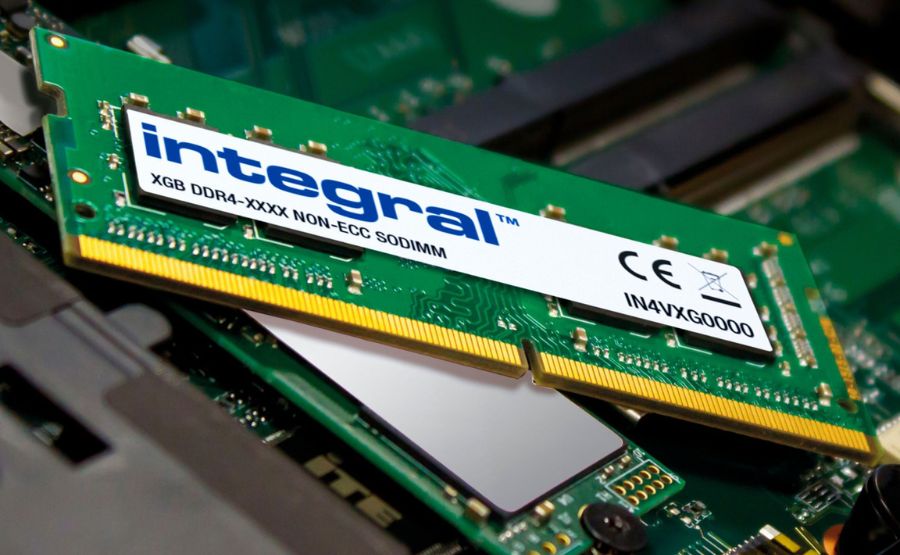
RAM
நினைவக அட்டை
Syllable: நி-னை-வ-க-அட்-டை
Pronunciation: NinaivagaAttai
- RAM stores temporary data – ரேம் தற்காலிக தரவை சேமிக்கிறது
- RAM improves speed – ரேம் வேகத்தை அதிகரிக்கிறது
- RAM is important – ரேம் முக்கியமானது

Hard Disk
கடின வட்டு
Syllable: க-டி-ன-வட்-டு
Pronunciation: KadinaVattu
- Hard disk stores files – கடின வட்டு கோப்புகளை சேமிக்கிறது
- Hard disk has large storage – கடின வட்டில் அதிக சேமிப்பு உள்ளது
- Hard disk keeps data safe – கடின வட்டு தரவை பாதுகாக்கிறது

SSD
திடநிலை சேமிப்பகம்
Syllable: தி-ட-நி-லை-சே-மிப்-ப-கம்
Pronunciation: ThidaNilaiSemippagam
- SSD loads quickly – எஸ்எஸ்டி வேகமாக ஏற்றுகிறது
- SSD improves performance – எஸ்எஸ்டி செயல்திறனை மேம்படுத்துகிறது
- SSD is faster than HDD – எஸ்எஸ்டி ஹார்டு டிஸ்க்கை விட வேகமானது

Power Supply Unit
மின்வழங்கும் அலகு
Syllable: மின்-வ-ழங்-கும்-அ-ல-கு
Pronunciation: MinValangumAlagu
- PSU supplies power – பிஎஸ்யூ மின்சாரம் வழங்குகிறது
- PSU powers components – பிஎஸ்யூ கூறுகளுக்கு மின்சாரம் தருகிறது
- PSU is necessary – பிஎஸ்யூ அவசியமானது
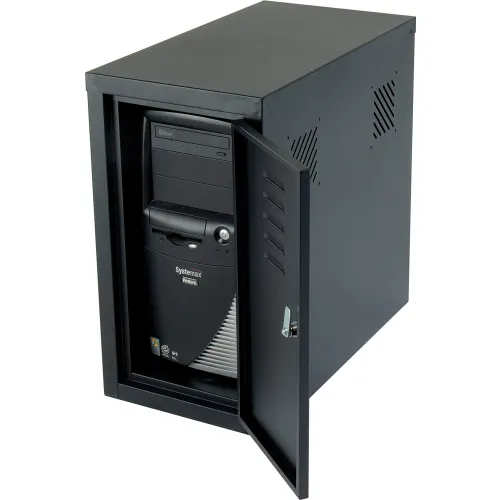
Cabinet
கணினி பெட்டி
Syllable: க-ணி-னி-பெட்-டி
Pronunciation: KaniniPetti
- Cabinet holds components – கணினி பெட்டி கூறுகளை வைத்திருக்கிறது
- Cabinet protects hardware – கணினி பெட்டி கருவிகளை பாதுகாக்கிறது
- Cabinet is strong – கணினி பெட்டி வலிமையானது

Speaker
ஒலிபெருக்கி
Syllable: ஒ-லி-பெ-ருக்-கி
Pronunciation: OliPerukki
- Speaker plays sound – ஒலிபெருக்கி ஒலியை ஒலிக்கிறது
- Speaker outputs audio – ஒலிபெருக்கி ஒலியை வெளியிடுகிறது
- Speaker is useful – ஒலிபெருக்கி பயனுள்ளது

Microphone
ஒலிவாங்கி
Syllable: ஒ-லி-வாங்-கி
Pronunciation: OliVaangi
- Microphone records sound – ஒலிவாங்கி ஒலியை பதிவு செய்கிறது
- Microphone helps communication – ஒலிவாங்கி தொடர்புக்கு உதவுகிறது
- Microphone captures voice – ஒலிவாங்கி குரலை பதிவு செய்கிறது
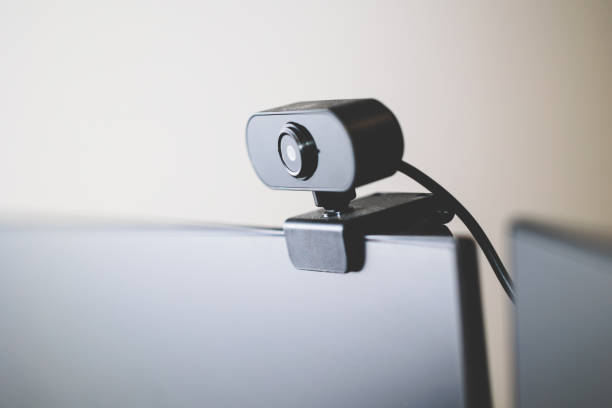
Webcam
இணைய கேமரா
Syllable: இ-ணை-ய-கே-ம-ரா
Pronunciation: InaiyaCamera
- Webcam records video – இணைய கேமரா வீடியோ பதிவு செய்கிறது
- Webcam helps meetings – இணைய கேமரா கூட்டங்களுக்கு உதவுகிறது
- Webcam captures images – இணைய கேமரா படங்களை எடுக்கிறது

Printer
அச்சுப்பொறி
Syllable: அச்-சுப்-பொ-றி
Pronunciation: AchchuPori
- Printer prints documents – அச்சுப்பொறி ஆவணங்களை அச்சிடுகிறது
- Printer produces copies – அச்சுப்பொறி நகல்களை உருவாக்குகிறது
- Printer is useful in offices – அச்சுப்பொறி அலுவலகங்களில் பயன்படுகிறது

Scanner
வருடி
Syllable: வ-ரு-டி
Pronunciation: Varudi
- Scanner scans documents – வருடி ஆவணங்களை ஸ்கேன் செய்கிறது
- Scanner creates digital copies – வருடி மின்னணு நகல்களை உருவாக்குகிறது
- Scanner reads images – வருடி படங்களை படிக்கிறது

USB Flash Drive
யுஎஸ்பி நினைவகம்
Syllable: யு-எஸ்-பி-நி-னை-வ-கம்
Pronunciation: USBNinaivagam
- USB stores files – யுஎஸ்பி கோப்புகளை சேமிக்கிறது
- USB is portable – யுஎஸ்பி எளிதில் எடுத்துச் செல்லலாம்
- USB transfers data – யுஎஸ்பி தரவை மாற்றுகிறது

DVD Drive
டிவிடி இயக்கி
Syllable: டி-வி-டி-இ-யக்-கி
Pronunciation: DVDIyakki
- DVD drive reads discs – டிவிடி இயக்கி வட்டுகளை படிக்கிறது
- DVD drive plays media – டிவிடி இயக்கி ஊடகங்களை இயக்குகிறது
- DVD drive stores data – டிவிடி இயக்கி தரவை அணுகுகிறது

Graphics Card
வரைகலை அட்டை
Syllable: வ-ரை-க-லை-அட்-டை
Pronunciation: VaraikalaiAttai
- Graphics card improves visuals – வரைகலை அட்டை காட்சியை மேம்படுத்துகிறது
- Graphics card renders games – வரைகலை அட்டை விளையாட்டுகளை இயக்குகிறது
- Graphics card processes graphics – வரைகலை அட்டை வரைகலையை செயலாக்குகிறது

Laptop
மடிக்கணினி
Syllable: ம-டி-க்-க-ணி-னி
Pronunciation: Madikkanini
- Laptop is portable – மடிக்கணினி எளிதில் எடுத்துச் செல்லலாம்
- Laptop helps study – மடிக்கணினி படிப்புக்கு உதவுகிறது
- Laptop runs software – மடிக்கணினி மென்பொருளை இயக்குகிறது

Touchpad
தொடு தளம்
Syllable: தொ-டு-த-ளம்
Pronunciation: ThoduThalam
- Touchpad controls cursor – தொடு தளம் கர்சரை கட்டுப்படுத்துகிறது
- Touchpad replaces mouse – தொடு தளம் சுட்டிக்கு மாற்றாக செயல்படுகிறது
- Touchpad is sensitive – தொடு தளம் உணர்திறன் கொண்டது

Battery
மின்கலம்
Syllable: மின்-க-லம்
Pronunciation: MinKalam
- Battery stores power – மின்கலம் மின்சாரத்தை சேமிக்கிறது
- Battery powers laptop – மின்கலம் மடிக்கணினிக்கு மின்சாரம் தருகிறது
- Battery is rechargeable – மின்கலம் மீண்டும் சார்ஜ் செய்யக்கூடியது

Router
வழிப்படுத்தி
Syllable: வ-ழிப்-ப-டு-த்தி
Pronunciation: Vazhipaduthi
- Router connects internet – வழிப்படுத்தி இணையத்தை இணைக்கிறது
- Router shares network – வழிப்படுத்தி வலையமைப்பை பகிர்கிறது
- Router provides Wi-Fi – வழிப்படுத்தி வைஃபை வழங்குகிறது

Modem
மோடம்
Syllable: மோ-டம்
Pronunciation: Modam
- Modem connects network – மோடம் வலையமைப்பை இணைக்கிறது
- Modem transfers data – மோடம் தரவை மாற்றுகிறது
- Modem enables internet – மோடம் இணையத்தை செயல்படுத்துகிறது

Network Card
பிணைய அட்டை
Syllable: பி-ணை-ய-அட்-டை
Pronunciation: PinaiyaAttai
- Network card connects systems – பிணைய அட்டை கணினிகளை இணைக்கிறது
- Network card sends data – பிணைய அட்டை தரவை அனுப்புகிறது
- Network card receives signals – பிணைய அட்டை சமிக்ஞைகளை பெறுகிறது

Projector
படவீச்சி
Syllable: ப-ட-வீச்-சி
Pronunciation: Padaveechi
- Projector displays presentations – படவீச்சி விளக்கக்காட்சிகளை காட்டுகிறது
- Projector enlarges images – படவீச்சி படங்களை பெரிதாக்குகிறது
- Projector is used in meetings – படவீச்சி கூட்டங்களில் பயன்படுகிறது

Headphones
தலையணி ஒலிக்கருவி
Syllable: த-லை-ய-ணி-ஒ-லி-க்-க-ரு-வி
Pronunciation: ThalaiyaniOlikkaruvi
- Headphones play sound privately – தலையணி ஒலிக்கருவி தனிப்பட்ட முறையில் ஒலியை கேட்க உதவுகிறது
- Headphones improve listening – தலையணி ஒலிக்கருவி கேட்பதைக் மேம்படுத்துகிறது
- Headphones reduce noise – தலையணி ஒலிக்கருவி சத்தத்தை குறைக்கிறது
Pen Drive
பென் டிரைவ்
Syllable: பென்-டிரைவ்
Pronunciation: PenDrive
- Pen drive stores data – பென் டிரைவ் தரவை சேமிக்கிறது
- Pen drive is portable – பென் டிரைவ் எடுத்துச் செல்ல எளிது
- Pen drive transfers files – பென் டிரைவ் கோப்புகளை மாற்றுகிறது

Joystick
இயக்கக் கம்பி
Syllable: இ-யக்-கக்-கம்-பி
Pronunciation: IyakkaKambi
- Joystick controls games – இயக்கக் கம்பி விளையாட்டுகளை கட்டுப்படுத்துகிறது
- Joystick improves gaming – இயக்கக் கம்பி விளையாட்டு அனுபவத்தை மேம்படுத்துகிறது
- Joystick is fun to use – இயக்கக் கம்பி பயன்படுத்த சுவாரஸ்யமானது

Barcode Scanner
பார்கோடு வருடி
Syllable: பார்-கோ-டு-வ-ரு-டி
Pronunciation: BarcodeVarudi
- Barcode scanner reads codes – பார்கோடு வருடி குறியீடுகளை படிக்கிறது
- Barcode scanner is used in shops – பார்கோடு வருடி கடைகளில் பயன்படுகிறது
- Barcode scanner works fast – பார்கோடு வருடி வேகமாக செயல்படுகிறது

UPS
தடையில்லா மின்வழங்கல்
Syllable: த-டை-யில்-லா-மின்-வ-ழங்-கல்
Pronunciation: ThadaiyillaMinValangal
- UPS provides backup power – யுபிஎஸ் மாற்று மின்சாரம் வழங்குகிறது
- UPS protects computer – யுபிஎஸ் கணினியை பாதுகாக்கிறது
- UPS prevents shutdown – யுபிஎஸ் திடீர் நிறுத்தத்தை தடுக்கிறது
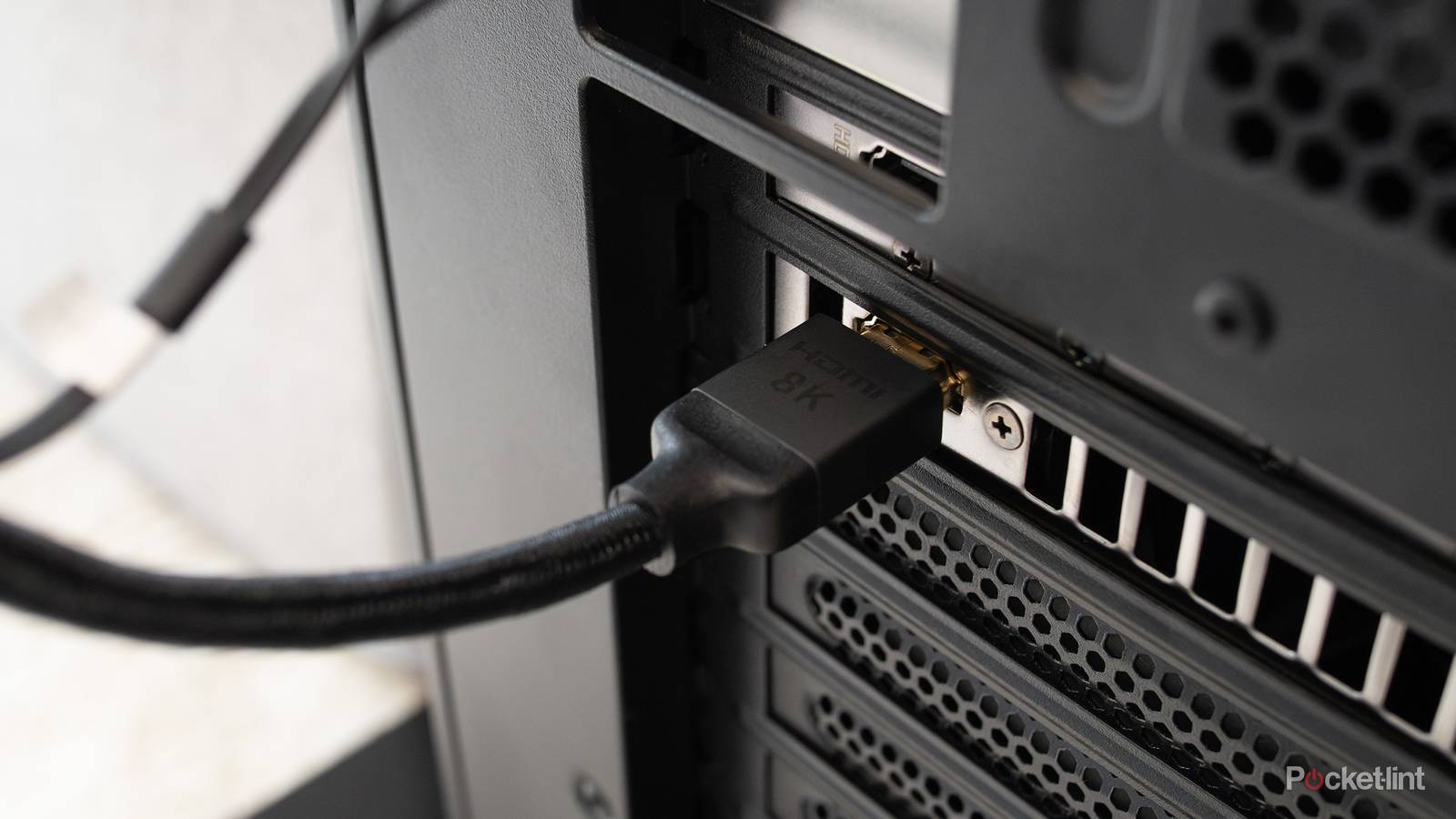
HDMI Cable
எச்டிஎம்ஐ கேபிள்
Syllable: எச்-டி-எம்-ஐ-கே-பிள்
Pronunciation: HDMICable
- HDMI cable connects displays – எச்டிஎம்ஐ கேபிள் திரைகளை இணைக்கிறது
- HDMI cable transfers video – எச்டிஎம்ஐ கேபிள் வீடியோவை மாற்றுகிறது
- HDMI cable carries audio – எச்டிஎம்ஐ கேபிள் ஒலியையும் கொண்டு செல்கிறது

Ethernet Cable
ஈதர்நெட் கேபிள்
Syllable: ஈ-தர்-நெட்-கே-பிள்
Pronunciation: EthernetCable
- Ethernet cable connects network – ஈதர்நெட் கேபிள் வலையமைப்பை இணைக்கிறது
- Ethernet cable transfers data – ஈதர்நெட் கேபிள் தரவை மாற்றுகிறது
- Ethernet cable is reliable – ஈதர்நெட் கேபிள் நம்பகமானது
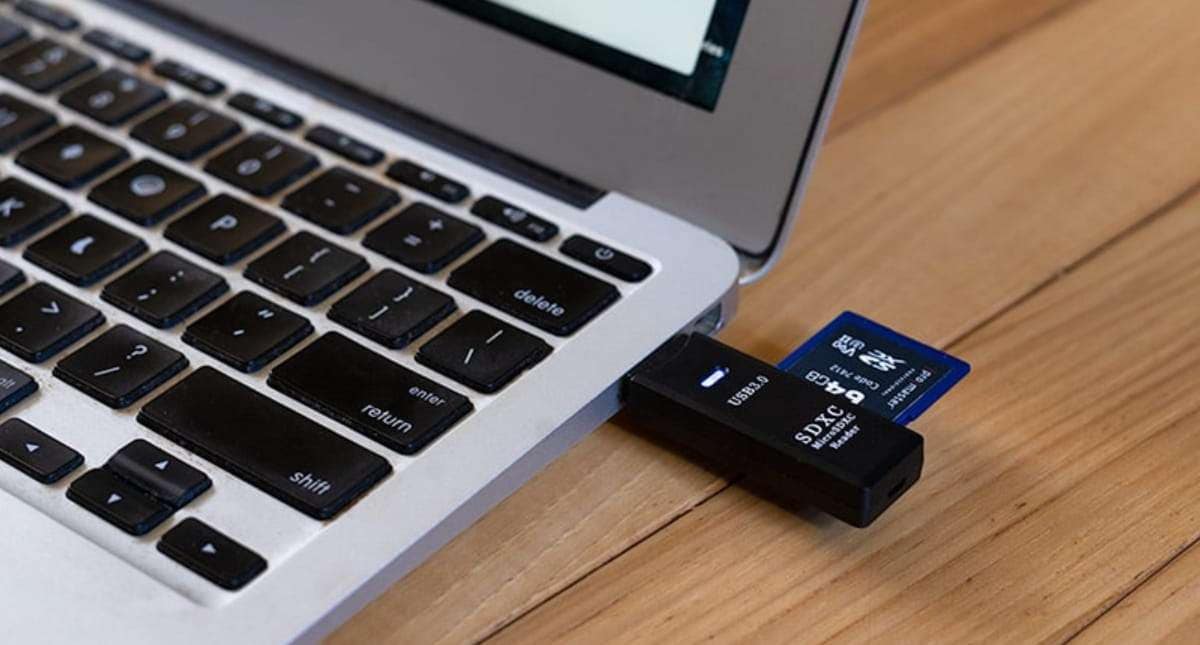
SD Card
எஸ்டி அட்டை
Syllable: எஸ்-டி-அட்-டை
Pronunciation: SDCard
- SD card stores data – எஸ்டி அட்டை தரவை சேமிக்கிறது
- SD card is small – எஸ்டி அட்டை சிறியது
- SD card is used in cameras – எஸ்டி அட்டை கேமராக்களில் பயன்படுகிறது

Fingerprint Scanner
கைரேகை வருடி
Syllable: கை-ரே-கை-வ-ரு-டி
Pronunciation: KairegaiVarudi
- Fingerprint scanner verifies identity – கைரேகை வருடி அடையாளத்தை சரிபார்க்கிறது
- Fingerprint scanner improves security – கைரேகை வருடி பாதுகாப்பை அதிகரிக்கிறது
- Fingerprint scanner is fast – கைரேகை வருடி வேகமானது
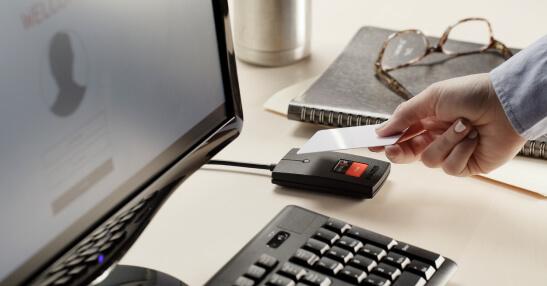
Card Reader
அட்டை வாசிப்பான்
Syllable: அட்-டை-வா-சிப்-பான்
Pronunciation: AttaiVaasippan
- Card reader reads cards – அட்டை வாசிப்பான் அட்டைகளை படிக்கிறது
- Card reader transfers data – அட்டை வாசிப்பான் தரவை மாற்றுகிறது
- Card reader supports memory cards – அட்டை வாசிப்பான் நினைவக அட்டைகளை ஆதரிக்கிறது
Easy Ways to Remember Tamil Computer Parts Names
Technology vocabulary becomes easier to remember when learners interact with the actual devices. Instead of memorizing a list, learners can point to different computer parts and say their Tamil names while using the computer.
Visual learning methods work particularly well for this topic. Diagrams, labeled images, and worksheets help learners connect each part with its function and appearance. Since most computer components have a unique shape and purpose, creating associations becomes easier.
Breaking the vocabulary into smaller groups can also help. Learners can study input devices, output devices, and storage devices separately before combining everything together.
Simple Practice Ideas
- Label computer parts using Tamil vocabulary.
- Learn a few new terms each week.
- Use picture-based flashcards.
- Draw a computer setup and label each component.
- Watch Tamil educational videos about computers.
- Create a notebook for technology-related words.
- Match pictures with the correct Tamil names.
- Practice pronunciation aloud.
- Use new vocabulary in simple sentences.
- Review older terms regularly.
- Ask friends or family members to quiz you.
- Identify computer parts while working on a device.
Regular exposure to the devices helps reinforce learning and improves vocabulary retention over time.
Computer Parts Names in Tamil At a Glance
| # | English Name | Tamil Name | Pronunciation |
|---|---|---|---|
| 1 | Computer | கணினி | Kanini |
| 2 | Monitor | திரை | Thirai |
| 3 | Keyboard | விசைப்பலகை | Visaippalagai |
| 4 | Mouse | சுட்டி | Sutti |
| 5 | CPU | மைய செயலி | MaiyaSeyali |
| 6 | Motherboard | மதர்போர்டு | Motherboard |
| 7 | RAM | நினைவக அட்டை | NinaivagaAttai |
| 8 | Hard Disk | கடின வட்டு | KadinaVattu |
| 9 | SSD | திடநிலை சேமிப்பகம் | ThidaNilaiSemippagam |
| 10 | Power Supply Unit | மின்வழங்கும் அலகு | MinValangumAlagu |
| 11 | Cabinet | கணினி பெட்டி | KaniniPetti |
| 12 | Speaker | ஒலிபெருக்கி | OliPerukki |
| 13 | Microphone | ஒலிவாங்கி | OliVaangi |
| 14 | Webcam | இணைய கேமரா | InaiyaCamera |
| 15 | Printer | அச்சுப்பொறி | AchchuPori |
| 16 | Scanner | வருடி | Varudi |
| 17 | USB Flash Drive | யுஎஸ்பி நினைவகம் | USBNinaivagam |
| 18 | DVD Drive | டிவிடி இயக்கி | DVDIyakki |
| 19 | Graphics Card | வரைகலை அட்டை | VaraikalaiAttai |
| 20 | Laptop | மடிக்கணினி | Madikkanini |
| 21 | Touchpad | தொடு தளம் | ThoduThalam |
| 22 | Battery | மின்கலம் | MinKalam |
| 23 | Router | வழிப்படுத்தி | Vazhipaduthi |
| 24 | Modem | மோடம் | Modam |
| 25 | Network Card | பிணைய அட்டை | PinaiyaAttai |
| 26 | Projector | படவீச்சி | Padaveechi |
| 27 | Headphones | தலையணி ஒலிக்கருவி | ThalaiyaniOlikkaruvi |
| 28 | Pen Drive | பென் டிரைவ் | PenDrive |
| 29 | Joystick | இயக்கக் கம்பி | IyakkaKambi |
| 30 | Barcode Scanner | பார்கோடு வருடி | BarcodeVarudi |
| 31 | UPS | தடையில்லா மின்வழங்கல் | ThadaiyillaMinValangal |
| 32 | HDMI Cable | எச்டிஎம்ஐ கேபிள் | HDMICable |
| 33 | Ethernet Cable | ஈதர்நெட் கேபிள் | EthernetCable |
| 34 | SD Card | எஸ்டி அட்டை | SDCard |
| 35 | Fingerprint Scanner | கைரேகை வருடி | KairegaiVarudi |
| 36 | Card Reader | அட்டை வாசிப்பான் | AttaiVaasippan |
Tamil Computer Parts Quiz
Building Tamil Vocabulary Through Everyday Technology
Computers are used in schools, offices, libraries, and homes, making computer-related vocabulary highly practical for modern learners. Since these devices are encountered regularly, learners have many opportunities to see, hear, and use the words in meaningful contexts. This makes technology vocabulary both useful and memorable.
As you continue expanding your Tamil vocabulary, computer-related terms can help you understand educational materials and technology discussions more confidently. Which computer part do you use most often—the keyboard, mouse, monitor, or something else? Share your thoughts in the comments and let us know which Tamil computer term was the easiest for you to remember.