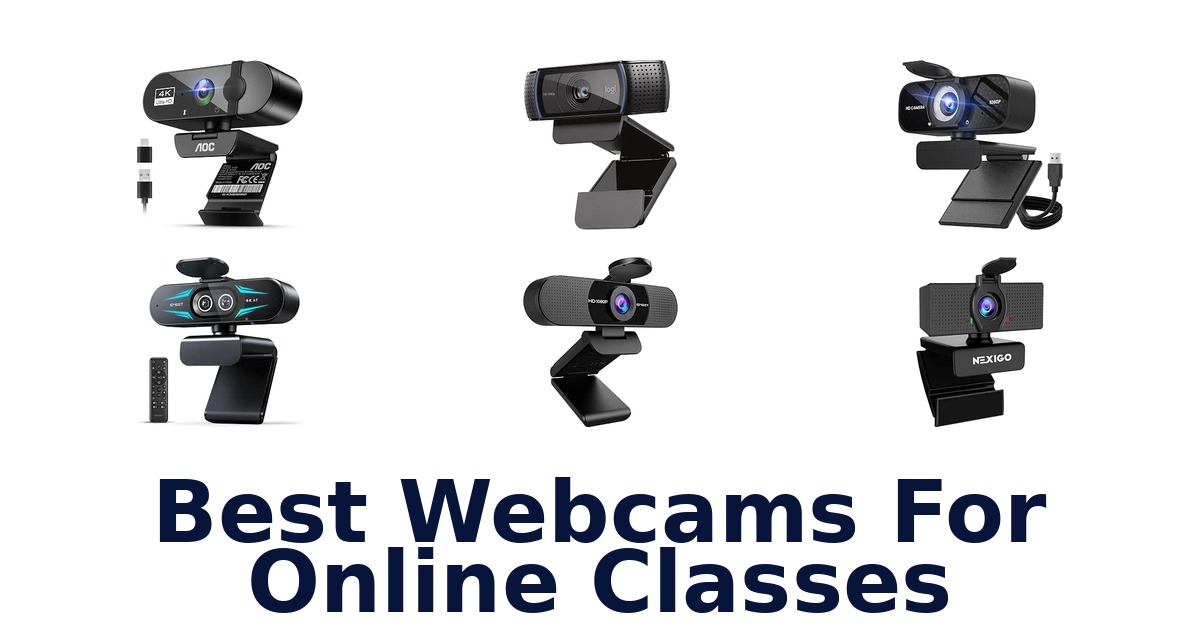
A strong webcam for online classes delivers a clear, steady image, a usable microphone, and a setup that works with your computer. The Logitech C920x is the strongest all-around fit in this group, pairing Full HD 1080p video at 30fps with autofocus, automatic light correction, and dual built-in microphones. Other options suit different classroom setups: the EMEET C960 adds a privacy cover and two noise-cancelling microphones, while the NexiGo N930AF offers autofocus that can be switched off.
For students who need a straightforward connection, several models are plug-and-play. This roundup compares ten webcams by their listed resolution, focus, microphone, privacy, and compatibility details.
Check your device connections and class software requirements before choosing, since the supplied specifications do not confirm compatibility with every platform.
The Logitech C920x is the best overall webcam for online classes in this selection. It combines Full HD 1080p video at 30fps with HD autofocus, automatic light correction, and dual built-in microphones—useful features for keeping your face and voice clear during lessons. The EMEET C960 is a strong alternative if you want a privacy cover and two noise-cancelling microphones.
For variable subject distance, the NexiGo N930AF adds autofocus that can also be turned off for manual focus.
Our Top Picks
 Best Overall
Full HD 1080p at 30fps, HD autofocus, automatic light correction, and dual built-in microphones make it a balanced choice for classes.
View on Amazon Best Privacy Cover
It combines 1080p video, a removable privacy cover, two noise-cancelling microphones, and automatic low-light correction.
View on Amazon Autofocus Pick
Its 1080p autofocus helps keep video sharp at changing distances, and users can switch autofocus off to set focus manually.
View on Amazon- Simple Setup Logitech Brio 101
Compare webcams for online classes
| # | Product | Compatible Devices | Warranty Description | Dimensions D x W x H | Buy |
|---|---|---|---|---|---|
| 1 | 1. Logitech C920xBest Overall | Personal Computer | 1 Year Limited Hardware Warranty | 1.7"D x 3.7"W x 2.7"H | View on Amazon |
| 2 | 2. EMEET C960Best Privacy Cover | Devices using Windows 7/10/11, MacOS 10.10… | 36-Month Warranty includes parts & labor. | 4.88"D x 2.65"W x 2.04"H | View on Amazon |
| 3 | 3. NexiGo N930AFAutofocus Pick | Computers, Laptops, Smartphones | 1 Year Manufacturer | 10.01"D x 5.69"W x 5.11"H | View on Amazon |
| 4 |  4. Logitech Brio 101Simple Setup 4. Logitech Brio 101Simple Setup | Windows 7 and up, macOS 10.10 and up, Chrome OS | 1 Year Limited Hardware Warranty | 1.26"D x 2.87"W x 2.62"H | View on Amazon |
| 5 |  5. Acer A610Plug-and-play classroom setup 5. Acer A610Plug-and-play classroom setup | Personal Computer, Laptop | 2 years | 2.19"D x 3.14"W x 2.05"H | View on Amazon |
| 6 |  6. NexiGo N60Fixed-distance desk lessons 6. NexiGo N60Fixed-distance desk lessons | Devices with USB connectivity and software… | 1 | 2.55"D x 3.14"W x 2.16"H | View on Amazon |
| 7 |  7. TRAUSI TW05Wide-view online teaching 7. TRAUSI TW05Wide-view online teaching | Laptops, Desktops, PC | 90 Days Manufacturer | — | View on Amazon |
| 8 |  8. Philips SPL6418High-detail online presentations 8. Philips SPL6418High-detail online presentations | Laptop, Personal Computer | 3 Months | — | View on Amazon |
| 9 |  9. AOC AC310Flexible 4K desk framing 9. AOC AC310Flexible 4K desk framing | Personal Computer, Laptop | 3 Year Manufacturer | 2.5"D x 2.5"W x 3.5"H | View on Amazon |
| 10 |  10. EMEET C60E DualTeachers switching scene views 10. EMEET C60E DualTeachers switching scene views | Laptop, Personal Computer | 2 Year Warranty | 2.09"D x 2.87"W x 2.09"H | View on Amazon |
Detailed Reviews: Best Webcams For Online Classes
#1 · Best Overall
1. Logitech C920x
- Compatible Devices: Personal Computer
- Warranty Description: 1 Year Limited Hardware Warranty
- Dimensions D x W x H: 1.7"D x 3.7"W x 2.7"H
Best for: Autofocus for changing setups.
Why it ranks #1: Full HD 1080p at 30fps, HD autofocus, automatic light correction, and dual built-in microphones make it a balanced choice for classes.
HD autofocus and automatic light correction help the Logitech C920x keep a clear picture as lighting and focus conditions change. Its Full HD 1080p video suits online classes where image detail matters, while two built-in microphones provide voice pickup without adding a separate microphone to a student’s desk setup.
The autofocus and light correction work together to maintain a sharp, bright image as classroom lighting varies, while the camera captures up to 1080p video at 30fps. Two built-in mics support voice capture during lessons and calls. Logitech also lists advanced capture software and XSplit VCam compatibility for creating or sharing video content. Compatibility is specified for personal computers, making this a PC-oriented option for students using a desktop or laptop.
- Up to Full HD 1080p at 30fps
- Autofocus and automatic light correction
- Two built-in microphones
- XSplit VCam compatibility and advanced capture software
- The listed compatible-device category is personal computers, not a broad list of operating systems.
Skip it if you need listed compatibility with Chrome OS or Linux; the EMEET C960 lists both operating systems.
Consider it for PC-based classes where autofocus, light correction and built-in stereo-style mic coverage matter. Its listed device compatibility is personal computers, so students using another platform should check that constraint before choosing.
Full product details
| Brand | Logitech |
|---|---|
| Color | Black |
| Compatible Devices | Personal Computer |
| Exposure Control Type | Automatic |
| Dimensions | 1.7"D x 3.7"W x 2.7"H |
| Item Weight | 5.7 ounces |
| Manufacturer | Logitech |
| Model | C920x |
| Model Number | 960-001335 |
| Photo Sensor Size | 1/2.9 inch |
| Screen Size | 2.7 inches |
| Special Feature | XSplit VCam compatibility |
| Style Name | 1080P/30 fps, 720p/30fps |
| Warranty Description | 1 Year Limited Hardware Warranty |
Listed on Amazon as: Logitech C920x HD Pro PC Webcam Full 1080p/30fps Video – Black
View on Amazon#2 · Best Privacy Cover
2. EMEET C960
- Compatible Devices: Devices using Windows 7/10/11, MacOS 10.10…
- Warranty Description: 36-Month Warranty includes parts & labor.
- Dimensions D x W x H: 4.88"D x 2.65"W x 2.04"H
Best for: Wide framing with mic coverage.
Why it ranks #2: It combines 1080p video, a removable privacy cover, two noise-cancelling microphones, and automatic low-light correction.
The EMEET C960 combines a 90° wide field of view with dual noise-cancelling microphones, enabling a broader classroom frame and built-in voice pickup. Its 1080p video and five-layer anti-glare lens support clear calls, while the removable cover provides a way to protect privacy when the webcam is not in use.
A 90° field of view can include more of a desk or teaching area, and dual noise-cancelling microphones provide onboard audio for class participation. The fixed-focus lens is specified for subjects 11.8 to 118.1 inches away, which gives a useful range for a student seated at a desk. Automatic low-light correction addresses dimmer conditions, and compatibility spans Windows, macOS, Linux and Android TV 7.0 or later.
- 1080p video with a five-layer anti-glare lens
- 90° wide field of view
- Dual noise-cancelling microphones
- Automatic low-light correction and removable cover
- The fixed-focus lens works within its specified 11.8-to-118.1-inch range.
Skip it if you need autofocus when moving closer or farther from the camera; the NexiGo N930AF provides autofocus and lets you turn it off.
A practical choice for students who want a wide view, built-in noise-cancelling microphones and broad listed operating-system compatibility. Its fixed-focus distance range makes a stable seating position important for consistent framing.
Full product details
| Brand | EMEET |
|---|---|
| Color | Black |
| Compatible Devices | Devices using Windows 7/10/11, MacOS 10.10 and above, Linux, and Android TV 7.0 or later |
| Exposure Control Type | Automatic |
| Dimensions | 4.88"D x 2.65"W x 2.04"H |
| Item Weight | 0.16 kg |
| Manufacturer | Shenzhen eMeet technology Co.,Ltd. |
| Model | C960 |
| Model Number | 960 |
| Screen Size | 1.97 inches |
| Special Feature | Usb, Dual Noise-Cancelling Microphones, Auto Low-light Correction, Webcam with Cover, Tripod Holder |
| Style Name | Clear 1080P w/ 90° Wide FOV |
| Warranty Description | 36-Month Warranty includes parts & labor. |
Listed on Amazon as: EMEET 1080P Webcam with Microphone, C960 Web Camera 2 Mics Streaming Webcam
View on Amazon#3 · Autofocus Pick
3. NexiGo N930AF
- Compatible Devices: Computers, Laptops, Smartphones
- Warranty Description: 1 Year Manufacturer
- Dimensions D x W x H: 10.01"D x 5.69"W x 5.11"H
Best for: Autofocus for active students.
Why it ranks #3: Its 1080p autofocus helps keep video sharp at changing distances, and users can switch autofocus off to set focus manually.
Autofocus gives the NexiGo N930AF flexibility when a student shifts position, with a stated starting point of 7 cm and 1080p video at 30fps. Users can also turn autofocus off to set a manual focal point, while the included privacy cover blocks the lens between online lessons.
Autofocus can keep the image sharp as distance changes, and the option to disable it allows a manually selected focal point when a setup stays fixed. The webcam records up to 1080p at 30fps and includes low-light correction for classroom calls in varied lighting. A privacy cover adds a physical lens block after class. It is listed for computers, laptops and smartphones, with plug-and-play and software support among its features.
- 1080p video at 30fps
- Autofocus can be turned off for manual focus
- Low-light correction
- Privacy cover and listed compatibility with computers, laptops and smartphones
- The autofocus feature may need to be turned off when you want a manually fixed focal point.
Skip it if you prefer a fixed-focus webcam with a wide 90° view; the EMEET C960 lists both a fixed-focus range and 90° field of view.
A strong fit for students who move around during lessons or want the choice of autofocus and manual focus. Its privacy cover and low-light correction add practical class-call features, with smartphone compatibility also listed.
Full product details
| Brand | NexiGo |
|---|---|
| Color | Black |
| Compatible Devices | Computers, Laptops, Smartphones |
| Exposure Control Type | Automatic |
| Dimensions | 10.01"D x 5.69"W x 5.11"H |
| Item Weight | 0.19 kg |
| Manufacturer | NexiGo |
| Model | AutoFocus 1080p Webcam with Stereo Microphone and Privacy Cover |
| Model Number | A229AF/N930AF |
| Screen Size | 6.5 inches |
| Special Feature | Autofocus, Low Light Correction, Software Support, Plug and Play |
| Style Name | 1080P Webcam |
| Warranty Description | 1 Year Manufacturer |
Listed on Amazon as: NexiGo N930AF Webcam with Microphone for Desktop, Autofocus, Webcam for Laptop, Computer Camera, 1080p HD USB Web Camera, Compatible with Zoom/Switch 2/Teams/Webex
View on Amazon#4 · Simple Setup
4. Logitech Brio 101
- Compatible Devices: Windows 7 and up, macOS 10.10 and up, Chrome OS
- Warranty Description: 1 Year Limited Hardware Warranty
- Dimensions D x W x H: 1.26"D x 2.87"W x 2.62"H
Best for: Privacy-minded class attendees.
Why it ranks #4: This 1080p webcam has a built-in microphone, plug-and-play operation, a sliding privacy cover, and automatic brightness adjustment.
RightLight boosts brightness by up to 50% while reducing shadows, helping students remain visible when room lighting is uneven. Logitech’s Brio 101 also records Full HD 1080p video, giving online classes a clear picture, and its integrated slide cover offers a direct way to block the lens between calls.
The automatic light balancing addresses dim or shadowy rooms, while Full HD 1080p keeps the image clear for lessons and meetings. Its built-in microphone handles voice pickup without requiring a separate mic, and plug-and-play setup helps simplify getting started. The integrated privacy cover slides over the lens when class ends. Compatibility includes Windows 7 and up, macOS 10.10 and up, and Chrome OS, so it suits a range of common school computers.
- Full HD 1080p video
- RightLight boosts brightness by up to 50% and reduces shadows
- Integrated sliding privacy cover
- Built-in microphone and plug-and-play setup
- No listed autofocus feature for adjusting focus as your distance changes.
Skip it if you need listed autofocus for changing camera distances; the Logitech C920x specifies autofocus and automatic light correction.
A good fit for students who want a simple 1080p camera with a physical privacy shutter and built-in mic for everyday classes. Check that your computer runs one of its listed supported operating systems.
Full product details
| Brand | Logitech |
|---|---|
| Color | Black |
| Compatible Devices | Windows 7 and up, macOS 10.10 and up, Chrome OS |
| Exposure Control Type | Automatic |
| Dimensions | 1.26"D x 2.87"W x 2.62"H |
| Item Weight | 4.96 ounces |
| Manufacturer | Logitech |
| Model | BRIO 100 |
| Model Number | 960-001589 |
| Screen Size | 0.01 |
| Special Feature | Low Light |
| Style Name | 1080p |
| Warranty Description | 1 Year Limited Hardware Warranty |
Listed on Amazon as: Logitech Brio 101 Full HD 1080p Webcam for Streaming and Meetings – Black
View on Amazon#5
5. Acer A610
- Compatible Devices: Personal Computer, Laptop
- Warranty Description: 2 years
- Dimensions D x W x H: 2.19"D x 3.14"W x 2.05"H
Best for: Plug-and-play classroom setup.
Why it ranks #5: The 1080p model is described for online teaching and offers plug-and-play setup, built-in microphones, and a two-year warranty.
Plug-and-play setup without drivers makes the Acer A610 quick to connect for online classes, while its 1080p Full HD video supports clear calls. The listed CMOS sensor is described as improving image clarity and color performance, and the webcam is intended for laptops and personal computers used in virtual classrooms.
The 1080p video provides a clear class-call format, while the CMOS sensor is described as improving image clarity and color performance. Driver-free plug-and-play setup can reduce installation steps on a compatible laptop or PC. Acer lists automatic exposure control, which handles exposure automatically, and the product is positioned for remote work, meetings and online teaching. The supplied details do not specify a microphone feature, so buyers needing onboard voice pickup should consider that when planning their setup.
- 1080p Full HD video
- CMOS sensor described as improving clarity and color
- Plug-and-play setup with no drivers needed
- Listed for laptops and personal computers
- The supplied product details do not list a built-in microphone.
Skip it if you need a listed built-in microphone in the webcam; the EMEET C960 specifies dual noise-cancelling microphones.
Consider the A610 for a laptop or PC class setup where simple connection and 1080p video are priorities. The supplied details do not list an onboard microphone, so plan separate audio if needed.
Full product details
| Brand | Acer |
|---|---|
| Color | Black |
| Compatible Devices | Personal Computer, Laptop |
| Exposure Control Type | Automatic |
| Dimensions | 2.19"D x 3.14"W x 2.05"H |
| Item Weight | 4.8 ounces |
| Manufacturer | Acer |
| Model | WBC-0H01 |
| Model Number | WBC-0H01 |
| Photo Sensor Size | 1/3-inch |
| Screen Size | 2 inches |
| Special Feature | Projector |
| Style Name | 1080P |
| Warranty Description | 2 years |
Listed on Amazon as: Acer A610 1080p Webcam for PC with Microphones Computer Camera for Meeting
View on Amazon#6
6. NexiGo N60
- Compatible Devices: Devices with USB connectivity and software…
- Warranty Description: 1
- Dimensions D x W x H: 2.55"D x 3.14"W x 2.16"H
Best for: Fixed-distance desk lessons.
Why it ranks #6: It provides 1080p video at 30fps, a privacy cover, software control, and plug-and-play USB 2.0 or 3.0 connection.
The NexiGo N60’s 3.6mm glass lens is optimized for distances from 19.6 inches to 13 feet, making its fixed-distance image a concrete fit for a typical indoor class setup. It records Full HD 1080p at 30fps and includes a privacy cover for blocking the camera between lessons.
Its fixed-distance lens range can suit a student who stays seated at a desk, while 1080p video at 30fps supports clear, smooth class calls. USB 2.0 and 3.0 compatibility and driver-free setup help simplify connection to supported devices. A privacy cover provides a physical way to cover the lens after class. The camera also offers software control and adjustable field of view, letting users tailor the view when setting up their indoor workspace.
- 1080p video at 30fps
- 3.6mm lens optimized for 19.6 inches to 13 feet
- USB 2.0/3.0 and no additional drivers required
- Privacy cover and software control
- The lens is specified for fixed distances rather than autofocus.
Skip it if you move frequently between the camera and desk; the NexiGo N930AF offers autofocus for changing distances.
Choose it for a mostly stationary desk setup where a defined lens range, 1080p video and a physical cover suit online classes. Its fixed-distance lens is less suited to students who regularly change their position.
Full product details
| Brand | NexiGo |
|---|---|
| Color | Black |
| Compatible Devices | Devices with USB connectivity and software support for webcam features |
| Exposure Control Type | Automatic |
| Dimensions | 2.55"D x 3.14"W x 2.16"H |
| Manufacturer | NexiGo |
| Model | N60 |
| Model Number | N60 |
| Photo Sensor Size | 1/3-inch |
| Screen Size | 19.6 inches |
| Special Feature | 1080P, Adjustable FOV, Low Light Correction, Privacy Cover |
| Style Name | 1080p Webcam |
| Warranty Description | 1 |
Listed on Amazon as: NexiGo N60 1080P Webcam with Microphone, Software Control & Privacy Cover, USB HD Computer Web Camera, Plug and Play, for Zoom/Skype/Teams, Conferencing and Video Calling
View on Amazon#7
7. TRAUSI TW05
- Compatible Devices: Laptops, Desktops, PC
- Warranty Description: 90 Days Manufacturer
Best for: Wide-view online teaching.
Why it ranks #7: Its listed features include 1080p video at 30fps, a wide-angle lens, a built-in microphone, and light correction for calls.
A wide-angle lens gives the TRAUSI TW05 room to show more of a teaching setup than a tightly framed view, while its 1080p video supports clear online lessons. Smart auto light correction addresses changing illumination, and the built-in microphone lets students or teachers handle calls without a separate mic.
The wide-angle lens can help include more of a desk or teaching space in the frame, while 1080p at 30fps provides the stated video format for lessons and calls. Smart auto light correction is intended to help when room lighting is poor or variable. Its built-in microphone keeps the core camera-and-voice setup together, and plug-and-play USB connection supports a straightforward start on listed laptops, desktops and PCs.
- 1080p video at 30fps
- Wide-angle lens for a broader view
- Smart auto light correction
- Built-in microphone and plug-and-play USB connection
- The supplied specifications do not state a precise field-of-view angle.
Skip it if you need a specified field-of-view angle before framing a fixed teaching space; the AOC AC310 lists an 80° wide-angle lens.
A sensible match for students or teachers who want a wide view, light correction and integrated audio for routine online classes. The listed details do not quantify the lens angle, so precise framing requirements may favor a specified view.
Full product details
| Brand | TRAUSI |
|---|---|
| Color | Dark Black |
| Compatible Devices | Laptops, Desktops, PC |
| Flash Memory Installed Size | 8 GB |
| Manufacturer | TRAUSI |
| Model | TW05 |
| Model Number | TW05 |
| Screen Size | 1.5 centimeters |
| Special Feature | 1080P HD, Wide-Angle Lens, Built-in Microphone |
| Style Name | Minimalist |
| Warranty Description | 90 Days Manufacturer |
Listed on Amazon as: TRAUSI Webcam 1080P with Built-in Mic, Wide Angle & Privacy Cover for PC/Laptop, Plug & Play USB HD Computer Web Camera with Light Correction for Meetings, Streaming and Video Calling
View on Amazon#8
8. Philips SPL6418
- Compatible Devices: Laptop, Personal Computer
- Warranty Description: 3 Months
Best for: High-detail online presentations.
Why it ranks #8: The 4K webcam includes a microphone and is described for online learning, though the supplied specifications give fewer setup details.
4K Ultra HD resolution is the Philips webcam’s defining feature, enabling detailed video for online presentations and lessons. Its integrated microphone supports everyday communication without a separate audio device, and the product information also emphasizes easy setup for meetings, online learning and daily calls, making it a straightforward classroom-oriented camera.
The 4K resolution targets buyers who want a detailed image for presentations, while the built-in microphone covers daily spoken communication. Philips describes easy setup and stable performance for meetings and online learning, which can keep routine class calls uncomplicated. It is listed as compatible with laptops and personal computers. The supplied specifications do not provide a frame rate or focus type, so buyers who need either specific detail should weigh that information gap when selecting a webcam.
- 4K Ultra HD video resolution
- Integrated microphone for daily communication
- Listed compatibility with laptops and personal computers
- Philips cites easy setup for online learning and calls
- The supplied specifications do not state a frame rate or autofocus capability.
Skip it if you require a stated frame rate and autofocus specification; the NexiGo N930AF lists 1080p at 30fps and autofocus.
A fit for laptop or PC users prioritizing 4K detail and a built-in mic for online presentations or lessons. The supplied details leave frame rate and focus behavior unspecified, which may matter for buyers with particular video requirements.
Full product details
| Brand | PHILIPS |
|---|---|
| Color | Black |
| Compatible Devices | Laptop, Personal Computer |
| Manufacturer | Philips |
| Model Number | SPL6418 |
| Screen Size | 3.5 |
| Style Name | Minimalist |
| Warranty Description | 3 Months |
Listed on Amazon as: PHILIPS 4K Webcam for PC with Microphone, Computer Camera for Meetings
View on Amazon#9
9. AOC AC310
- Compatible Devices: Personal Computer, Laptop
- Warranty Description: 3 Year Manufacturer
- Dimensions D x W x H: 2.5"D x 2.5"W x 3.5"H
Best for: Flexible 4K desk framing.
Why it ranks #9: Its 4K video, physical sliding lens cover, and USB-A to USB-C adapter suit students wanting extra resolution and connection flexibility.
4K Ultra HD video gives the AOC AC310 a high-detail image, while its wide-angle lens and 180° tilt plus 360° swivel help adapt framing for online classes. A physical sliding lens cover provides privacy between calls, and the included USB-A to USB-C adapter supports connection to different computer ports.
The 4K video targets detailed calls, and the stated 80° field of view can fit more of a desk scene than a narrow frame. Tilt and swivel adjustments help position the camera on a monitor, desk or tripod, while the sliding lens cover blocks the camera between lessons. Plug-and-play operation and the included USB-A to USB-C adapter support setup with USB-A or USB-C computers without extra drivers.
- 4K Ultra HD video
- 80° wide-angle lens with 180° tilt and 360° swivel
- Physical sliding lens cover
- Plug-and-play with USB-A to USB-C adapter
- The listed field of view is 80°, which may be too wide for students wanting a tighter frame.
Skip it if you want a narrower fixed view for a tightly framed class call; the Logitech C920x lists autofocus and automatic light correction instead of an angle.
A fit for students who want 4K video and adjustable positioning across a monitor, desk or tripod. Its 80° view suits broader framing; consider whether that angle matches your preferred classroom composition.
Full product details
| Brand | AOC |
|---|---|
| Color | Black |
| Compatible Devices | Personal Computer, Laptop |
| Exposure Control Type | Automatic |
| Dimensions | 2.5"D x 2.5"W x 3.5"H |
| Item Weight | 0.16 kg |
| Manufacturer | AOC |
| Model | AC310 |
| Model Number | AC310 |
| Screen Size | 1 |
| Special Feature | 4K Ultra HD Video Webcam, Complete Privacy with a Physical Sliding Lens Cover, True Plug-and-Play Simplicity, Universal Compatibility with USB-C & USB-A Adapter, Wide 90° Field of View & Full 360° Flexibility |
| Style Name | Minimalist |
| Warranty Description | 3 Year Manufacturer |
Listed on Amazon as: AOC 4K Webcam for PC, Streaming Computer Camera with Noise-Canceling Mic
View on Amazon#10
10. EMEET C60E Dual
- Compatible Devices: Laptop, Personal Computer
- Warranty Description: 2 Year Warranty
- Dimensions D x W x H: 2.09"D x 2.87"W x 2.09"H
Best for: Teachers switching scene views.
Why it ranks #10: Its dual-camera 4K design switches between wide-angle and telephoto views, but the advanced presentation setup is more than most classes require.
Two cameras let the EMEET C60E switch between a wide-angle view of people and backgrounds and a telephoto close-up for details. That flexibility can serve online teaching that alternates between the teacher and presented material, while its shared 4K sensor supports detailed video and the included remote enables control at a distance.
The wide-angle camera is described for panoramic scenes and near focus, while the telephoto camera is intended for detailed close-ups at a recommended distance of 13.8 inches. Switching between views can make it easier to move a lesson from the overall scene to a closer presentation. The webcam also lists two microphones, RGB lighting and remote control. Its laptop and personal-computer compatibility suits common class setups, though the close-up view has a stated distance recommendation.
- Dual-camera wide-angle and telephoto views
- 4K sensor shared by the two cameras
- Remote control for view adjustments
- Two microphones
- The telephoto camera has a recommended distance of 13.8 inches for close-ups.
Skip it if you only need a straightforward 1080p class webcam without switching views; the Acer A610 offers 1080p plug-and-play video.
Best suited to teachers who switch between showing themselves, a wider scene and close-up details during lessons. Keep the telephoto camera’s 13.8-inch recommended distance in mind when planning a desk demonstration.
Full product details
| Brand | EMEET |
|---|---|
| Color | Black |
| Compatible Devices | Laptop, Personal Computer |
| Exposure Control Type | EMEET STUDIO Software, Remote Control |
| Dimensions | 2.09"D x 2.87"W x 2.09"H |
| Manufacturer | Shenzhen eMeet technology Co.,Ltd. |
| Model | C60E Dual |
| Model Number | E3402 |
| Photo Sensor Size | 1/2.8-inch |
| Screen Size | 3.8 inches |
| Special Feature | 2 Mics, RGB Lighting, Remote Control, Wide-angle Camera and Telephoto Camera, World's 1st Dual-Camera 4K Webcam |
| Style Name | Dual-Camera w/ Remote |
| Warranty Description | 2 Year Warranty |
Listed on Amazon as: EMEET C60E Dual-Camera 4K Webcam for Streaming, Wide-Angle & Telephoto
View on AmazonAvoid the built-in microphone trap
A webcam’s built-in microphone may be convenient, but these listings do not establish how clearly it will capture a student in a particular room. The C920x lists dual built-in microphones, the C960 specifies two dual noise-cancelling microphones, and several other models simply list a built-in microphone or microphones. Room echo, distance from the camera, and background noise can affect the result, so a microphone count alone cannot guarantee clear speech.
If you already use a headset for class, its microphone may be the more predictable choice; check that your class device and software allow you to select it. If you plan to rely on the webcam, place it near eye level and avoid setting it far from where you sit.
Do a short audio check in the actual room before an important lesson rather than assuming that a product description predicts your sound quality.
Check connection and framing before class
A listed resolution does not tell you whether a webcam will connect to your specific computer or frame your classroom setup well. The Brio 101 lists compatibility with Windows 7 and up, macOS 10.10 and up, and Chrome OS; other listings use broader terms such as laptop or personal computer. The AOC AC310 specifies a USB-A to USB-C adapter, while multiple models describe plug-and-play setup.
Still, confirm your computer’s available port and the requirements of your class software before buying. Framing also depends on placement: the NexiGo N60’s lens is optimized for fixed distances from 19.6 inches to 13 feet, while the C960 lists a fixed-focus range of 11.8 to 118.1 inches.
A camera mounted too close or far away may not frame you as intended. Check the stated distance guidance and test the view from your normal seated position.
How to Choose a Webcam for Online Classes
Resolution and focus
Look for a resolution and focus system that match how you attend class. Most options here list 1080p: the C920x records up to 1080p at 30fps, the NexiGo N930AF offers 1080p autofocus, and the N60 specifies a fixed-distance glass lens. Philips, AOC, and EMEET’s C60E Dual list 4K video, while the C60E also switches between wide-angle and telephoto views.
Higher resolution alone does not establish that your class platform will display 4K. A student who mainly sits in one place can favour a 1080p model with straightforward focus; someone who moves between positions may prefer the N930AF’s autofocus.
Consider 4K or switching views when those specific capabilities serve your lessons, rather than treating resolution as the only deciding factor.
Microphone and privacy
Choose a microphone and privacy arrangement that fits your classroom routine. The C920x has dual built-in microphones; the C960 specifies two noise-cancelling microphones and a removable cover; the Brio 101 has a built-in microphone and integrated sliding cover. NexiGo’s N60 also lists a privacy cover, while the AOC AC310 uses a physical sliding lens cover.
Other models list microphones but do not provide the same detail about noise handling or privacy hardware. If you need to mute video physically between sessions, prioritize a model with a listed cover.
If clear speech matters most, compare the microphone details and consider whether you will use a separate headset. The product descriptions do not establish how any microphone performs in your room, so test your setup before relying on it for class.
Compatibility, mounting, and setup
Check your computer connection, operating system, and mounting needs before selecting a webcam. The Brio 101 lists Windows 7 and up, macOS 10.10 and up, and Chrome OS; the EMEET C960 lists Windows, macOS, Linux, and Android TV compatibility. The AOC AC310 includes a USB-A to USB-C adapter, and several options describe plug-and-play operation.
Mounting and placement vary too: the C960 lists a tripod holder, while the AOC AC310 specifies monitor, desk, or tripod mounting and 360-degree swivel. For a student who wants minimal setup, a compatible plug-and-play model is a sensible fit.
If you need a particular operating system, port, or tripod position, choose based on those listed details and confirm them against your device before class.
Which webcam should you choose for online classes?
For most students, choose the Logitech C920x: its 1080p video, autofocus, automatic light correction, and dual microphones make it the most balanced class option. Choose the EMEET C960 if a privacy cover and two noise-cancelling microphones matter more, or the NexiGo N930AF if autofocus that can be switched off suits your setup. The Logitech Brio 101 is a straightforward pick with a sliding cover and plug-and-play setup.
If online teaching is your priority, the Acer A610 is explicitly described for that use and includes built-in microphones. Consider the Philips SPL6418, AOC AC310, or EMEET C60E Dual if you specifically want 4K; the latter two add extra framing or camera features.
Before ordering, verify your computer’s ports, operating system, and class software requirements.
Frequently Asked Questions
Will these webcams work with my school’s video-calling platform?
Most are intended for common video-calling uses, and some titles specifically mention platforms such as Zoom, Skype, Teams, or Webex. Compatibility can still depend on your computer, operating system, ports, and school software. Check those requirements and the webcam’s connection details before ordering.
How should I position a webcam to keep my face well framed during class?
Place the camera near eye level, centered above or beside your screen, and far enough away to show your head and shoulders. Check the preview before class, adjust the angle to avoid excessive empty space, and keep the background and lighting consistent.
Should I use a webcam’s built-in microphone or a separate headset?
A built-in microphone can be convenient for class, and several options here include microphones; the C920x has two, while the EMEET C960 has two noise-cancelling microphones. A headset may suit you better if your room is noisy or you need to reduce audio feedback. Test your setup before lessons.
Do I need a webcam with a privacy cover?
A privacy cover is useful if you want a physical way to block the camera when it is not in use. The Logitech Brio 101, NexiGo N60, and TRAUSI titles mention covers; check the product details to confirm how the cover works with your setup.
What should I check before ordering a webcam?
Verify that your computer has a compatible port, that its operating system supports the webcam, and that your school’s calling software can use it. Also consider whether you need features such as autofocus, a privacy cover, or a particular camera angle for your class setup.
Final Words
For most students, the Logitech C920x is the most balanced choice, with Full HD video, autofocus, automatic light correction, and dual microphones. Choose the EMEET C960 if its privacy cover and noise-cancelling microphones better fit your needs, or the NexiGo N930AF if switchable autofocus matters. For online teaching, consider the Acer A610.
Before ordering, confirm your computer’s ports, operating system, and class software requirements.