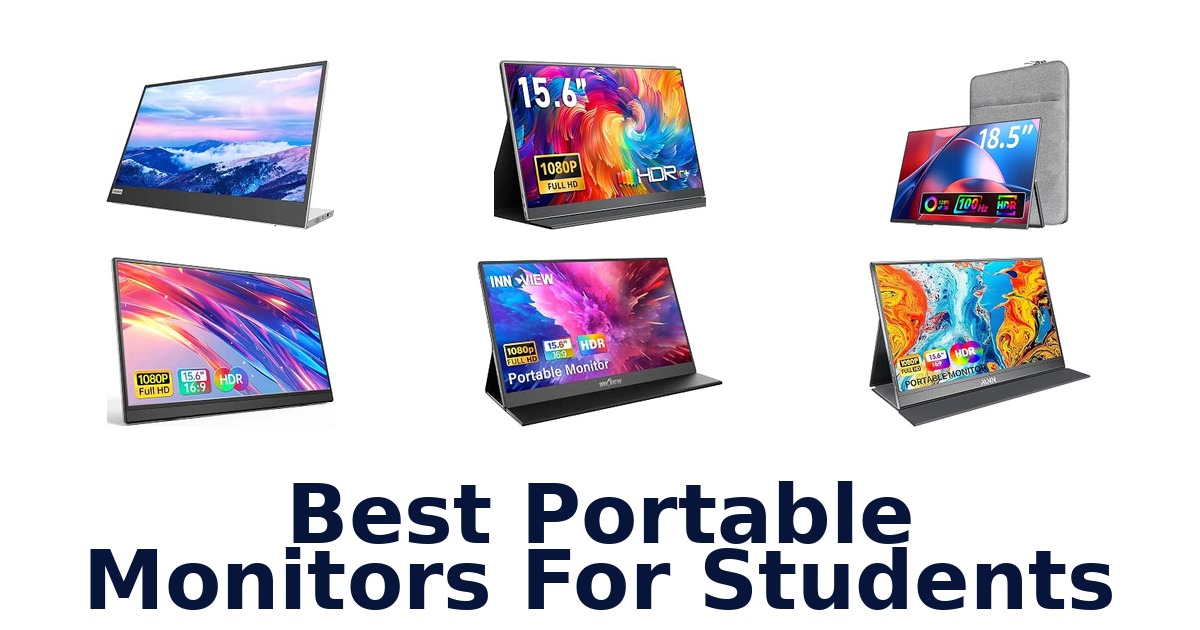
A strong student portable monitor adds a clear second screen for notes, research, and writing while staying practical to carry between classes, dorms, and study spots. The MSI Pro MP165 E6 leads this lineup with a 15.6-inch Full HD IPS panel, eye-comfort features, a foldable stand, and a three-year manufacturer warranty. Most of the options here are 15.6-inch 1080p displays, but their weights, included covers or cables, and connection choices differ.
There is also an 18.5-inch model for students who prefer a larger workspace, as well as choices with height-adjustable or built-in stands. Before choosing, check whether your laptop’s USB-C port carries video; a USB-C-shaped connector alone does not guarantee a one-cable display setup.
The MSI Pro MP165 E6 is the best overall choice for students because it combines a 15.6-inch Full HD IPS display with anti-flicker and low-blue-light features, a foldable kickstand, and both USB-C and HDMI connectivity. Its included cables and protection pouch are useful for carrying and setup, while the three-year manufacturer warranty is listed in the product data. Students who prioritize lower listed weight or a height-adjustable stand may prefer another pick, but MSI offers the strongest set of study-focused features overall.
Our Top Picks
 Best Overall
Its 15.6-inch FHD IPS screen, anti-flicker and low-blue-light features, foldable stand, included cables, and three-year warranty suit regular study use.
View on Amazon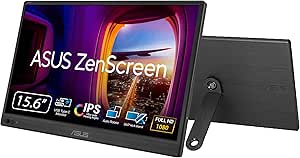 Lightest Listed
At 960 g, it is the lightest listed option; its 15.6-inch anti-glare display and USB-C plus mini-HDMI ports suit campus portability.
View on Amazon Adjustable Stand
The 15.6-inch FHD IPS panel has 250-nit brightness and a height-adjustable stand, a useful ergonomic feature for long study sessions.
View on Amazon- Lightweight Option MNN 15.6-inch Monitor
- Largest Screen VisionOwl 18.5-inch Monitor
Compare the portable monitors at a glance
| # | Product | Screen Size | Weight | Compatible Devices | Warranty Type | Buy |
|---|---|---|---|---|---|---|
| 1 | 1. MSI Pro MP165 E6Best Overall | 15.6 in | — | — | — | View on Amazon |
| 2 | 2. ASUS ZenScreen MB169CKLightest Listed | 16 in | 960 g | Desktop, Laptop, Monitor | 3 Years Manufacturer Warranty | View on Amazon |
| 3 | 3. Lenovo L15Adjustable Stand | 15.6 in | 4.7 lb | — | 1 Year Manufacturer Warranty | View on Amazon |
| 4 |  4. MNN 15.6-inch MonitorLightweight Option 4. MNN 15.6-inch MonitorLightweight Option | 156 in | 1.5 lb | Tablet | — | View on Amazon |
| 5 |  5. Yodoit PTM15One-cable remote coursework 5. Yodoit PTM15One-cable remote coursework | 15.6 in | 690 g | Laptop | 1 Year Manufacturer Warranty | View on Amazon |
| 6 |  6. cocopar Y156FH7SMulti-device classwork setup 6. cocopar Y156FH7SMulti-device classwork setup | 15.6 in | 2.4 lb | Macbook, Surface Pro, Surface Laptop, Lenovo… | 2 Years Manufacturer Warranty | View on Amazon |
| 7 |  7. Anyuse 15.6-inch MonitorLightweight dorm-to-library display 7. Anyuse 15.6-inch MonitorLightweight dorm-to-library display | 15.6 in | 1.4 lb | Laptop, PS, XBOX, SWITCH game consoles… | 2 Year Warranty | View on Amazon |
| 8 |  8. InnoView 15.6-inch MonitorTravel-ready study multitasking 8. InnoView 15.6-inch MonitorTravel-ready study multitasking | 15.6 in | 2.7 lb | Desktop | 12 Months Manufacturer Warranty | View on Amazon |
| 9 |  9. WGK 15.6-inch MonitorEye-comfort dorm study 9. WGK 15.6-inch MonitorEye-comfort dorm study | 15.6 in | — | Laptops, Desktops, Gaming Consoles… | Limited warranty | View on Amazon |
| 10 |  10. VisionOwl 18.5-inch MonitorLargest Screen 10. VisionOwl 18.5-inch MonitorLargest Screen | 18.5 in | 2.6 lb | Laptop, Mac, Surface, PC, PS4/PS5, Xbox | 2 Years Manufacturer Warranty | View on Amazon |
Detailed Reviews: Best Portable Monitors For Students
#1 · Best Overall
1. MSI Pro MP165 E6
- Screen Size: 15.6 in
Best for: Flexible-orientation study screen.
Why it ranks #1: Its 15.6-inch FHD IPS screen, anti-flicker and low-blue-light features, foldable stand, included cables, and three-year warranty suit regular study use.
The MSI PRO MP165 E6’s foldable kickstand supports horizontal and vertical orientations, letting students choose a layout for coursework, reading, or other content. Its 15.6-inch Full HD IPS screen also includes anti-flicker, low-blue-light, and anti-glare features for extended viewing.
A single Type-C cable can carry both power and display, helping simplify a compatible laptop setup, while an HDMI connection offers another route. The kickstand’s landscape and portrait support gives students options for arranging documents or other material, and a 1/4-inch tripod socket plus VESA support expands placement possibilities. Included Type-C and HDMI cables, along with a protection pouch, support setup and transport; the supplied product information does not state its weight.
- Foldable kickstand supports horizontal and vertical orientations
- 15.6-inch Full HD IPS display
- Anti-glare, anti-flicker, and low-blue-light features
- Tripod socket and VESA mounting support
- The supplied specifications do not state a product weight for assessing daily carry.
Skip it if you need a verified weight before choosing a daily campus carry; Lenovo L15 Portable Monitor lists its weight as 4.7 pounds.
Students who want adjustable screen orientation and multiple placement options may find the MSI useful for varied study setups. Its supplied cables and pouch aid setup and transport, but the listed information gives no weight to compare for a campus bag.
Full product details
| Brand | msi |
|---|---|
| Color | Black |
| Color Gamut | 49 |
| Included Components | Pro MP165 E6 Widescreen LCD Monitor, 1x L-shaped right angle HDMI cable, 1x L-shaped right angle Type-C to Type-C cable, 1x Type-A to Type-C cable, 1x Protection Pouch, 1x Quick Guide |
| Dimensions | 0.55"D x 14.04"W x 8.28"H |
| Manufacturer | MSI |
| Model | ProMP165E6 |
| Model Number | PRO MP165 E6 |
| Screen Size | 15.6 inches |
| Warranty Description | 3 Year Manufacturer |
Listed on Amazon as: msi Pro MP165 E6 Ultra Slim & Light Portable Monitor,15.6" FHD IPS 1080p, USB Type-C, HDMI, Built-in Speakers, Tripod Mount Support, Perfect for PC, Mac, PS5, PS4, Xbox, Mobile, Metal Gray
View on Amazon#2 · Lightest Listed
2. ASUS ZenScreen MB169CK
- Screen Size: 16 in
- Weight: 960 g
- Compatible Devices: Desktop, Laptop, Monitor
- Warranty Type: 3 Years Manufacturer Warranty
Best for: Anti-glare travel coursework.
Why it ranks #2: At 960 g, it is the lightest listed option; its 15.6-inch anti-glare display and USB-C plus mini-HDMI ports suit campus portability.
The ASUS ZenScreen MB169CK’s 15.6-inch Full HD IPS anti-glare display helps keep reflections from distracting students working in cafes or shared spaces. Its USB-C connection carries power and video over one cable, supporting a tidier laptop study setup on the move.
The anti-glare panel is suited to varied work locations named in the listing, including cafes and coworking spaces, where reflections can be distracting. A single USB-C cable can carry both power and video for compatible laptops, reducing cable clutter at a temporary desk. The listing also identifies dual USB-C and mini-HDMI ports, offering connection flexibility; at 960 grams, its listed weight and slim travel profile suit students packing a display with other study essentials.
- 15.6-inch Full HD IPS anti-glare display
- USB-C cable carries power and video
- Dual USB-C and mini-HDMI ports are specified
- Listed weight is 960 grams
- The single-cable power-and-video setup requires a laptop that supports USB-C display.
Skip it if you need an included stand in the supplied components; cocopar Y156FH7S includes a magnetic cover that functions as a stand.
The ASUS fits students who study in cafes, coworking spaces, or other changing locations and want anti-glare viewing with a one-cable setup. Its USB-C benefit depends on laptop display support, while mini-HDMI provides a listed alternative.
Full product details
| Brand | ASUS |
|---|---|
| Color | BLACK |
| Color Gamut | 100 |
| Compatible Devices | Desktop, Laptop, Monitor |
| Included Components | MB169CK Monitor |
| Dimensions | 16"D x 0.6"W x 8"H |
| Item Weight | 960 g |
| Manufacturer | ASUS |
| Model | MB169CK |
| Model Number | MB169CK |
| Screen Size | 16 inches |
| Warranty Description | 3 years warranty with ARR |
| Warranty Type | 3 Years Manufacturer Warranty |
Listed on Amazon as: ASUS ZenScreen MB169CK 15.6 Inch 1080p Portable Monitor
View on Amazon#3 · Adjustable Stand
3. Lenovo L15
- Screen Size: 15.6 in
- Weight: 4.7 lb
- Warranty Type: 1 Year Manufacturer Warranty
Best for: Adjustable dorm desk monitor.
Why it ranks #3: The 15.6-inch FHD IPS panel has 250-nit brightness and a height-adjustable stand, a useful ergonomic feature for long study sessions.
The Lenovo L15’s height-adjustable stand lets students position its 15.6-inch screen for a more tailored study posture, an uncommon convenience in a portable setup. Its Full HD IPS panel and 250-nit brightness provide a defined workspace for reading, browsing, and keeping class materials open.
Two USB-C ports support use as a second screen for work or entertainment, while the height-adjustable stand lets students alter screen position at a dorm desk or study table. The Full HD IPS display supports clear web-page and video viewing, and flicker-free technology is specified for longer sessions. Although described as lightweight and portable, its listed specifications give a 4.7-pound weight, so frequent daily transport is a meaningful consideration alongside its ergonomic stand.
- Height-adjustable stand
- 15.6-inch Full HD IPS panel
- Two USB-C ports
- 250-nit brightness and flicker-free technology
- The listed weight is 4.7 pounds, a substantial carry for a portable monitor.
Skip it if you carry your display every day and prioritize a lower listed weight; Anyuse A156JP lists 1.4 pounds.
The Lenovo L15 suits students who keep a monitor at a dorm desk and value height adjustment for extended study sessions. Its USB-C ports and Full HD panel support second-screen work, but its listed 4.7-pound weight is a boundary for campus carrying.
Full product details
| Brand | Lenovo |
|---|---|
| Color | Black/Grey |
| Dimensions | 9.66"D x 42.67"W x 14.17"H |
| Item Weight | 4.7 pounds |
| Manufacturer | Lenovo |
| Model | L15 |
| Model Number | 66E4UCC1UZ |
| Screen Size | 15.6 inches |
| Warranty Description | 1 year manufacturer |
| Warranty Type | 1 Year Manufacturer Warranty |
Listed on Amazon as: Lenovo L15 Portable Monitor, 15.6” Display, Full HD Resolution, IPS Panel, 250 nits Brightness, 60Hz Refresh Rate, USB-C Ports, Height-Adjustable Stand, Flicker-Free Technology, Grey
View on Amazon#4 · Lightweight Option
4. MNN 15.6-inch Monitor
- Screen Size: 156 in
- Weight: 1.5 lb
- Compatible Devices: Tablet
Best for: Wide-angle study screen.
Why it ranks #4: Its 15.6-inch FHD IPS screen, listed 1.5-pound weight, two Type-C ports, and two-year warranty make it a practical portable study screen.
The MNN’s 15.6-inch Full HD IPS panel offers a 178-degree viewing angle, letting students read notes or share a screen without needing to sit directly in front of it. Its 1920 × 1080 resolution gives laptop work a dedicated second display for studying, video, or games.
The Full HD resolution provides room to keep class materials visible beside a writing or research window, while the 178-degree IPS viewing angle helps maintain a clear view when shifting position. The listing identifies it as a second monitor for a laptop and specifies tablet compatibility, making it relevant for study setups beyond a single computer. Its 1.5-pound listed weight supports carrying it between study locations, though the supplied feature excerpt does not detail its port configuration.
- 15.6-inch Full HD, 1920 × 1080 display
- IPS screen with 178-degree viewing angle
- Listed weight is 1.5 pounds
- Eye-care features include reduced blue light and no flickering
- The supplied specifications list tablet compatibility but do not identify specific laptop models.
Skip it if you need a listed connection-port breakdown before choosing; cocopar Y156FH7S specifies two full-featured USB-C ports and HDMI.
A student seeking a lightweight second screen for laptop study, video, or gaming can consider the MNN. Its wide-view IPS panel suits shared viewing; students who need clearly documented ports should prefer a model with a fuller connection list.
Full product details
| Brand | MNN |
|---|---|
| Color | Matte black |
| Compatible Devices | Tablet |
| Dimensions | 20"D x 2"W x 22"H |
| Item Weight | 1.5 pounds |
| Manufacturer | MNN |
| Model | M156F01 |
| Model Number | 15 |
| Screen Size | 156 inches |
| Voltage | 5 volts |
| Warranty Description | 2 Year |
Listed on Amazon as: MNN 15.6" FHD 60Hz Portable Monitor USB-C HDMI IPS HDR Gaming Laptop
View on Amazon#5
5. Yodoit PTM15
- Screen Size: 15.6 in
- Weight: 690 g
- Compatible Devices: Laptop
- Warranty Type: 1 Year Manufacturer Warranty
Best for: One-cable remote coursework.
Why it ranks #5: The 15.6-inch FHD IPS monitor weighs 690 g and includes a smart cover and USB-C cable; its listed color gamut is 45.
Yodoit advertises one-cable USB-C connection for both power and display, letting students turn a compatible laptop and desk into a dual-screen study setup without a separate power adapter. The 15.6-inch Full HD IPS screen comes with a smart cover for carrying and propping it up.
The one-cable setup can reduce desk clutter when a laptop supports USB-C display, and the listing says no driver installation or external power adapter is needed for that connection. Its 15.6-inch, 1920 × 1080 IPS screen gives room for class references alongside notes, while the included smart cover can support transport and screen positioning. The listed weight is 690 grams, and a mini-HDMI cable is included for another connection route.
- 15.6-inch 1920 × 1080 IPS display
- USB-C connection supports power and display with one cable
- Listed weight is 690 grams
- Smart cover and mini-HDMI cable are included
- The one-cable USB-C setup depends on a laptop that supports USB-C display.
Skip it if you need an explicitly listed console compatibility range; WGK W156F1 lists gaming consoles and HDMI or USB-C devices.
Yodoit is a fit for students with a compatible USB-C laptop who want a light second screen for remote coursework and a smart cover for transport. Its one-cable convenience has a clear boundary: the laptop must support display over USB-C.
Full product details
| Brand | Yodoit |
|---|---|
| Color | Black |
| Color Gamut | 45 |
| Compatible Devices | Laptop |
| Included Components | 1 × USB-C to USB-C Cable, 1 × miniHDMI to HDMI Cable, 15.6 inch portable monitor, Smart Cover |
| Dimensions | 2"D x 16"W x 10"H |
| Item Weight | 690 g |
| Manufacturer | Yodoit Limited |
| Model | PTM15US |
| Model Number | PTM15 |
| Screen Size | 15.6 inches |
| Voltage | 220 volts |
| Warranty Type | 1 Year Manufacturer Warranty |
Listed on Amazon as: Yodoit Portable Monitor 15.6" 1920×1080 FHD IPS Travel Screen Display with USB-C Plug & Play, Built-in Speakers Smart Cover for MacBook PC Xbox, Extended Display for Remote Workers (Black)
View on Amazon#6
6. cocopar Y156FH7S
- Screen Size: 15.6 in
- Weight: 2.4 lb
- Compatible Devices: Macbook, Surface Pro, Surface Laptop, Lenovo…
- Warranty Type: 2 Years Manufacturer Warranty
Best for: Multi-device classwork setup.
Why it ranks #6: This 15.6-inch 1080p screen includes a magnetic cover, display-capable USB-C cable, and two-year manufacturer warranty for a ready-to-carry setup.
Two full-featured USB-C ports and an HDMI port give the cocopar 15.6-inch monitor several ways to connect a study device. Its Full HD panel supports an extended or mirrored laptop display, useful for keeping lecture notes visible during writing, meetings, or presentations.
The listed USB-C and HDMI connections cover a broad set of compatible devices, including laptops, phones, consoles, and Raspberry Pi; the supplied cables distinguish video-capable USB-C from power-only connections. Extend and Mirror modes let students choose between extra workspace and duplicating a screen for presenting. A magnetic cover serves as the included stand, combining protection and support in one accessory, while the listed 2.4-pound weight is a consideration for daily campus carrying.
- Two full-featured USB-C ports and an HDMI port
- Supports Extend and Mirror display modes
- Magnetic cover is included and functions as a stand
- Compatible-device list includes laptops, phones, and consoles
- A charging-only USB-C cable will not carry display video; use the supplied display cable.
Skip it if you want a lighter listed weight for daily carrying; MNN 15.6-inch Portable Monitor lists 1.5 pounds versus this model’s 2.4.
Students who switch between laptops and other listed devices may value the cocopar’s connection choices and display modes. Its magnetic cover helps combine carrying protection with screen support, but its 2.4-pound listed weight may not suit the lightest campus load.
Full product details
| Brand | cocopar |
|---|---|
| Color | Black |
| Color Gamut | 85 |
| Compatible Devices | Macbook, Surface Pro, Surface Laptop, Lenovo Laptop, HP Laptop, Dell Laptop, ASUS Laptop, PS4, Xbox, Nintendo Switch, Raspberry Pi, Phones, PCs, Laptops with USB Type C and mini HDMI port |
| Included Components | HDMI cable (for Display only), Portable Monitor & Magnetic Cover, USB-A to USB-C cable (for Power only), USB-C to USB-C cable (for Power & Display), User Guide |
| Dimensions | 0.2"D x 14.12"W x 8.8"H |
| Item Weight | 2.4 pounds |
| Manufacturer | cocopar |
| Model | Y156FH7S |
| Model Number | Y156FH7S |
| Screen Size | 15.6 inches |
| Voltage | 5 volts |
| Warranty Description | 2-years warranty |
| Warranty Type | 2 Years Manufacturer Warranty |
Listed on Amazon as: cocopar Portable Monitor 15.6 Inch 1080P FHD 60Hz 85% sRGB Travel Monitor with Speaker HDMI USB-C Second Screen for Laptop MacBook Surface PC Xbox PS4/5, VESA Mountable, with Cover Stand
View on Amazon#7
7. Anyuse 15.6-inch Monitor
- Screen Size: 15.6 in
- Weight: 1.4 lb
- Compatible Devices: Laptop, PS, XBOX, SWITCH game consoles…
- Warranty Type: 2 Year Warranty
Best for: Lightweight dorm-to-library display.
Why it ranks #7: Its 15.6-inch FHD IPS display, 1.4-pound listed weight, two full-featured USB-C ports, mini-HDMI, and two-year warranty fit student use.
At a listed 1.4 pounds, the Anyuse 15.6-inch monitor is a relatively light Full HD companion for students moving between study locations. Its IPS panel, HDR, and 178-degree viewing angle support viewing coursework from different positions, with low-blue-light features also specified.
The monitor’s two full-featured USB-C ports and Mini HDMI connection provide alternatives for compatible laptops and consoles, so students are not limited to a single listed input type. Its 1920 × 1080 resolution supports a separate workspace for readings, notes, or other class materials, while the 178-degree viewing angle can help when the screen is viewed from the side. At 1.4 pounds, the listed weight is suitable to consider for regular carrying.
- Listed weight is 1.4 pounds
- 15.6-inch Full HD, 1920 × 1080 IPS screen
- Two full-featured USB-C ports and Mini HDMI
- HDR, low-blue-light features, and 178-degree viewing angle
- Its supplied feature text cautions that USB-C connection depends on device capability.
Skip it if you want a specifically documented ergonomic height adjustment; Lenovo L15 Portable Monitor lists a height-adjustable stand.
Students carrying a second screen between dorm, library, and other workspaces may appreciate Anyuse’s listed weight and mixed input options. It fits Full HD study multitasking, but check that the chosen device supports the connection route you plan to use.
Full product details
| Brand | Anyuse |
|---|---|
| Color | black |
| Compatible Devices | Laptop, PS, XBOX, SWITCH game consoles, devices with USB-C or HDMI ports |
| Dimensions | 16.9"D x 1.96"W x 11.4"H |
| Item Weight | 1.4 pounds |
| Manufacturer | Anyuse |
| Model | PM1561P |
| Model Number | A156JP |
| Screen Size | 15.6 inches |
| Warranty Description | 2 year |
| Warranty Type | 2 Year Warranty |
Listed on Amazon as: Anyuse 15.6" FHD IPS USB-C HDMI Portable Monitor
View on Amazon#8
8. InnoView 15.6-inch Monitor
- Screen Size: 15.6 in
- Weight: 2.7 lb
- Compatible Devices: Desktop
- Warranty Type: 12 Months Manufacturer Warranty
Best for: Travel-ready study multitasking.
Why it ranks #8: The 15.6-inch FHD screen supports laptop, phone, tablet, and console connections, and the product includes a protective case; warranty details vary in the listing.
The InnoView’s 15.6-inch screen adds viewing space without requiring an app or driver installation, so students can connect it for study, meetings, or travel work. Its Full HD resolution and protective case pair a sharper second display with a practical way to carry it.
The listing names HDMI and USB-C connectivity and a range of compatible laptops, phones, tablets, and consoles, giving students options across study and entertainment devices. The extra display area can reduce repeated page switching while keeping reference material beside coursework. With a 15.6-inch screen and listed 2.7-pound weight, it balances a useful viewing size against carry weight; the included protective case is relevant when moving between home, campus, and travel workspaces.
- No app or driver installation required
- 15.6-inch Full HD 1080p display
- Listed compatibility spans laptops, phones, tablets, and consoles
- Protective case is included
- At 2.7 pounds, its listed weight is heavier than several 15.6-inch options in this roundup.
Skip it if you prioritize a lighter 15.6-inch screen; MNN 15.6-inch Portable Monitor lists 1.5 pounds compared with InnoView’s 2.7.
The InnoView fits students who want a driver-free second screen for coursework, meetings, and travel, especially across several device types. Its protective case helps with transport, but students prioritizing a lighter carry should weigh its listed 2.7 pounds.
Full product details
| Brand | InnoView |
|---|---|
| Color | Black |
| Color Gamut | 80 |
| Compatible Devices | Desktop |
| Included Components | 1x Portable Monitor, 1x full-featured Type-C ports, 1x standard HDMI port |
| Dimensions | 0.26"D x 13.99"W x 8.7"H |
| Item Weight | 2.7 pounds |
| Manufacturer | Shenzhen Yingchuang Technology Co., LTD |
| Model | INVPM406 |
| Model Number | INVPM406 |
| Screen Size | 15.6 inches |
| Voltage | 5 volts |
| Warranty Description | 18 Month Warranty |
| Warranty Type | 12 Months Manufacturer Warranty |
Listed on Amazon as: InnoView Portable Monitor, 15.6 Inch FHD 1080P HDMI USB C Second External Monitor for Laptop, Desktop, MacBook, Phones, Tablet, PS5/4, Xbox, Switch, Built-in Speaker with Protective Case
View on Amazon#9
9. WGK 15.6-inch Monitor
- Screen Size: 15.6 in
- Compatible Devices: Laptops, Desktops, Gaming Consoles…
- Warranty Type: Limited warranty
Best for: Eye-comfort dorm study.
Why it ranks #9: It offers a 15.6-inch FHD IPS panel, two USB-C ports, mini-HDMI, speakers, and a stand, though its listed data gives no weight.
WGK pairs a 15.6-inch Full HD IPS display with HDR and low-blue-light features, giving students a detailed second screen with features intended to reduce eye strain. Its 178-degree viewing angle also helps when coursework or presentations are viewed from off-center seats.
Two USB-C ports and a Mini HDMI port give the WGK several connection paths; the listing says a Thunderbolt 3/4 or full-featured USB-C device can connect over USB-C. That flexibility can suit a desk shared among laptop and gaming devices. The 1920 × 1080 resolution provides a familiar Full HD workspace, while the included stand supports placement without requiring a separate stand purchase; VESA support is also identified in the title for mounting options.
- 15.6-inch Full HD, 1920 × 1080 IPS screen
- 178-degree viewing angle with HDR
- Two USB-C ports and one Mini HDMI port
- Includes a stand and supports VESA mounting
- USB-C one-cable use is specified for Thunderbolt 3/4 or full-featured USB-C devices.
Skip it if you need a listed height-adjustable stand for long desk sessions; Lenovo L15 Portable Monitor specifically includes one.
WGK suits students seeking Full HD viewing, several connection options, and an included stand for dorm or home study. Consider the stated USB-C device requirement before relying on one-cable setup, and use its VESA support if mounting fits your workspace.
Full product details
| Brand | WGK |
|---|---|
| Color | Black |
| Compatible Devices | Laptops, Desktops, Gaming Consoles, Multimedia Devices with HDMI or USB-C ports |
| Manufacturer | WGK |
| Model | W156F1 |
| Model Number | W156F1 |
| Screen Size | 15.6 inches |
| Special Feature | Portable |
| Warranty Type | Limited warranty |
#10 · Largest Screen
10. VisionOwl 18.5-inch Monitor
- Screen Size: 18.5 in
- Weight: 2.6 lb
- Compatible Devices: Laptop, Mac, Surface, PC, PS4/PS5, Xbox
- Warranty Type: 2 Years Manufacturer Warranty
Best for: Larger-screen shared study.
Why it ranks #10: Its 18.5-inch FHD IPS screen and 100Hz refresh rate suit students wanting more viewing area, but its larger size is less campus-friendly.
The VisionOwl’s 18.5-inch Full HD IPS display offers more viewing area than a typical 15.6-inch portable screen, helping students keep larger materials or multiple windows visible. Its 100Hz refresh rate is another listed distinction for users who also connect compatible game systems.
The 18.5-inch panel provides more screen space for coursework and side-by-side windows, while its 1080p resolution keeps the display at Full HD. A built-in kickstand supports use without a separate stand, and VESA mounting offers another way to place it. The listing gives a 2.6-pound weight and 0.55-inch maximum thickness, so students should consider the larger viewing area alongside bag space; HDMI and USB-C cables are included for setup.
- 18.5-inch Full HD IPS display
- 100Hz refresh rate
- Built-in kickstand and VESA mounting support
- Listed weight is 2.6 pounds
- Its 18.5-inch screen takes more bag space than a 15.6-inch portable monitor.
Skip it if you want a smaller screen for a compact study bag; ASUS ZenScreen MB169CK has a 15.6-inch display.
The VisionOwl suits students who value a larger portable workspace for reading, multitasking, or compatible gaming. Its kickstand and VESA support add placement flexibility, but the 18.5-inch panel requires more bag space than smaller options.
Full product details
| Brand | VisionOwl |
|---|---|
| Color | Black |
| Compatible Devices | Laptop, Mac, Surface, PC, PS4/PS5, Xbox |
| Included Components | 1 x Sleeve Case, 1 × HDMI cable (for video only), 1 × Portable Monitor, 1 × Power Adapter, 2 × USB-C to USB-C cable (full-featured) |
| Dimensions | 0.55"D x 16.6"W x 10.1"H |
| Item Weight | 2.6 pounds |
| Manufacturer | VisionOwl |
| Model | Y185LS |
| Model Number | Y185LS |
| Screen Size | 18.5 inches |
| Voltage | 5 volts |
| Warranty Description | 2 Year Warranty |
| Warranty Type | 2 Years Manufacturer Warranty |
| Additional Information | Important information Safety Information If you have any issue in using this portable monitor, please feel free to contact us. We will provide you with excellent customer service. |
Avoid the USB-C compatibility trap
A USB-C connector does not guarantee that a laptop can send video to a portable monitor. The cocopar listing specifically says to use its original USB-C display cable and warns that charging-only cables will not work. Several monitors in this lineup describe one-cable USB-C video and power, but that still depends on a compatible laptop port.
If your device lacks USB-C video output, check for an HDMI connection and the appropriate cable before buying; the ASUS ZenScreen MB169CK and several other models list HDMI-style connectivity, while included cables differ. Also distinguish a cable that carries video from one that only supplies power: the cocopar package identifies its HDMI cable as display-only and its USB-A-to-USB-C cable as power-only.
Confirm your laptop’s port capabilities and the included cable types against the product listing, rather than relying on the connector shape alone.
Balance screen area against carry size
A larger display provides more viewing area but is not automatically the best choice for carrying around campus. Most products here use 15.6-inch screens, a consistent size for placing a second display beside a laptop, while the VisionOwl expands to 18.5 inches and weighs a listed 2.6 pounds. In contrast, the ASUS ZenScreen MB169CK is listed at 960 g, and the Yodoit PTM15 at 690 g.
Those weights make the smaller-screen group easier to compare for a student who carries a monitor daily, though included covers and cables add items to pack. Product measurements and weight entries are not perfectly consistent across listings, so treat them as listed figures rather than a guarantee of a complete travel setup’s total weight.
Choose the larger screen when workspace matters more than bag space; favor a 15.6-inch option when portability is central.
How to Choose a Student Portable Monitor
Weight and screen size
Look for a screen large enough to read beside your laptop without adding more weight than you want to carry. Most models here have 15.6-inch screens, while the VisionOwl is 18.5 inches; listed weights range from the Yodoit’s 690 g and ASUS’s 960 g to 2.7 pounds for InnoView. These figures make a useful comparison, but check the complete package dimensions and included accessories in the listing.
Students who walk between classes or use crowded study spaces may prefer a 15.6-inch, lower-listed-weight model such as Yodoit or ASUS. If extra workspace matters more than a compact bag, VisionOwl offers the larger panel, with a corresponding portability trade-off.
Ports and cable requirements
Check the monitor’s connection options against the video outputs your laptop actually supports. Products list combinations including USB-C, mini-HDMI, or HDMI; the MSI Pro MP165 E6 includes USB-C and HDMI cables, while the ASUS lists dual USB-C and mini-HDMI ports. USB-C can carry both video and power on compatible devices, but the cocopar listing warns that a charging-only cable will not carry display signal.
For a student whose laptop supports USB-C video, a one-cable setup can reduce desk clutter. If it does not, choose a monitor and cable arrangement that matches the laptop’s video output, and verify whether a separate power connection is needed.
Compatibility is more important than the number of ports alone.
Stand, cover, and viewing comfort
Consider how the screen will stay upright and whether eye-comfort features matter for long study sessions. The Lenovo L15 lists a height-adjustable stand, while the MSI has a foldable kickstand and the ASUS includes an anti-glare display. MNN describes eye-care and flicker-free viewing; MSI lists anti-flicker and low-blue-light features.
Several others include a cover or stand, such as the cocopar magnetic cover and the Yodoit smart cover. Students who work for hours at a desk may favor an adjustable or stable stand and the ability to position the screen comfortably.
For library visits and quick setups, a protective cover that also serves as a stand can reduce what you need to carry, though the listings do not establish that every cover offers the same adjustability.
Which portable monitor suits your student setup?
For most students, choose the MSI Pro MP165 E6: its 15.6-inch FHD IPS display, foldable stand, eye-comfort features, and included cables make it a balanced study companion. If you carry your screen every day and listed weight is a priority, consider the ASUS ZenScreen MB169CK at 960 g or Yodoit PTM15 at 690 g; verify each model’s cable and laptop compatibility. Choose the Lenovo L15 if a height-adjustable stand is more useful than a particularly low listed weight.
For a larger workspace, the VisionOwl offers an 18.5-inch screen, but its larger size is a trade-off for campus portability. Before ordering any pick, confirm that your laptop supports video over its intended connection and check which cables and stand components are included.
Frequently Asked Questions
Will a USB-C portable monitor work with my laptop if its USB-C port only supports charging or data?
Not through USB-C video: a port that supports only charging or data does not send a display signal. Check your laptop’s specifications for video output over USB-C. If both devices support HDMI, that may be an alternative; confirm the required cables and connection options for your chosen monitor before ordering.
Do portable monitors need a separate power source when used for studying?
It depends on the monitor and your laptop’s ports. Some setups may supply power through USB-C, while an HDMI connection may require a separate power connection. Check the monitor’s instructions and your laptop’s port capabilities before relying on a single cable, especially for a long study session.
Is a 15.6-inch portable monitor large enough to use beside a laptop in a dorm or library?
For many students, a 15.6-inch screen offers a practical second workspace beside a laptop, and several picks here use that size. Whether it fits comfortably depends on your desk space and how you work. If you want a larger display, the VisionOwl listing specifies an 18.5-inch screen, with portability as a trade-off.
What should I check before choosing a monitor’s connection and cables?
Confirm that your laptop can send video through the connection you plan to use, not merely charge or transfer data over USB-C. Then check which ports the monitor has and whether the necessary cables are included. The article’s picks differ in connectivity and included accessories, so verify the specific listing before ordering.
Which stand features matter for studying on campus?
Choose a setup that suits where you study and how often you move it. The MSI pick has a foldable kickstand, while the Lenovo L15 listing specifies a height-adjustable stand. Other titles mention covers or stands, but check each listing for what is included and whether its position works for your desk.
Final Words
For most students, the MSI Pro MP165 E6 is the balanced choice, combining a 15.6-inch FHD IPS display, eye-comfort features, a foldable stand, and included cables. If carrying weight matters most, consider the ASUS ZenScreen MB169CK or Yodoit PTM15; choose the Lenovo L15 for height adjustment, or the VisionOwl for a larger screen. Before ordering, verify video compatibility, included cables, and stand components.