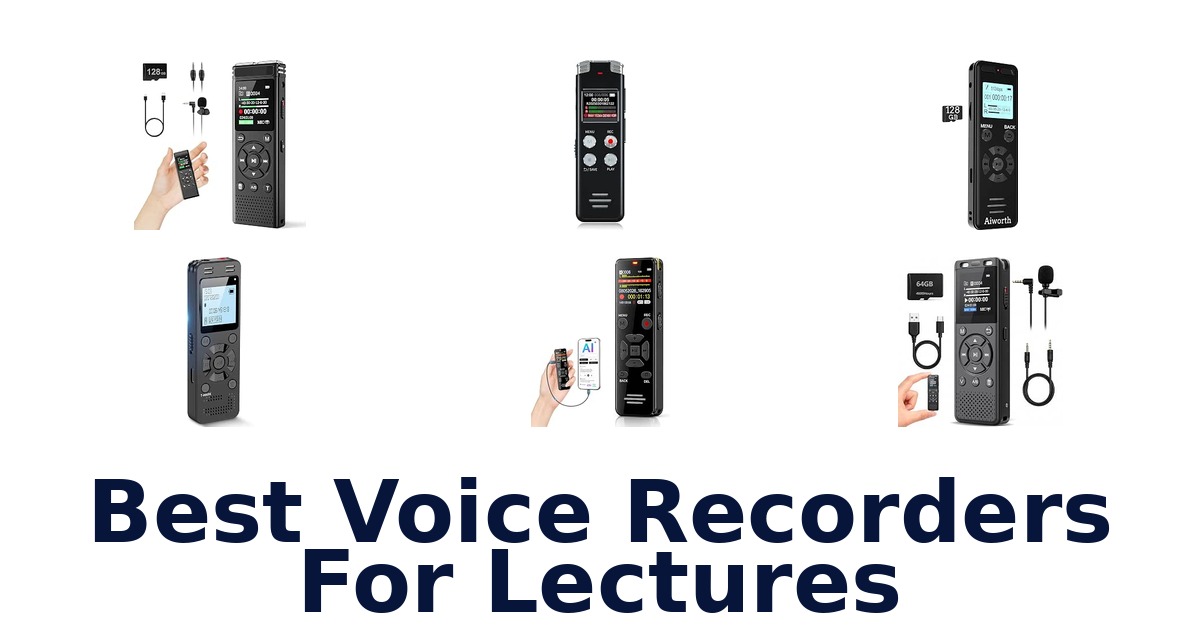
A strong lecture recorder captures clear speech, starts quickly, and gives you a practical way to replay or transfer class notes; it suits students who want a dependable record without relying on handwritten notes alone. These 10 options range from simple one-button devices to models with voice activation, PCM recording, or AI transcription and summaries. Memory ranges from 16GB to 136GB, while listed recording features include noise reduction and adjustable gain on selected models.
The right choice depends on whether you prioritize straightforward operation, large storage, or turning speech into searchable text. Compare the specifications carefully: advertised memory and listed specification capacity do not always match, and transcription features may depend on an app.
Our rankings emphasize lecture relevance and stated capabilities, not unverified performance claims.
The EVISTR L357 is our leading choice because its listed features address common lecture needs: 64GB of storage, PCM intelligent noise reduction, 360° sound collection, and seven adjustable recording-gain levels. Those gain settings can help tailor capture when a lecturer is farther away, while playback and USB are included in the product title. If you want transcription and summaries instead of a conventional recorder, consider the EVISTR L359; for greater listed capacity, the EVIDA VR01 offers 128GB.
Our Top Picks
 Best Overall
Its 64GB storage, 360° sound collection, PCM noise reduction, and seven adjustable gain levels make it a versatile fit for varied lecture settings.
View on Amazon Highest Capacity
The listed 128GB capacity and 1536Kbps PCM recording suit students who want extensive storage and a recorder specifically marketed for lectures.
View on Amazon Best AI Notes
It combines 128GB storage and 3072Kbps HD sound with transcription in 113 languages, summaries, speaker identification, and mind maps through its app.
View on Amazon- Longest Listed Runtime Tonfarb A20
- Quickest Start Tonfarb A12
Compare the Lecture Recorders
| # | Product | Dimensions | Weight | Memory Storage Capacity | Compatible Devices | Buy |
|---|---|---|---|---|---|---|
| 1 | 1. EVISTR L357Best Overall | 0.47"D x 1.2"W x 3.86"H | 2.24 oz | 64 GB | recorder | View on Amazon |
| 2 | 2. EVIDA VR01Highest Capacity | 2.59"D x 0.41"W x 0.77"H | 3.35 oz | 128 GB | Personal Computer | View on Amazon |
| 3 | 3. EVISTR L359Best AI Notes | 0.39"D x 1.25"W x 4"H | 2.24 oz | 128 GB | Computer, Phone | View on Amazon |
| 4 |  4. Tonfarb A20Longest Listed Runtime 4. Tonfarb A20Longest Listed Runtime | 0.47"D x 1.45"W x 4"H | 100 g | 136 GB | Laptop, MP3 Player, Personal Computer… | View on Amazon |
| 5 |  5. Aiworth E36Lecture capture with variable speed 5. Aiworth E36Lecture capture with variable speed | 0.49"D x 1.25"W x 3.81"H | 2.4 oz | 72 GB | Personal Computer | View on Amazon |
| 6 |  6. Tonfarb A12Quickest Start 6. Tonfarb A12Quickest Start | 0.47"D x 1.45"W x 4"H | — | 64 GB | Personal Computer | View on Amazon |
| 7 |  7. Cappsu V02Voice-triggered lecture capture 7. Cappsu V02Voice-triggered lecture capture | 4.16"D x 1.46"W x 0.47"H | 1.6 oz | 32 GB | Earphone, Laptop, Personal Computer | View on Amazon |
| 8 |  8. Sunlan RecorderSimple-button lecture reviewer 8. Sunlan RecorderSimple-button lecture reviewer | 0.5"D x 1.4"W x 3.3"H | 35 g | 16 GB | Personal Computer | View on Amazon |
| 9 |  9. HoTiyan H-10001Compact voice-activated recorder 9. HoTiyan H-10001Compact voice-activated recorder | 0.46"D x 1.37"W x 3.26"H | 1.6 oz | 16 GB | Personal Computer | View on Amazon |
| 10 |  10. Plaud Note ProIn-person and online lecture notes 10. Plaud Note ProIn-person and online lecture notes | 2.13"D x 3.37"W x 0.12"H | 30 g | 64 GB | Laptop, Personal Computer, Smartphone, Tablet | View on Amazon |
Detailed Reviews: Best Voice Recorders For Lectures
#1 · Best Overall
1. EVISTR L357
- Dimensions: 0.47"D x 1.2"W x 3.86"H
- Weight: 2.24 oz
- Memory Storage Capacity: 64 GB
- Compatible Devices: recorder
Best for: Adjustable-gain lecture capture.
Why it ranks #1: Its 64GB storage, 360° sound collection, PCM noise reduction, and seven adjustable gain levels make it a versatile fit for varied lecture settings.
Seven recording-gain levels let the EVISTR L357 adapt capture sensitivity to different lecture-room distances and speaking levels. Its 360-degree sound collection and PCM noise reduction support classroom recording, while 64GB of storage and playback make it practical for saving and reviewing course audio.
The L357 combines a dynamic noise-reduction microphone with PCM intelligent noise reduction and records stereo audio at up to 1536 kbps. Those features support detailed speech capture, while seven gain settings let users adjust recording sensitivity for quieter or more distant speakers. Its 64GB capacity provides space for recordings, and playback supports on-device review. The compact 3.86-inch height and 2.24-ounce listed weight suit carrying between classes; the product also includes a setup video guide for getting started.
- Seven adjustable recording-gain levels
- 360-degree sound collection with PCM noise reduction
- 1536 kbps stereo recording
- 64GB storage and playback
- 64GB is less listed storage than the 128GB and 136GB options in this roundup.
Skip it if you need more than 64GB of listed storage; EVIDA VR01 specifies 128GB for a larger recording archive.
The L357 fits students who want adjustable gain for varied classroom acoustics and stereo capture in a compact recorder. Its 64GB capacity is the boundary to weigh if you keep a large archive of lectures on the device.
Full product details
| Brand | EVISTR |
|---|---|
| Compatible Devices | recorder |
| Dimensions | 0.47"D x 1.2"W x 3.86"H |
| Item Weight | 2.24 ounces |
| Manufacturer | EVISTR |
| Memory Storage Capacity | 64 GB |
| Microphone Operation Mode | Stereo |
| Model Number | L357 |
| Screen Size | 1 inches |
| Warranty Description | 1 Year |
| Additional Information | Important Information Visible screen diagonal 1" / 3 cm |
#2 · Highest Capacity
2. EVIDA VR01
- Dimensions: 2.59"D x 0.41"W x 0.77"H
- Weight: 3.35 oz
- Memory Storage Capacity: 128 GB
- Compatible Devices: Personal Computer
Best for: Computer-transfer lecture recorder.
Why it ranks #2: The listed 128GB capacity and 1536Kbps PCM recording suit students who want extensive storage and a recorder specifically marketed for lectures.
Type-C file transfer is the practical draw of the EVIDA recorder for students who move lecture recordings to a computer after class. It pairs that workflow with 128GB of storage and 1536 kbps PCM recording, plus playback for checking or revisiting captured material.
The noise-cancelling microphone and professional recording chip support 1536 kbps PCM capture, a useful combination for recording spoken lecture material. After class, the Type-C cable enables file transfer to a computer, while the playback function lets you access recordings on the device. Its 128GB capacity accommodates a sizable collection, and the 1.5-inch screen provides an on-device display. The recorder also supports common music formats, including MP3, WAV, FLAC, APE, OGG, and WMA, for listening beyond class notes.
- 128GB of listed storage
- 1536 kbps PCM recording with noise-cancelling microphone
- Type-C cable supports computer file transfer
- Playback and support for several music formats
- Listed compatible devices specify a personal computer, not a broader device range.
Skip it if you want listed compatibility with phones or tablets; EVISTR L359 lists both computer and phone compatibility.
Choose this EVIDA for lecture recording when your review workflow centers on the recorder and computer transfers. Its large listed storage and broad audio-format support add flexibility, but the stated compatible-device listing is limited to personal computers.
Full product details
| Brand | EVIDA |
|---|---|
| Compatible Devices | Personal Computer |
| Dimensions | 2.59"D x 0.41"W x 0.77"H |
| Item Weight | 3.35 ounces |
| Manufacturer | EVIDA |
| Memory Storage Capacity | 128 GB |
| Microphone Operation Mode | Mono, Noise Cancellation |
| Model Number | VR01 |
| Screen Size | 1.5 inches |
| Warranty Description | 18Months Worry-free Warranty |
| Additional Information | Important Information Visible screen diagonal 2" / 4 cm |
Listed on Amazon as: 128GB Digital Voice Recorder for Lectures Meetings – EVIDA 9296 Hours Voice Activated Recording Device Audio Recorder with Playback,Password
View on Amazon#3 · Best AI Notes
3. EVISTR L359
- Dimensions: 0.39"D x 1.25"W x 4"H
- Weight: 2.24 oz
- Memory Storage Capacity: 128 GB
- Compatible Devices: Computer, Phone
Best for: AI-assisted lecture note taker.
Why it ranks #3: It combines 128GB storage and 3072Kbps HD sound with transcription in 113 languages, summaries, speaker identification, and mind maps through its app.
Transcription across 113 languages gives the EVISTR L359 a lecture workflow beyond audio playback, with the companion app also offering summaries, mind maps, speaker identification, and Ask AI insights. Its 128GB storage and 3072 kbps HD sound pair the note tools with substantial recording capacity.
The L359 records lectures and conversations at up to 3072 kbps with noise reduction, then the AI DVR Link app can turn audio into transcripts and smart summaries. Support for 113 languages and speaker identification helps organize multilingual or multi-speaker material, while mind maps and Ask AI insights add ways to revisit content. Its 128GB capacity accommodates recordings, and listed compatibility with computers and phones supports a connected workflow. A slide-HOLD control locks the keys to reduce accidental recording interruptions.
- Transcription support for 113 languages
- App features include summaries, mind maps, speaker identification, and Ask AI
- 3072 kbps HD sound with noise reduction
- 128GB storage and slide-HOLD key lock
- AI transcription and summary features run through the AI DVR Link app.
Skip it if you want to use transcription without the companion app; the listed AI tools are accessed through AI DVR Link.
The L359 suits students who want searchable, organized lecture notes through app-based transcription and summaries, as well as recorded audio. It is a better fit for a connected workflow than for someone seeking only standalone playback.
Full product details
| Brand | EVISTR |
|---|---|
| Compatible Devices | Computer, Phone |
| Dimensions | 0.39"D x 1.25"W x 4"H |
| Item Weight | 2.24 ounces |
| Manufacturer | EVISTR |
| Memory Storage Capacity | 128 GB |
| Microphone Operation Mode | Mono, Speech Recognition |
| Warranty Description | 1 Year Manufacture |
Listed on Amazon as: EVISTR Digital Voice Recorder 128GB AI Transcribe & Summarize Note Taker
View on Amazon#4 · Longest Listed Runtime
4. Tonfarb A20
- Dimensions: 0.47"D x 1.45"W x 4"H
- Weight: 100 g
- Memory Storage Capacity: 136 GB
- Compatible Devices: Laptop, MP3 Player, Personal Computer…
Best for: High-capacity lecture archiver.
Why it ranks #4: The product lists 136GB storage and up to 68 hours of battery life, plus one-click recording, playback, and automatic noise reduction.
One-click recording and 136GB of storage give the Tonfarb A20 a simple way to capture long lecture schedules without frequent file clearing. Its 1536 kbps PCM recording and dual noise-reduction microphones target clearer speech, while voice activation can limit recording to moments when someone is speaking.
For students who want a straightforward capture-and-review routine, the one-click controls start and save recordings without navigating a complex setup. PCM recording at up to 1536 kbps and dual noise-reduction microphones support detailed lecture audio; voice-activated recording can reduce background-only stretches. The 136GB capacity provides room for a substantial archive, and playback plus repeat mode lets you revisit sections while studying. Its listed compatibility includes laptops, computers, smartphones, and tablets for a range of transfer or listening setups.
- One-click recording and saving
- 136GB listed storage capacity
- 1536 kbps PCM recording with dual noise-reduction microphones
- Playback and repeat mode for reviewing sections
- The 1.44-inch screen offers a compact viewing area for on-device navigation.
Skip it if you need a larger screen for navigating recordings; the listed display measures 1.44 inches.
The A20 suits students who want a high-capacity recorder with quick controls and playback for reviewing lectures. Consider its compact 1.44-inch screen when deciding whether you will manage files on the device or on a compatible computer.
Full product details
| Brand | Tonfarb |
|---|---|
| Compatible Devices | Laptop, MP3 Player, Personal Computer, Smartphone, Tablet |
| Dimensions | 0.47"D x 1.45"W x 4"H |
| Item Weight | 100 g |
| Manufacturer | Tonfarb |
| Memory Storage Capacity | 136 GB |
| Microphone Operation Mode | noise cancellation |
| Model Number | A20 |
| Screen Size | 1.44 inches |
| Warranty Description | 2 Year Manufacturer |
| Additional Information | Important Information Visible screen diagonal 2" / 4 cm |
Listed on Amazon as: Tonfarb 136GB Digital Voice Recorder with Playback,9775 Hours Audio Record
View on Amazon#5
5. Aiworth E36
- Dimensions: 0.49"D x 1.25"W x 3.81"H
- Weight: 2.4 oz
- Memory Storage Capacity: 72 GB
- Compatible Devices: Personal Computer
Best for: Lecture capture with variable speed.
Why it ranks #5: Dual-microphone 1536Kbps PCM recording and a listed 2-inch screen offer useful recording and playback features, though capacity is inconsistent across its listing.
Variable-speed playback gives the Aiworth E36 a useful study feature: listeners can change playback pace when reviewing recorded lectures. Its dual-microphone 1536 kbps PCM capture supports clear voice recording, and password protection and an MP3-player function extend its role beyond basic note capture.
For lecture review, variable-speed playback can make it easier to move through familiar sections or slow down a passage, while the playback function keeps review on the recorder. Dual sensitive microphones and a professional recording IC support PCM recording up to 1536 kbps. The listed 136GB title capacity provides room for a substantial library, and password protection adds a device-level access feature. The E36 also functions as an MP3 player, making it suitable for both class recordings and audio listening.
- Variable-speed playback for reviewing recordings
- Dual microphones and professional recording IC
- 1536 kbps PCM recording
- Password protection and MP3-player function
- The specifications list 72GB of memory, while the product title states 136GB.
Skip it if you require one unambiguous listed storage capacity; EVISTR L359 specifies 64GB consistently in its title and specifications.
The E36 suits students who value adjustable playback speed and password protection alongside lecture capture. Check the conflicting storage figures in its supplied title and specifications before choosing it for a particular recording-library requirement.
Full product details
| Brand | Aiworth |
|---|---|
| Compatible Devices | Personal Computer |
| Dimensions | 0.49"D x 1.25"W x 3.81"H |
| Item Weight | 2.4 ounces |
| Manufacturer | aiworth |
| Memory Storage Capacity | 72 GB |
| Microphone Operation Mode | Stereo, Music recording mode |
| Model Number | E36 |
| Screen Size | 2 inches |
| Warranty Description | 1 year warranty |
| Additional Information | Important Information Visible screen diagonal 2" / 6 cm |
#6 · Quickest Start
6. Tonfarb A12
- Dimensions: 0.47"D x 1.45"W x 4"H
- Memory Storage Capacity: 64 GB
- Compatible Devices: Personal Computer
Best for: One-click class recording.
Why it ranks #6: Its side control starts recording even when powered off, with one-click saving, 64GB storage, and USB file transfer for straightforward class use.
A side switch starts recording with one click, even when the Tonfarb A12 is powered off, and moving it back saves the file. That fast control can help capture a lecture promptly; 64GB of storage, playback, and 1536 kbps audio support subsequent review and file management.
The A12’s physical start-and-save switch favors quick operation when class begins, while its playback function lets you check recordings afterward. The supplied facts list 1536 kbps high-quality audio and 64GB of storage for keeping lecture files on the device. USB connection to a computer supports quick file transfer, giving students a way to move recordings into another study workflow. It also plays MP3 and WAV files, so the recorder can handle music listening alongside captured notes.
- Starts recording from powered-off state with a side switch
- One-click saving
- 64GB storage and playback
- USB computer transfer and MP3/WAV playback
- 64GB is less listed storage than the Tonfarb A20's 136GB.
Skip it if you need a larger listed recording archive; Tonfarb A20 offers 136GB, compared with this model's 64GB.
The A12 fits students who want immediate physical controls, playback, and computer transfer in a recorder for class. Its 64GB capacity suits a moderate archive, but frequent long-term keepers may need more room.
Full product details
| Brand | Tonfarb |
|---|---|
| Compatible Devices | Personal Computer |
| Dimensions | 0.47"D x 1.45"W x 4"H |
| Manufacturer | Tonfarb |
| Memory Storage Capacity | 64 GB |
| Microphone Operation Mode | Stereo |
| Model Number | A12 |
| Screen Size | 1.44 inches |
| Warranty Description | 2 Year |
| Additional Information | Important Information Visible screen diagonal 2" / 4 cm |
Listed on Amazon as: Tonfarb 64GB Digital Voice Recorder with Playback,Audio Recording Device
View on Amazon#7
7. Cappsu V02
- Dimensions: 4.16"D x 1.46"W x 0.47"H
- Weight: 1.6 oz
- Memory Storage Capacity: 32 GB
- Compatible Devices: Earphone, Laptop, Personal Computer
Best for: Voice-triggered lecture capture.
Why it ranks #7: It offers 32GB storage, 1536Kbps recording, and voice activation that pauses during silence, a useful combination for shorter or intermittent lectures.
Voice-activated recording starts when sound is detected and pauses during silence, helping the Cappsu V02 conserve recording time and storage during quiet stretches in a lecture. It also records at up to 1536 kbps and provides 32GB of built-in memory for class notes and playback.
The V02’s voice-activated mode responds to detected sound and pauses in silent moments, a useful way to limit empty stretches in lecture files. Recording at up to 1536 kbps supports detailed voice capture, while the product advises placing it closer to the speaker or sound source for more balanced results. Its 32GB memory provides built-in storage, and listed compatibility includes earphones, laptops, and personal computers. The 4.16-inch length is worth considering when choosing where to place or carry it.
- Voice activation pauses during silent moments
- Recording up to 1536 kbps
- 32GB built-in memory
- Listed compatibility with earphones, laptops, and computers
- The product advises placing it closer to the speaker for more balanced recording results.
Skip it if you cannot place a recorder near the speaker; its guidance calls for closer placement for more balanced results.
The V02 suits students who want voice activation to reduce silent stretches and can place the recorder near a lecturer. Its stated placement guidance matters in large rooms or when seating limits access to the speaker.
Full product details
| Brand | Cappsu |
|---|---|
| Compatible Devices | Earphone, Laptop, Personal Computer |
| Dimensions | 4.16"D x 1.46"W x 0.47"H |
| Item Weight | 1.6 ounces |
| Manufacturer | Shenzhen Jingyuan Technology Co., Ltd. |
| Memory Storage Capacity | 32 GB |
| Microphone Operation Mode | Voice Activated |
| Model Number | V02 |
| Warranty Description | 2-Years Warranty |
Listed on Amazon as: Digital Voice Recorder with Playback, 32GB Built-in Memory Storage
View on Amazon#8
8. Sunlan Recorder
- Dimensions: 0.5"D x 1.4"W x 3.3"H
- Weight: 35 g
- Memory Storage Capacity: 16 GB
- Compatible Devices: Personal Computer
Best for: Simple-button lecture reviewer.
Why it ranks #8: The one-button record and stop workflow, playback, and A-B repeat make reviewing a section simple, but its 16GB capacity is comparatively limited.
A three-button REC, STOP, and PLAY workflow makes the Sunlan recorder approachable for students who want to capture and replay lectures with minimal control steps. Its A-B repeat function helps isolate a passage for study, while 16GB of storage keeps the device focused on a smaller recording collection.
Starting a recording with REC and ending it with STOP creates a simple routine for class use, and PLAY lets you listen back through the built-in speaker. The A-B repeat control lets you select an important section and replay it, which can help when revisiting a difficult point. Noise reduction is listed for recording, and the 16GB capacity suits a more limited set of saved files. Its compact 3.3-inch height and 35-gram weight support carrying it between lectures.
- Simple REC, STOP, and PLAY controls
- A-B repeat for revisiting a selected passage
- Built-in speaker for playback
- Compact 35-gram listed weight
- 16GB of storage limits the size of an on-device lecture archive.
Skip it if you keep a large lecture archive on the recorder; Tonfarb A20 lists 136GB of storage for more room.
The Sunlan is suited to students who prioritize uncomplicated recording and repeat playback over a large archive. Its 16GB capacity is a meaningful boundary, so it fits best when recordings are reviewed and managed regularly.
Full product details
| Brand | Sunlan |
|---|---|
| Compatible Devices | Personal Computer |
| Dimensions | 0.5"D x 1.4"W x 3.3"H |
| Item Weight | 35 g |
| Manufacturer | Sunlan |
| Memory Storage Capacity | 16 GB |
| Microphone Operation Mode | Mono, Noise Cancellation |
| Model Number | 1 |
| Screen Size | 1 inches |
| Additional Information | Important Information Visible screen diagonal 1" / 3 cm WARNING: This product contains small magnets. Swallowed magnets can stick together across intestines causing serious infections and death. Seek immediate medical attention if magnets are swallowed or inhaled. |
Listed on Amazon as: Digital Voice Recorder 16GB Voice Recorder with Playback for Lectures – USB Rechargeable Dictaphone Upgraded Small Tape Recorder Device
View on Amazon#9
9. HoTiyan H-10001
- Dimensions: 0.46"D x 1.37"W x 3.26"H
- Weight: 1.6 oz
- Memory Storage Capacity: 16 GB
- Compatible Devices: Personal Computer
Best for: Compact voice-activated recorder.
Why it ranks #9: It has 16GB storage, voice activation, stereo recording, and a rechargeable battery, but the supplied details offer fewer lecture-specific advantages than higher-ranked models.
Voice activation lets the HoTiyan H-10001 start recording when sound reaches its selected threshold, helping lecture capture focus on audible speech rather than continuous silence. Its noise-reduction function, stereo recording, and 16GB capacity provide a compact setup for recording and reviewing class material.
The voice-activated mode uses adjustable voice-decibel levels, so users can set a sound threshold for when recording begins. A sensitive microphone, noise-reduction function, and professional recording chip support stereo capture, while the playback function allows review on the device. The 16GB memory suits a smaller collection of lecture files. Its rechargeable 400mAh battery and Micro USB 2.0 connection support charging and transferring files with a computer or telephone, according to the supplied facts.
- Voice activation with adjustable sound thresholds
- Stereo recording with noise reduction
- Playback for reviewing recordings
- Rechargeable battery and Micro USB file transfer
- 16GB of storage provides less room than the 32GB Cappsu V02.
Skip it if you need at least 32GB of listed storage; Cappsu V02 specifies 32GB, compared with this model's 16GB.
The H-10001 fits students who want voice-triggered stereo recording and a rechargeable, compact device for a smaller lecture collection. Its 16GB capacity is the main boundary for anyone keeping many recordings on the recorder.
Full product details
| Brand | HoTiyan |
|---|---|
| Compatible Devices | Personal Computer |
| Dimensions | 0.46"D x 1.37"W x 3.26"H |
| Item Weight | 1.6 ounces |
| Manufacturer | HoTiyan |
| Memory Storage Capacity | 16 GB |
| Microphone Operation Mode | Stereo |
| Model Number | H-10001 |
| Screen Size | 1.1 inches |
| Warranty Description | 2 years |
| Additional Information | Important Information Visible screen diagonal 2" / 3 cm |
Listed on Amazon as: Voice Recorder 16GB Capacity Voice Activated Recording Device Digital Voice Recorder for Lectures, Meetings, Interviews Audio Recorder with USB Rechargeable WAV/MP3 Tape Recorder (16GB)
View on Amazon#10
10. Plaud Note Pro
- Dimensions: 2.13"D x 3.37"W x 0.12"H
- Weight: 30 g
- Memory Storage Capacity: 64 GB
- Compatible Devices: Laptop, Personal Computer, Smartphone, Tablet
Best for: In-person and online lecture notes.
Why it ranks #10: Its 64GB storage, multi-microphone setup, and transcription support suit meeting notes, but its phone-call and online-meeting emphasis is less lecture-specific.
Smart Dual-Mode Recording switches between phone calls and in-person conversations, while Plaud Desktop captures online meetings without a bot. For students attending lectures across formats, its microphone array and AI transcription with speaker labels connect capture to organized notes.
Four MEMS microphones and one VPU microphone use AI beamforming to capture voices across a room, supporting in-person lecture recording. Smart Dual-Mode Recording switches between calls and in-person conversations, and Plaud Desktop can capture online meetings without a bot, covering different listening contexts. Plaud Intelligence transcribes in 112 languages with speaker labels and can turn recordings into notes. The 64GB capacity stores audio, while compatibility spans laptops, computers, smartphones, and tablets for a multi-device workflow.
- Four MEMS microphones and one VPU with AI beamforming
- Dual-mode recording switches between calls and in-person audio
- Desktop capture for online meetings without a bot
- Transcription in 112 languages with speaker labels
- 64GB of storage is less than the 128GB capacity listed for the EVISTR L359.
Skip it if you need 128GB of listed storage; EVISTR L359 specifies that capacity, compared with this recorder's 64GB.
Plaud Note Pro suits students who move between classroom, phone, and online lecture formats and want transcripts with speaker labels. Its listed 64GB storage is the capacity boundary to consider for a growing audio archive.
Full product details
| Brand | Plaud |
|---|---|
| Compatible Devices | Laptop, Personal Computer, Smartphone, Tablet |
| Dimensions | 2.13"D x 3.37"W x 0.12"H |
| Item Weight | 30 g |
| Manufacturer | PLAUD Inc. |
| Memory Storage Capacity | 64 GB |
| Microphone Operation Mode | Mono, Stereo |
| Model Number | PN0300 |
| Screen Size | 0.95 inches |
| Warranty Description | 1 Year |
| Additional Information | Important Information Visible screen diagonal 1" / 3 cm |
Listed on Amazon as: Plaud Note Pro AI Voice Recorder Transcribe & Summarize for Meetings Calls
View on AmazonAvoid losing a lecture to voice activation
Voice activation can miss the beginning or end of quiet speech, so test it before relying on it for a full lecture. The EVIDA VR01 and Cappsu V02 list voice-activated recording, and the Cappsu description says it starts when sound is detected and pauses during silence. That can conserve storage, but a pause, distant question, or soft-spoken lecturer may not trigger recording as expected.
For an important class, continuous recording is the safer approach when available; confirm the selected mode and check that the device is actually recording before class starts. Also consider where the recorder sits: the Cappsu listing advises placing it closer to the speaker or sound source for more balanced results.
Voice activation is a convenience, not a substitute for checking the file afterward. Make a short test recording in the actual room, including quiet speech and pauses, and listen back before trusting the setup for exams, guest lectures, or detailed notes.
Check memory claims before planning a semester
Do not assume a headline storage figure and the specification table agree; verify the actual capacity shown for the exact listing. The Aiworth E36 title says 136GB, while its specifications list 72GB, so buyers should confirm the current product details rather than plan around the larger headline number. Other products list capacities from 16GB on the Sunlan and HoTiyan to 128GB on the EVIDA VR01 and EVISTR L359.
A capacity number alone also does not tell you how many lecture hours will fit: recording format, bit rate, and settings affect file size, and the supplied data does not give comparable hour estimates for all models. If you record many classes before transferring files, lean toward higher listed capacity and periodically check remaining space.
If you transfer recordings after each class, a smaller device may be sufficient. Treat advertised maximum-hour figures as product-specific claims, not directly comparable guarantees.
How to Choose a Lecture Voice Recorder
Recording clarity and microphone controls
Look for stated recording formats, noise reduction, and microphone adjustments rather than assuming every recorder captures a distant speaker equally well. The EVISTR L357 lists 1536kbps stereo sound, 360° collection, PCM noise reduction, and seven gain levels; the EVIDA VR01 and Aiworth E36 also list 1536Kbps PCM recording with noise-cancelling or dual microphones. The EVISTR L359 lists 3072Kbps HD sound, but the supplied facts do not establish that a higher figure guarantees clearer lecture recordings.
Students seated far from the lecturer may favor adjustable gain, while those near the front may prefer simpler controls. Whatever the device, placement and a test recording matter.
Storage for your recording routine
Choose enough listed memory for how often you record and how regularly you move files off the device. The products span 16GB on the Sunlan and HoTiyan, 32GB on the Cappsu, 64GB on the EVISTR L357 and Tonfarb A12, and 128GB on the EVIDA VR01 and EVISTR L359. Tonfarb A20 lists 136GB, while the Aiworth E36 has a mismatch between its 136GB title and 72GB specification.
Students who save recordings for a whole term may favor greater stated capacity, while those who transfer files after each class can consider smaller options. Actual recording duration varies with settings, so do not equate memory figures with guaranteed lecture hours.
Playback, transfer, and note workflow
Decide whether you need to review audio on the device, move files to a computer, or generate written notes. Playback is specified or included in the descriptions for options such as the EVIDA VR01, Tonfarb A20, Sunlan Recorder, and HoTiyan H-EVIDA states that it transfers files to a computer using a Type-C cable, while Tonfarb A12 lists USB computer connection.
For transcription, EVISTR L359 offers app-based transcription and summaries in 113 languages, and Plaud Note Pro lists transcription in 112 languages. Students who mainly replay difficult passages may favor a conventional playback recorder; those who need text notes may favor an AI model, after checking app requirements and whether any service limitations apply.
Which Recorder Fits Your Lecture Routine?
For a flexible conventional recorder with adjustable capture, choose the EVISTR L357: its 64GB storage, seven gain levels, and PCM noise reduction give it the strongest all-around lecture-focused feature set here. If you keep many recordings on-device, the EVIDA VR01 lists 128GB and PCM recording. Choose the EVISTR L359 if turning lectures into transcripts and summaries matters more than relying only on audio playback; its AI functions run through an app.
For a one-button start-and-save workflow, the Tonfarb A12 is a straightforward alternative with 64GB listed storage. If you use voice activation to conserve space, the Cappsu V02 is an option, but test it in the room before depending on it.
Check permission requirements and app conditions before recording.
Frequently Asked Questions
Can I record a lecture without the instructor’s permission?
Check with the instructor and follow your school’s rules before recording. Permission requirements can vary by location and setting, and a recorder’s features do not determine whether recording is allowed. When in doubt, ask first, explain how you plan to use the audio, and respect any limits on sharing it.
Will voice activation reliably capture a quiet lecturer or soft-spoken questions?
Not reliably in every room; quiet speech may not trigger voice activation consistently. The Cappsu V02 is listed as voice activated, but the article recommends testing that feature in the room before relying on it. For important lectures, consider checking a short sample and using a non-activated recording mode if available.
Can these recorders transcribe lectures without a subscription or internet connection?
The supplied product information does not establish whether transcription works without a subscription or internet connection. The EVISTR L359 offers AI transcription and summaries through an app, but its conditions are not specified here. Check the app requirements before choosing it, especially if offline use or ongoing access terms matter to you.
How much storage should I look for in a lecture recorder?
Choose capacity based on how many recordings you plan to keep on the device. The listed options include 64GB for the EVISTR L357 and 128GB for the EVIDA VR01, which the article recommends for greater listed capacity. Storage alone does not indicate recording duration, so consider your recording habits too.
What features help capture a lecturer who is farther away?
Adjustable recording gain can help tailor capture when the lecturer is farther away. The EVISTR L357 lists seven gain levels, along with 360° sound collection and PCM intelligent noise reduction. Room acoustics and recorder placement still matter, so check a sample recording to confirm voices are clear enough for your needs.
Final Words
For a flexible conventional recorder, the EVISTR L357 is the strongest all-around choice here, with 64GB storage, seven gain levels, and PCM noise reduction. Choose the EVIDA VR01 if its listed 128GB capacity is your priority, or the EVISTR L359 if app-based transcription and summaries matter more than playback alone. For a simple one-button start-and-save workflow, consider the Tonfarb A12.
Check permission and app conditions before recording.