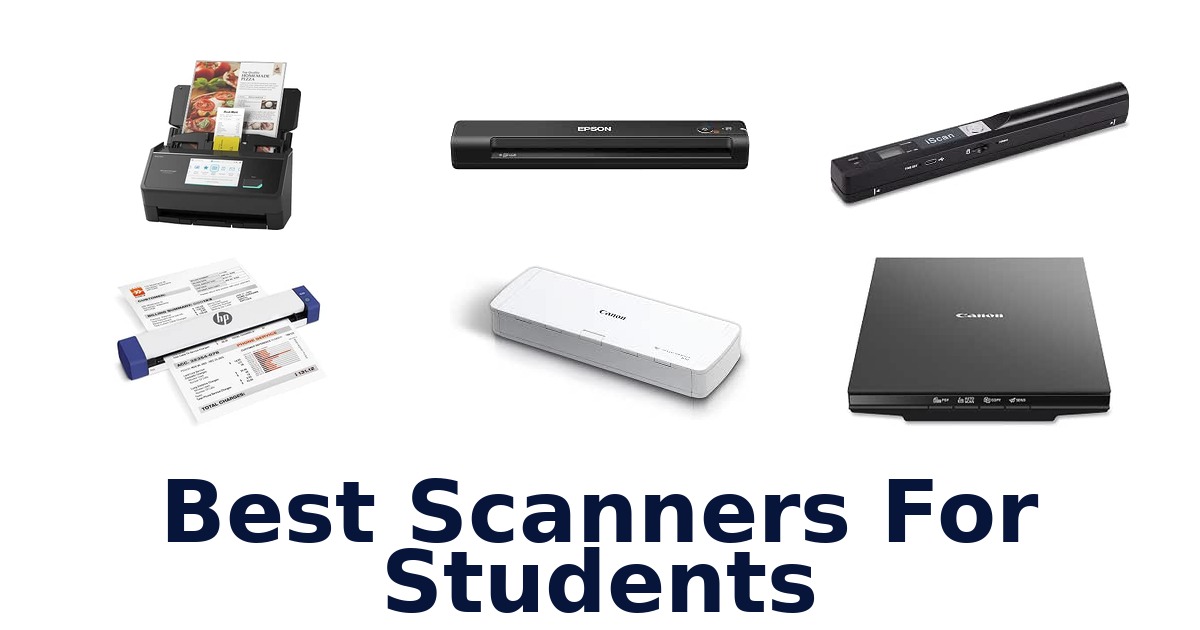
A strong student scanner makes it easy to digitize class handouts, receipts, and study materials without taking over a desk or requiring a complicated setup. The Canon imageFORMULA R10 leads this selection for students who want portable, two-sided document scanning, a 20-sheet feeder, and USB power from a laptop. Other options suit different routines: the Brother DS-640 is compact and scans up to 16 pages per minute, while the Epson WorkForce ES-400 II handles stacks with a 50-sheet feeder.
For books and bound course materials, a flatbed such as the Canon CanoScan LiDE 300 offers a different approach. The right choice depends on what you scan most, how often you carry it, and whether you need a feeder or a flat surface.
The Canon imageFORMULA R10 is the best all-around pick for students who need to scan class paperwork at home or on the move. It combines duplex scanning, a 20-sheet document feeder, and USB power, and it works with Windows and Mac. That makes it a practical match for batches of notes or handouts without requiring an external power supply.
Choose a portable single-sheet model for a smaller carry setup, or a flatbed scanner if book pages are your main priority.
Our Top Picks
 Best Overall
Its portable design combines duplex scanning, a 20-sheet feeder, and USB power, making it suited to scanning class handouts at home or on the move.
View on Amazon Most Compact
At about 1 pound and less than a foot long, it travels easily; scans color and black-and-white pages at up to 16 ppm.
View on Amazon Lightest Mobile
At 9.44 ounces, this USB-powered mobile scanner is easy to carry and scans a single page in as little as 5.5 seconds.
View on Amazon- Best For Stacks Epson WorkForce ES-400 II
- Largest Feeder ScanSnap iX2500
Compare the student scanners by how you plan to use them
| # | Product | Dimensions | Weight | Standard Sheet Capacity | Buy |
|---|---|---|---|---|---|
| 1 | 1. Canon imageFORMULA R10Best Overall | 3.74"D x 11.22"W x 1.57"H | 998 g | 20 | View on Amazon |
| 2 | 2. Brother DS-640Most Compact | 1.99"D x 11.9"W x 1.45"H | 1 lb | 1 | View on Amazon |
| 3 | 3. Epson WorkForce ES-50Lightest Mobile | 10.7"D x 10.7"W x 1.3"H | 9.44 oz | 1 | View on Amazon |
| 4 |  4. Epson WorkForce ES-400 IIBest For Stacks 4. Epson WorkForce ES-400 IIBest For Stacks | 11.6"D x 11.6"W x 6.9"H | 3.7 kg | 50 | View on Amazon |
| 5 |  5. ScanSnap iX2500Largest Feeder 5. ScanSnap iX2500Largest Feeder | 6.26"D x 11.5"W x 6.34"H | 7.7 lb | 100 | View on Amazon |
| 6 |  6. Canon CanoScan LiDE 300Flatbed books and photo scans 6. Canon CanoScan LiDE 300Flatbed books and photo scans | 14.5"D x 9.9"W x 1.7"H | 3.6 lb | 1 | View on Amazon |
| 7 |  7. Fujitsu ScanSnap S1100iSearchable files on the move 7. Fujitsu ScanSnap S1100iSearchable files on the move | — | 1.6 lb | 1 | View on Amazon |
| 8 |  8. HP HPPS100Lightweight USB document scanning 8. HP HPPS100Lightweight USB document scanning | 2"D x 11.6"W x 1.4"H | 3 oz | 10 | View on Amazon |
| 9 |  9. MUNBYN Portable ScannerCord-free book and note scans 9. MUNBYN Portable ScannerCord-free book and note scans | 0.84"D x 10"W x 0.7"H | 145 g | — | View on Amazon |
| 10 |  10. AOZBZ 900DPI ScannerHandheld book-page scanning 10. AOZBZ 900DPI ScannerHandheld book-page scanning | 10"D x 1"W x 1"H | 170 g | 4 | View on Amazon |
Detailed Reviews: Best Scanners For Students
#1 · Best Overall
1. Canon imageFORMULA R10
- Dimensions: 3.74"D x 11.22"W x 1.57"H
- Weight: 998 g
- Standard Sheet Capacity: 20
Best for: USB-powered mobile duplex scanning.
Why it ranks #1: Its portable design combines duplex scanning, a 20-sheet feeder, and USB power, making it suited to scanning class handouts at home or on the move.
USB power and duplex scanning give the Canon imageFORMULA R10 a useful mix for students digitizing two-sided handouts away from a fixed desk. Its 20-sheet feeder handles documents, receipts, and business cards, while the compact design suits movement between classrooms, home, and remote study spaces.
The R10 draws power from its supplied USB cable when connected to a laptop, so students do not need a separate power source for mobile use. Its 20-sheet feeder and duplex scanning help process more than isolated pages, and Canon CaptureOnTouch Lite provides built-in scanning software. Windows and Mac compatibility supports common student computers; searchable PDF and JPEG output gives students options for organizing documents, though the feeder is smaller than desktop batch models.
- Duplex scanning
- 20-sheet document feeder
- USB-powered from a connected laptop
- Built-in Canon CaptureOnTouch Lite software and Windows/Mac compatibility
- Its 20-sheet feeder holds fewer pages than the Epson WorkForce ES-400 II's 50-sheet feeder.
Skip it if you process larger stacks at a desk; the Epson WorkForce ES-400 II feeder holds 50 sheets compared with this scanner's 20.
Students who want USB-powered, two-sided scanning for handouts and receipts can use the R10 at home or on the go. Its 20-sheet feeder suits moderate batches, while frequent larger stacks favor a higher-capacity desktop feeder.
Full product details
| Brand | Canon |
|---|---|
| Color Depth | 24 bits |
| Dimensions | 3.74"D x 11.22"W x 1.57"H |
| Item Weight | 998 g |
| Manufacturer | Canon USA |
| Model | Canon imageFORMULA R10 Portable Document Scanner with Scanning Software |
| Standard Sheet Capacity | 20 |
| Warranty Description | One Year Warranty – Advanced Exchange Service |
| Wattage | 2.5 |
| Additional Information | Important Information On-mode power consumption 2.5 watts |
Listed on Amazon as: Canon imageFORMULA R10 – Portable Document Scanner, USB Powered, Duplex Scanning, Document Feeder, Easy Setup, Convenient, Perfect for Mobile Users, White
View on Amazon#2 · Most Compact
2. Brother DS-640
- Dimensions: 1.99"D x 11.9"W x 1.45"H
- Weight: 1 lb
- Standard Sheet Capacity: 1
Best for: Portable color document scanning.
Why it ranks #2: At about 1 pound and less than a foot long, it travels easily; scans color and black-and-white pages at up to 16 ppm.
Color scans run at the same speed as black-and-white scans—up to 16 pages per minute—so the Brother DS-640 can keep mixed-color coursework moving. At less than a foot long, it is a mobile document scanner for students who carry their scanning setup between campus and home.
The DS-640 weighs about a pound and measures under 11.8 inches long, making it easier to stow in a student bag than a desktop scanner. Its included micro USB 3.0 cable powers it from a laptop or PC, so scanning can happen away from a dedicated desk. Bundled document-management and OCR software can turn hardcopy pages into editable Microsoft Office files, supporting a digital workflow beyond simply saving image scans.
- Scans color and black-and-white pages at up to 16 ppm
- Color speed matches black-and-white speed
- Compact, less-than-11.8-inch-long design weighs about one pound
- Included software offers document management and OCR
- Its one-sheet capacity requires feeding pages individually.
Skip it if you regularly digitize stacks in one loading; the Epson WorkForce ES-400 II has a 50-sheet automatic document feeder.
Students needing portable color scanning and OCR for notes or paperwork can use the DS-640 with a laptop on the move. It suits individual pages better than unattended batches, since its listed sheet capacity is one.
Full product details
| Brand | Brother |
|---|---|
| Color Depth | 48, 24 |
| Dimensions | 1.99"D x 11.9"W x 1.45"H |
| Item Weight | 1 pounds |
| Manufacturer | BROTHER |
| Model | Compact |
| Standard Sheet Capacity | 1 |
| Warranty Description | 1-year limited warranty |
| Wattage | 2.5 watts |
Listed on Amazon as: Brother DS-640 Compact Mobile Document Scanner, (Model: DS640)
View on Amazon#3 · Lightest Mobile
3. Epson WorkForce ES-50
- Dimensions: 10.7"D x 10.7"W x 1.3"H
- Weight: 9.44 oz
- Standard Sheet Capacity: 1
Best for: Quick scans between classes.
Why it ranks #3: At 9.44 ounces, this USB-powered mobile scanner is easy to carry and scans a single page in as little as 5.5 seconds.
A single page scans in as little as 5.5 seconds, giving students a quick way to digitize handouts, receipts, or ID cards between classes. The Epson WorkForce ES-50 is a compact, lightweight, computer-connected option for coursework that calls for occasional, on-the-go scanning.
At 10.7 inches long and 9.44 ounces, the ES-50 is easy to carry alongside a laptop. Its single-sheet feed keeps the workflow straightforward for individual pages, while support for documents up to 8.5 by 72 inches accommodates long pages as well as receipts and ID cards. Epson ScanSmart helps students review and save scans, and the scanner draws power through its USB connection to a computer, so no separate power supply or batteries are required.
- Scans a single page in as little as 5.5 seconds
- Handles documents up to 8.5 by 72 inches, receipts, and ID cards
- Epson ScanSmart supports reviewing and saving scans
- USB-connected computer supplies power; no batteries required
- The single-sheet capacity means stacks must be fed page by page.
Skip it if you need to process stacks without feeding pages individually; the Epson WorkForce ES-400 II has a 50-sheet feeder.
For students who want quick individual-page scans at a library, class, or home desk, the ES-50 keeps the setup portable and simple. Its single-sheet feed is the boundary: larger batches require repeated feeding.
Full product details
| Brand | Epson |
|---|---|
| Color Depth | 16 bpp |
| Dimensions | 10.7"D x 10.7"W x 1.3"H |
| Item Weight | 9.44 ounces |
| Manufacturer | Epson |
| Model | WorkForce ES-50 |
| Standard Sheet Capacity | 1 |
| Warranty Description | Contact Manufacturer |
| Wattage | 2.1 watts |
| Additional Information | Important Information On-mode power consumption 2.1 watts |
Listed on Amazon as: Epson Workforce ES-50 Compact & Lightweight Mobile Document Scanner
View on Amazon#4 · Best For Stacks
4. Epson WorkForce ES-400 II
- Dimensions: 11.6"D x 11.6"W x 6.9"H
- Weight: 3.7 kg
- Standard Sheet Capacity: 50
Best for: Large coursework batches.
Why it ranks #4: Its 50-sheet feeder and two-sided single-pass scanning help students digitize batches, with speeds listed up to 35 ppm or 70 ipm.
A 50-sheet automatic document feeder lets the Epson WorkForce ES-400 II take on a stack of coursework at once, while single-step technology captures both sides in one pass. This desktop scanner suits students handling frequent, multi-page assignments, notes, or paperwork at a fixed study space.
The ES-400 II scans up to 35 pages per minute and 70 images per minute, helping move larger batches through a two-sided workflow. Its feeder accommodates multiple paper types and sizes in one batch, reducing the need to sort every page into a separate run. Epson ScanSmart lets students preview, email, and save scans, and can create searchable PDFs or editable Word and Excel files for later reference and coursework.
- 50-sheet automatic document feeder
- Two-sided capture in one pass
- Scanning speeds up to 35 ppm and 70 ipm
- ScanSmart supports searchable PDFs and editable Word or Excel files
- At 3.7 kg, it is substantially heavier than the listed mobile scanners.
Skip it if you need a scanner to carry between classes; the Brother DS-640 weighs about one pound and is under a foot long.
Students digitizing substantial batches at a home or dorm desk will benefit from the feeder and duplex capture. Choose it when desk space and a 3.7-kilogram device are acceptable; it is not the lightest campus companion.
Full product details
| Brand | Epson |
|---|---|
| Color Depth | 8 bpp |
| Dimensions | 11.6"D x 11.6"W x 6.9"H |
| Item Weight | 3.7 kg |
| Manufacturer | Epson |
| Model | B11B261201 |
| Standard Sheet Capacity | 50 |
| Warranty Description | 1-year limited warranty in the U.S. and Canada |
| Additional Information | Important Information Visible screen diagonal 7" / 18 cm |
Listed on Amazon as: Epson Workforce ES-400 II High-Speed Color Duplex Desktop Document Scanner
View on Amazon#5 · Largest Feeder
5. ScanSnap iX2500
- Dimensions: 6.26"D x 11.5"W x 6.34"H
- Weight: 7.7 lb
- Standard Sheet Capacity: 100
Best for: Shared study-space scanning.
Why it ranks #5: The 100-sheet feeder, 45 ppm double-sided scanning, touchscreen, and Wi-Fi or USB connections suit students processing large paper batches at a fixed desk.
A customizable 5-inch touchscreen puts scan profiles and destinations on the ScanSnap iX2500 itself, making it practical for students sharing a scanner or switching between coursework workflows. Its 100-sheet feeder and 45-page-per-minute double-sided scanning support substantial batches at a dedicated desk.
Wi-Fi and USB connectivity give students two ways to connect the iX2500, while its touchscreen profiles can direct scans to a PC, Mac, mobile device, or cloud service. The 100-sheet feeder pairs with 45 ppm double-sided scanning to reduce interruptions when processing a large stack. ScanSnap Home adds document editing and automatic organization, helping keep digital files manageable; the scanner's 7.7-pound weight makes it better suited to a study space than daily carrying.
- 100-sheet document feeder
- Double-sided scanning at up to 45 ppm
- 5-inch touchscreen supports personalized profiles and destinations
- Wi-Fi and USB connectivity with PC, Mac, mobile, and cloud destinations
- At 7.7 pounds, it is heavier than a typical carry-between-classes scanner.
Skip it if you need a lightweight scanner to carry daily; the Epson WorkForce ES-50 weighs 9.44 ounces and connects through USB.
Students sharing a desk scanner or digitizing large two-sided batches can use its profiles, feeder, and multiple destinations. The iX2500 fits a stable study area better than a routine that demands a very light carry.
Full product details
| Brand | ScanSnap |
|---|---|
| Color Depth | 24 |
| Dimensions | 6.26"D x 11.5"W x 6.34"H |
| Item Weight | 7.7 pounds |
| Manufacturer | PFU Limited |
| Model | ScanSnap iX2500 |
| Standard Sheet Capacity | 100 |
| Warranty Description | 1 Year Manufacturer |
| Wattage | 17 watts |
Listed on Amazon as: ScanSnap iX2500 Wireless or USB High-Speed Document Scanner, Black
View on Amazon#6
6. Canon CanoScan LiDE 300
- Dimensions: 14.5"D x 9.9"W x 1.7"H
- Weight: 3.6 lb
- Standard Sheet Capacity: 1
Best for: Flatbed books and photo scans.
Why it ranks #6: Its flatbed design and raised lid accommodate bulky books, magazines, or document stacks, while 2400 x 2400 dpi resolution supports image scanning.
The Canon CanoScan LiDE 300's raised Advanced Z-lid can accommodate bulky books, magazines, or document stacks, letting students scan bound or uneven material on a flatbed. Its 2400 by 2400 dpi resolution also supports detailed document and image digitization at a home study space.
Auto Scan Mode detects what is being scanned, simplifying the choice between document and image workflows. Four EZ buttons provide one-touch access to document PDF or photo scanning, useful when digitizing repeated class materials. The lid can rise parallel to the platen by up to 21 mm, which helps when a book or stack does not lie flat. USB connectivity and a compact design suit a home desk, but the flatbed requires placing items on the platen individually.
- 2400 by 2400 dpi resolution
- Raised Z-lid accommodates bulky books and document stacks
- Auto Scan Mode detects the item being scanned
- Four EZ buttons enable one-touch document or photo scanning
- The flatbed requires placing each item on the platen individually.
Skip it if you need a feeder for unattended page batches; the Epson WorkForce ES-400 II includes a 50-sheet automatic document feeder.
Students scanning textbooks, magazines, photos, or loose pages at a desk may appreciate the raised lid and one-touch controls. Its flatbed format is a better match for varied originals than rapid, unattended stacks.
Full product details
| Brand | Canon |
|---|---|
| Color Depth | 48 bits bits |
| Dimensions | 14.5"D x 9.9"W x 1.7"H |
| Item Weight | 3.6 pounds |
| Manufacturer | Canon USA Inc. |
| Model | CanoScan |
| Standard Sheet Capacity | 1 |
| Warranty Description | 1-Year Limited Warranty |
| Wattage | 4.5 watts |
Listed on Amazon as: Canon Canoscan Lide 300 Scanner (PDF, AUTOSCAN, Copy, Send)
View on Amazon#7
7. Fujitsu ScanSnap S1100i
- Weight: 1.6 lb
- Standard Sheet Capacity: 1
Best for: Searchable files on the move.
Why it ranks #7: This USB-powered mobile scanner handles documents from 1 to 34 inches long and includes software for searchable PDFs and editable Word or Excel files.
The Fujitsu ScanSnap S1100i can create a searchable PDF with one button, giving students a direct way to make paper notes and documents easier to find later. USB power and a mobile form suit scanning at home or on the road without a separate power source.
The S1100i accepts pages from one inch up to 34 inches long, covering small originals and long documents in a single-sheet workflow. Its software can create searchable PDFs and send scans to editable Word or Excel files, supporting both retrieval and document editing. Cross-platform compatibility covers PC and Mac, while included business-card and receipt scanning software adds options for everyday student paperwork. At 1.6 pounds, it remains portable, but its one-sheet capacity is not intended for large unattended batches.
- Creates searchable PDFs with a button press
- Scans pages from one inch to 34 inches long
- Can scan to editable Word or Excel files
- Includes business-card and receipt scanning software
- The one-sheet capacity requires feeding pages individually.
Skip it if you regularly scan large stacks without feeding each page; the Epson WorkForce ES-400 II has a 50-sheet automatic feeder.
Students who value searchable class documents, editable files, and mobile USB-powered scanning can use the S1100i for individual pages. Its one-sheet capacity suits compact workflows rather than large batches processed unattended.
Full product details
| Brand | Fujitsu |
|---|---|
| Color Depth | 1 bits |
| Item Weight | 1.6 pounds |
| Manufacturer | FUJITSU IMAGING (SCANNERS) |
| Model | SCANSNAP S1100i |
| Standard Sheet Capacity | 1 |
| Wattage | 2.5 watts |
Listed on Amazon as: Fujitsu SCANSNAP S1100i MOBILE SCANNER PC/MAC
View on Amazon#8
8. HP HPPS100
- Dimensions: 2"D x 11.6"W x 1.4"H
- Weight: 3 oz
- Standard Sheet Capacity: 10
Best for: Lightweight USB document scanning.
Why it ranks #8: Its small USB sheet-fed design is described as portable, making it a potential fit for students who want basic single-sided scanning on the go.
At a listed three ounces, the HPPS100 is exceptionally light for students who want a small USB document and photo scanner to carry between study locations. Its sheetfed format and HP WorkScan software provide a straightforward route from paper originals to digital files on a PC or Mac.
The scanner measures 11.6 inches wide and 1.4 inches high, giving students a slim device to pack with their computer. Its USB connection supports plugging in for longer desk sessions and unplugging when it is time to travel, according to the supplied product information. HP WorkScan is included, and compatibility with PC and Mac broadens its usefulness across common student computers. The listed one-sided sheetfed scanning is the key workflow boundary for students handling two-sided material.
- Listed weight of three ounces
- Slim 11.6-inch-wide, 1.4-inch-high form
- HP WorkScan software included
- Compatible with PC and Mac
- Scans one side at a time, so two-sided pages need separate passes.
Skip it if you need duplex capture in one pass; the Canon imageFORMULA R10 offers duplex scanning and a 20-sheet feeder.
Students seeking a very light USB scanner for one-sided papers, photos, or travel paperwork may find this HP a convenient fit. Its one-sided operation calls for extra handling when coursework has print on both sides.
Full product details
| Brand | HP |
|---|---|
| Color Depth | 24 bits |
| Dimensions | 2"D x 11.6"W x 1.4"H |
| Item Weight | 3 ounces |
| Manufacturer | HP |
| Model | HPPS100 |
| Standard Sheet Capacity | 10 |
| Warranty Description | 2 Year Limited |
Listed on Amazon as: HP Small USB Document & Photo Scanner for Portable 1-Sided Sheetfed Digital Scanning, Model HPPS100, for Home, Office & Business, PC and Mac Compatible, HP WorkScan Software Included
View on Amazon#9
9. MUNBYN Portable Scanner
- Dimensions: 0.84"D x 10"W x 0.7"H
- Weight: 145 g
Best for: Cord-free book and note scans.
Why it ranks #9: The handheld wand scans up to A4 and offers 900 dpi, but it requires separately purchased AA batteries and takes practice to guide steadily.
The MUNBYN wand scans book pages, photos, and documents without a feeding slot, enabling students to capture material directly from a bound book. It supports A4-size pages and offers 900 dpi scanning, with scans saved to its included 16GB SD card for later transfer.
At 145 grams and about 9.5 inches long, the wand is small enough to carry in a bag for classes or library sessions. Its listed scan time is 3–5 seconds at 900 dpi, though students must guide it across a page rather than load a stack into a feeder. The scanner uses two AA batteries, which are not included, and stores scans on the supplied SD card, allowing use without a computer connection during capture.
- Handheld scanning can capture pages from books
- Supports A4-size documents
- Scans at 900 dpi in a listed 3–5 seconds
- Includes a 16GB SD card
- Two AA batteries are required and must be purchased separately.
Skip it if you want a computer-powered feeder rather than a battery-operated wand; the Canon imageFORMULA R10 draws power through USB.
Students who need to capture bound pages or individual documents away from a desk can consider this compact wand. Account for manually scanning each page and supplying the two AA batteries it requires.
Full product details
| Brand | MUNBYN |
|---|---|
| Color Depth | 48 bpp |
| Dimensions | 0.84"D x 10"W x 0.7"H |
| Item Weight | 145 g |
| Manufacturer | MUNBYN |
| Model | IDS001-BK |
| Warranty Description | 2 Year Manufacturer |
| Wattage | 145 watts |
Listed on Amazon as: MUNBYN Portable Scanner, 900 DPI Handheld Wand Scanner, A4, 16GB SD, Black
View on Amazon#10
10. AOZBZ 900DPI Scanner
- Dimensions: 10"D x 1"W x 1"H
- Weight: 170 g
- Standard Sheet Capacity: 4
Best for: Handheld book-page scanning.
Why it ranks #10: This handheld wand offers 300, 600, and 900 dpi modes and an included 16GB SD card, but manual swiping is less suited to routine batches.
A handheld wand can scan A4 documents and images without feeding them through a desktop machine, making the AOZBZ 900DPI useful for pages that stay bound in a book. Its three selectable resolutions, from 300 to 900 dpi, let students choose a scan setting for different coursework materials.
The wand saves scans to its included 16GB SD card and supports JPEG and PDF formats, so students can store files on the device before transferring them over USB. It works with Windows XP, 7, and Vista, plus Mac OS 10.4 or later, and the supplied description says no professional driver software is needed to view scans. Its handheld approach trades a feeder-driven workflow for manually moving the scanner across each page.
- Handheld scanning supports pages in books
- Selectable 300, 600, or 900 dpi resolution
- Includes a 16GB SD card and supports up to 32GB
- Saves scans in JPEG or PDF format
- Handheld scanning requires moving the wand across each page manually.
Skip it if you want pages pulled through a feeder instead of scanning by hand; the Canon imageFORMULA R10 has a 20-sheet document feeder.
Students copying book pages or images without removing them from a book may value this handheld format and resolution choice. It is best for deliberate page-by-page work, not a hands-off stack-scanning routine.
Full product details
| Brand | AOZBZ |
|---|---|
| Color Depth | 900 |
| Dimensions | 10"D x 1"W x 1"H |
| Item Weight | 170 g |
| Manufacturer | AOZBZ |
| Model | AOZBZ 900DPI |
| Standard Sheet Capacity | 4 |
| Warranty Description | 2 year |
| Wattage | 2 watts |
Listed on Amazon as: Portable Document Scanner, AOZBZ 900DPI Handheld Image Scanner, Scanning Wand,A4 Colour Photo Mobile Scanner Handy Scan (JPG/PDF Format, High Speed USB 2.0, Included 16G SD Card)
View on AmazonAvoiding common scanning mistakes with books and pages
A feeder is convenient for loose handouts, but it is not the right way to digitize a bound textbook; use a flatbed for material that cannot be separated into individual sheets. The Canon CanoScan LiDE 300 has a raised lid that can sit parallel up to 21 mm above the platen, a useful detail for bulky books and magazines. For loose pages, the Canon imageFORMULA R10 has a 20-sheet feeder and duplex scanning, while the Epson WorkForce ES-400 II offers a 50-sheet feeder.
Handheld wand scanners create a different risk: uneven movement can make a page harder to capture consistently. The MUNBYN product description notes that users need a little time to get the hang of scanning by hand.
For regular assignments, choose a feed-through or flatbed design based on whether the source is loose or bound.
Check the computer connection before buying
Confirm that the scanner’s stated connection and software fit the device you actually use for school. Several options here specifically mention Windows and Mac compatibility, including the Epson WorkForce ES-50, Canon imageFORMULA R10, and Brother DS-The R10 runs from its supplied USB cable and includes built-in Canon CaptureOnTouch Lite software; the Brother uses an included micro USB 3.0 cable.
The ScanSnap iX2500 adds Wi-Fi as well as USB, but its listing does not establish Chromebook or phone compatibility. Likewise, the AOZBZ wand stores scans on an SD card, which differs from scanning directly through a computer-connected document feeder.
None of the supplied product facts confirms Chromebook support across this list. If you use a school-issued Chromebook, tablet, or phone, verify supported software and file transfer before choosing rather than assuming that a USB connector guarantees compatibility.
How to Choose a Student Scanner
Portability and power
Look for a size and power setup that fits how often you carry the scanner between class, home, and the library. The Epson WorkForce ES-50 weighs 9.44 ounces and needs no external power when connected to a computer by USB; the Brother DS-640 weighs about 1 pound and uses an included micro USB 3.0 cable. The Canon imageFORMULA R10 weighs 998 g and is also USB-powered.
Wand scanners such as the MUNBYN weigh 145 g, but require two AA batteries that must be bought separately. Students scanning at a desk may prefer a larger feeder, while commuters or students with limited room may favour the lighter mobile models.
Feeder capacity and scanning speed
Match the feeder to the number of loose pages you usually scan in one sitting. Single-sheet models such as the Epson WorkForce ES-50 and Fujitsu ScanSnap S1100i require pages to be fed individually, while the Canon imageFORMULA R10 holds 20 sheets and the Epson WorkForce ES-400 II holds The ScanSnap iX2500 raises capacity to 100 sheets and lists 45 ppm double-sided scanning; the Brother DS-640 lists up to 16 ppm.
A student who only digitizes an occasional reading may prefer a compact single-sheet device, while frequent scanning of multi-page handouts favours a feeder with higher capacity and stated speed.
Source material and scan type
Choose the scanning method around whether your materials are loose pages, two-sided handouts, or bound books. The Canon imageFORMULA R10 supports duplex scanning, which captures both sides of loose documents, and the Epson WorkForce ES-400 II also uses single-step technology to capture both sides in one pass. For books and magazines, the Canon CanoScan LiDE 300 is a flatbed with a raised lid that accommodates bulky items.
Wand models such as the AOZBZ and MUNBYN scan by hand and support A4-size material; the AOZBZ offers 300, 600, and 900 dpi resolution modes. Frequent loose-page scanning favours a feeder, while bound reading material favours a flatbed.
Which Scanner Fits Your Student Routine?
For most students scanning loose class papers, choose the Canon imageFORMULA R10: its 20-sheet feeder, duplex scanning, and USB power balance portable use with convenient batch scanning. If you want a particularly compact unit for a bag, the Brother DS-640 weighs about 1 pound and scans up to 16 ppm. Choose the Epson WorkForce ES-50 for a lighter single-sheet option, or the Epson WorkForce ES-400 II if you regularly process larger stacks at a desk.
Students scanning bound textbooks should consider the Canon CanoScan LiDE 300 flatbed instead of a feeder. For very high-volume batches, the ScanSnap iX2500 has a 100-sheet feeder, but it weighs 7.7 pounds.
Pick a wand scanner only if manual scanning suits your occasional needs.
Frequently Asked Questions
Can a document feeder scan pages from a textbook without damaging the book?
A document feeder is intended for loose pages, not bound books. For textbook pages, use a flatbed scanner such as the Canon CanoScan LiDE 300, placing each page on the glass rather than pulling the book through a feeder. Check the book’s handling needs and avoid forcing its spine flat.
Will a scanner work with a Chromebook or a phone as well as a Windows or Mac computer?
Compatibility depends on the scanner and its software; the supplied information confirms Windows and Mac support for the Canon R10, but does not establish Chromebook or phone support across these models. Before choosing, check the manufacturer’s compatibility details for your exact device and connection method, including any required app or software.
How should students organize searchable scans of notes, handouts, and assignments?
Save scans as searchable PDFs when the scanner’s software offers text recognition, then use a consistent folder system by course and term. Name files with the date and topic, such as “2025-03-12 Biology lab,” and review each scan for legibility before deleting or recycling the paper original.
When is a document feeder more useful than scanning one page at a time?
A feeder is useful when you regularly scan stacks of loose notes, handouts, or assignments, since it can handle pages as a batch. For occasional single pages or bound material, a single-sheet or flatbed workflow may suit better. Consider how often you scan batches and whether portability or desk use matters more.
What should students consider before choosing a handheld wand scanner?
A wand scanner requires you to move the scanner manually over each page, so it suits students whose needs are occasional and who are comfortable with that process. For recurring batches of class papers, consider a scanner with a document feeder instead. Check the product’s supported formats and workflow before relying on it.
Final Words
For most loose class papers, the Canon imageFORMULA R10 is the practical all-around choice: its feeder, duplex scanning, and USB power suit batches at home or on the move. Choose the Brother DS-640 for a compact carry setup, the ES-400 II for larger desk-based stacks, or the CanoScan LiDE 300 for bound textbook pages. A wand scanner is best reserved for occasional manual scanning.