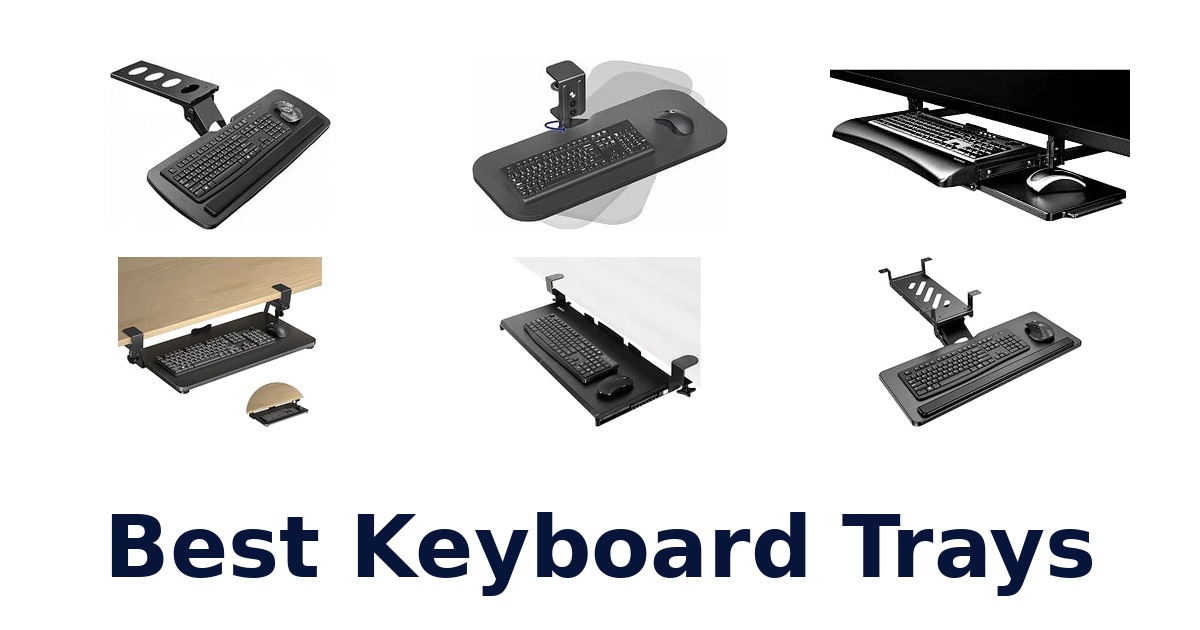
A strong keyboard tray frees desktop space while giving your keyboard a stable, usable position, making it a practical choice for home-office workers and anyone with a crowded desk. The right option depends on more than platform size: clamp clearance, desk edges, crossbars, legroom and whether you need height adjustment or rotation can determine whether it fits at all. This lineup includes simple slide-out platforms, rotating clamp-on trays, wrist-rest designs and models with extra adjustment.
VIVO Black Clamp-on 27-inch Keyboard Tray is the leading general-purpose pick for its 26.8-by-11-inch platform, sliding design and stated 11-pound capacity. Before choosing, check the exact product’s installation requirements against your desk; several models specify clearances or rule out certain edge shapes and obstructions.
VIVO Black Clamp-on 27-inch Keyboard Tray is the best overall choice for most shoppers seeking an under-desk keyboard tray. Its 26.8-by-11-inch platform is designed to hold a keyboard, mouse and small accessories, slides out for use, and supports up to 11 pounds. It also lists comfortable typing angles and an extension of up to 8.5 inches from the desk edge.
Check your desk’s underside and clamp fit before ordering, since installation compatibility varies by model.
Our Top Picks
 Best Overall
VIVO Black Clamp-on 27-inch Tray
Its 26.8-by-11-inch sliding platform holds a keyboard and mouse, extends up to 8.5 inches, and has a stated 11-pound capacity.
View on Amazon Best for Crossbars
HUANUO Cross-Beam Keyboard Tray
Two installation options address flat and cross-beam desks, with brackets for beams up to 2 inches and 6.3-inch height adjustment.
View on Amazon Wrist Rest Pick
HUANUO 25-inch Tray with Wrist Rest
The 25-by-9.84-inch slide-out platform includes a wrist rest and space for keyboards up to 17.3 by 5.5 inches.
View on Amazon- Large Platform XINLEI Large C-Clamp Tray
- Best for Swiveling VIVO Rotating 23-inch Tray
Compare Keyboard Tray Fit, Features, and Adjustability
| # | Product | Dimensions | Weight | Material Type | Buy |
|---|---|---|---|---|---|
| 1 | 1. VIVO Black Clamp-on 27-inch TrayBest Overall | 32.5 x 12.5 x 3.8 in | 10.45 lb | Alloy Steel | View on Amazon |
| 2 | 2. HUANUO Cross-Beam Keyboard TrayBest for Crossbars | — | 14.42 lb | — | View on Amazon |
| 3 | 3. HUANUO 25-inch Tray with Wrist RestWrist Rest Pick | 25 x 9.84 x 3.54 in | 11.54 lb | — | View on Amazon |
| 4 |  4. XINLEI Large C-Clamp TrayLarge Platform 4. XINLEI Large C-Clamp TrayLarge Platform | — | 8.73 lb | Metal | View on Amazon |
| 5 |  5. BONTEC Pull-Out Keyboard TrayFlat-edge clamp installations 5. BONTEC Pull-Out Keyboard TrayFlat-edge clamp installations | 11.8 x 25.6 x 1.57 in | 9.83 lb | Engineered Wood | View on Amazon |
| 6 |  6. VIVO Rotating 23-inch TrayBest for Swiveling 6. VIVO Rotating 23-inch TrayBest for Swiveling | 22.8 x 9.8 x 0.6 in | 9.75 lb | Particle Board, Steel | View on Amazon |
| 7 |  7. AX WABER Adjustable TrayHighly adjustable workstation setups 7. AX WABER Adjustable TrayHighly adjustable workstation setups | — | 9.77 lb | — | View on Amazon |
| 8 |  8. Klearlook 360-Degree TraySwivel-and-tilt positioning 8. Klearlook 360-Degree TraySwivel-and-tilt positioning | — | 7.83 lb | Acrylonitrile butadiene styrene, plastic | View on Amazon |
| 9 |  9. Fellowes Office Suites DrawerThree-height-position desk setups 9. Fellowes Office Suites DrawerThree-height-position desk setups | 11.63 x 22.37 x 2.25 in | 3.9 lb | Plastic | View on Amazon |
| 10 |  10. Klearlook Above-or-Under TrayAbove-or-under desk flexibility 10. Klearlook Above-or-Under TrayAbove-or-under desk flexibility | 22.83 x 14.57 x 18.5 in | 8.25 lb | — | View on Amazon |
Detailed Reviews: Best Keyboard Trays
#1 · Best Overall
1. VIVO Black Clamp-on 27-inch Tray
- Dimensions: 32.5 x 12.5 x 3.8 in
- Weight: 10.45 lb
- Material Type: Alloy Steel
Best for: Compact desk-space reclaimers.
Why it ranks #1: Its 26.8-by-11-inch sliding platform holds a keyboard and mouse, extends up to 8.5 inches, and has a stated 11-pound capacity.
A 26.8-by-11-inch platform that slides beneath the desk holds a keyboard, mouse, and small accessories, moving everyday controls off the work surface. Its pull-out travel reaches up to 8.5 inches from the desk edge, giving typists an adjustable working position while keeping the tray tucked away when it is not needed.
The alloy-steel tray measures 26.8 by 11 inches, with clamps bringing the overall width to 32.5 inches, so desk clearance matters before installation. Its stated 11-pound capacity covers a keyboard, mouse, and other small accessories, while the slide-in, slide-out action lets users bring the controls forward for typing and push them back afterward. VIVO also describes ergonomic typing angles intended to ease wrist and shoulder stress; the maximum extension is 8.5 inches from the desk edge.
- 26.8-by-11-inch platform holds a keyboard, mouse, and small accessories
- Slides in and out for storage beneath the desk
- Extends up to 8.5 inches from the desk edge
- Listed weight capacity is 11 pounds
- The 32.5-inch overall clamp width requires substantial desk-edge clearance.
Skip it if you lack room for a 32.5-inch clamp span; the narrower 25.6-inch BONTEC KMT01-v02 may suit your desk better.
Choose this VIVO for a keyboard-and-mouse setup that needs to clear the desktop and slide forward for typing. Check the 32.5-inch clamp span and 11-pound limit against your desk and equipment before choosing it.
Full product details
| Brand | VIVO |
|---|---|
| Color | Black |
| Item Weight | 10.45 pounds |
| Item model number | MOUNT-KB05E |
| Manufacturer | VIVO |
| Part Number | MOUNT-KB05E |
| Material | Alloy Steel |
| Dimensions | 32.5 x 12.5 x 3.8 inches |
| Size | 27 inch |
Listed on Amazon as: VIVO Black Clamp-on 27 x 11 in Keyboard Tray, MOUNT-KB05E
View on Amazon#2 · Best for Crossbars
2. HUANUO Cross-Beam Keyboard Tray
- Weight: 14.42 lb
Best for: Cross-beam standing desks.
Why it ranks #2: Two installation options address flat and cross-beam desks, with brackets for beams up to 2 inches and 6.3-inch height adjustment.
Two installation options set this HUANUO apart: included brackets allow mounting on cross-beams up to two inches high as well as flat-bottom desks. Once installed, the 25-by-9.84-inch tray combines 360-degree swivel, height adjustment, and tilt for flexible keyboard positioning.
The cross-beam brackets address a common mounting constraint for desks with underside beams, while the alternative installation supports flat-bottom desks. The tray measures 25 by 9.84 inches and supports up to 11 pounds, providing a defined capacity for a keyboard, mouse, and essentials. For positioning, it offers 6.3 inches of height adjustment, full 360-degree swivel, and tilt from +6 to -22 degrees; a wrist-rest pad is also included. Check beam height before installation.
- Includes brackets for cross-beams up to two inches high
- Also supports flat-bottom desk installation
- Adjusts 6.3 inches in height with 360-degree swivel
- Tilt ranges from +6 to -22 degrees and includes a wrist rest
- Cross-beam installation is limited to beams up to two inches high.
Skip it if you do not want a cross-beam mount and need a 30-inch platform; XINLEI DSF4 offers a larger 25.6-by-11.8-inch surface.
This HUANUO is a strong fit for owners of flat-bottom or cross-beamed desks who want several position adjustments. Confirm beam height and keep the 11-pound capacity in mind when loading the tray.
Full product details
| Brand | HUANUO |
|---|---|
| Item Weight | 14.42 pounds |
| Manufacturer | BESTQI INNOVATION (HONG KONG) TECHNOLOGY CO., LIMITED |
| Part Number | HNKB19B-US |
| Package Dimensions | 26 x 11 x 6.25 inches |
Listed on Amazon as: HUANUO Under Desk Keyboard Tray for Flat Bottom and Cross Beam Desks
View on Amazon#3 · Wrist Rest Pick
3. HUANUO 25-inch Tray with Wrist Rest
- Dimensions: 25 x 9.84 x 3.54 in
- Weight: 11.54 lb
Best for: Wrist-rest keyboard users.
Why it ranks #3: The 25-by-9.84-inch slide-out platform includes a wrist rest and space for keyboards up to 17.3 by 5.5 inches.
An included wrist rest distinguishes this 25-inch HUANUO slide-out tray, which also leaves room for a keyboard up to 17.3 by 5.5 inches and a mouse. It moves those controls below the desktop, pairing a more open work surface with a support feature intended for extended keyboard sessions.
The 25-by-9.84-inch platform accommodates keyboards up to 17.3 by 5.5 inches plus mouse space, while its wrist rest adds a contact point at the typing surface. Before ordering, check for a desk crossbar: the listing specifies 14.17 inches of clearance from the edge, or 16.22 inches for full slide-under movement. Desk-side obstacles also matter; it calls for 25 inches of side clearance, or 35.4 inches if the tray is rotated.
- Includes a wrist rest
- Fits keyboards up to 17.3 by 5.5 inches with mouse space
- Slides out from beneath the desk
- Lists clearance requirements for crossbars and side obstacles
- A crossbar may restrict movement unless the specified clearance is available.
Skip it if you need a tray compatible with cross-beamed desks; HUANUO HNKB19B-US includes brackets for cross-beams up to two inches high.
This HUANUO suits typists who want a wrist rest and a defined keyboard-size limit in a slide-out format. Check crossbar clearance, side space, and desk thickness requirements before committing to the installation.
Full product details
| Brand | HUANUO |
|---|---|
| Color | Black |
| Item Weight | 11.54 pounds |
| Item model number | HN-J |
| Manufacturer | BESTQI INNOVATION (HONG KONG) TECHNOLOGY CO., LIMITED |
| Part Number | US-HNKB03 |
| Dimensions | 25 x 9.84 x 3.54 inches |
| Size | 25"W x 9.84"D |
Listed on Amazon as: HUANUO Under Desk Keyboard Tray, 25 x 9.8 Inch Slide-Out Drawer
View on Amazon#4 · Large Platform
4. XINLEI Large C-Clamp Tray
- Weight: 8.73 lb
- Material Type: Metal
Best for: Stable, larger clamp trays.
Why it ranks #4: Its 25.6-by-11.8-inch platform offers generous room for a keyboard, mouse and small accessories, with a safety ledge stopper.
A 25.6-by-11.8-inch platform gives this XINLEI tray room for a keyboard, mouse, and small accessories beneath the desk. Its metal sliding rail supports smooth pull-out movement, while a safety ledge helps keep the keyboard from slipping backward during use.
The tray’s listed 30-inch total length, including clamps, makes desk-edge clearance an important part of setup. C-clamps hold the platform in place, and upper EVA pads help protect the workstation where the tray mounts. For daily access, the metal sliding rail allows the tray to move in and out; the safety ledge stopper addresses backward keyboard slippage. Together, these details support a stable pull-out workspace, but the overall clamp span may not suit narrower desk edges.
- 25.6-by-11.8-inch surface holds keyboard, mouse, and small accessories
- Metal sliding rail supports smooth movement
- C-clamps hold the tray in place
- Safety ledge helps prevent the keyboard from slipping backward
- The 30-inch total length including clamps needs ample desk-edge space.
Skip it if you have less than 30 inches of desk-edge space; the 22.8-inch VIVO MOUNT-KB04CB has a shorter listed tray width.
Choose this XINLEI for a larger pull-out surface with a ledge and desk-protective EVA pads. It is best suited to desks with room for the 30-inch total clamp span and a compatible mounting edge.
Full product details
| Brand | XINLEI |
|---|---|
| Color | Black |
| Item Weight | 8.73 pounds |
| Item model number | 1 |
| Manufacturer | XINLEI |
| Part Number | DSF4 |
| Material | Metal |
| Package Dimensions | 16.14 x 13.15 x 4.65 inches |
| Size | large |
Listed on Amazon as: XINLEI Keyboard Tray Under Desk Large C-Clamp 25.6” (30” Including Clamps) x 11.8” Slide-Out Platform Computer Drawer Pull Out Keyboard & Mouse Tray Black DSF4
View on Amazon#5
5. BONTEC Pull-Out Keyboard Tray
- Dimensions: 11.8 x 25.6 x 1.57 in
- Weight: 9.83 lb
- Material Type: Engineered Wood
Best for: Flat-edge clamp installations.
Why it ranks #5: This 25.6-by-11.8-inch platform has smooth-gliding motion and padded C-clamps, but needs at least 31.3 inches of under-desk width.
Sturdy C-clamps mount this BONTEC pull-out platform at a flat, straight desk edge, while smooth gliding makes it easy to bring the keyboard and mouse into working position. Anti-skid padding helps protect the desk surface from scratches, making this a practical option when its specific underside-clearance requirements are met.
The 25.6-by-11.8-inch engineered-wood platform needs at least 31.3 inches of width and 11.8 inches of depth beneath the desk for installation and sliding. Its C-clamps offer a mounting method for a compatible straight edge, and the smooth-glide action helps move the tray in and out during work. Anti-skid padding is intended to resist scratches. Curved, beveled, or rounded edges and underside crossbars or support beams are explicitly unsuitable.
- 25.6-by-11.8-inch pull-out platform
- C-clamps provide desk-edge mounting
- Smooth gliding supports in-and-out access
- Anti-skid padding helps resist desk scratches
- It will not mount on curved, beveled, rounded, or obstructed desk edges.
Skip it if you have an underside crossbar or rounded desk edge; HUANUO HNKB19B-US supports cross-beam installation with its included brackets.
Pick the BONTEC for a straightforward pull-out keyboard and mouse surface when your desk has a flat, unobstructed edge. Its minimum 31.3-inch width and 11.8-inch depth requirements make measuring essential before installation.
Full product details
| Brand | BONTEC |
|---|---|
| Color | Black |
| Item Weight | 9.83 pounds |
| Item model number | KMT01-v02 |
| Manufacturer | BONTEC |
| Part Number | KMT01-v02 |
| Material | Engineered Wood |
| Dimensions | 11.8 x 25.6 x 1.57 inches |
| Size | 25.6" x 11.8" |
Listed on Amazon as: BONTEC Under Desk Keyboard Tray, Pull-Out Keyboard & Mouse Platform
View on Amazon#6 · Best for Swiveling
6. VIVO Rotating 23-inch Tray
- Dimensions: 22.8 x 9.8 x 0.6 in
- Weight: 9.75 lb
- Material Type: Particle Board, Steel
Best for: Rotating clamp-tray users.
Why it ranks #6: The 22.8-by-9.8-inch platform pivots 360 degrees for out-of-way storage, provided the desk allows 32 inches of rotation clearance.
A single rotating clamp lets this VIVO keyboard tray pivot a full 360 degrees, so it can swing beneath the desk for storage or move into a typing position. Its 22.8-by-9.8-inch surface holds a keyboard and mouse, with rounded corners adding a safety-conscious detail.
The central rotating clamp provides 360-degree movement, but full rotation requires 32 inches of clearance around its circumference. When the tray is not in use, it can pivot beneath the desk, freeing the work surface. Its 22.8-by-9.8-inch platform is rated for up to 11 pounds and is intended to hold a keyboard and mouse. The clamp requires a flat desk edge; lipped or beveled edges are explicitly incompatible, making edge shape a key installation check.
- Single clamp pivots the tray 360 degrees
- Can swing beneath the desk for storage
- 22.8-by-9.8-inch platform holds keyboard and mouse
- Listed capacity is up to 11 pounds
- Not compatible with lipped or beveled desk edges.
Skip it if you have a lipped or beveled desk edge; Fellowes 9140305 uses an under-desk drawer installation instead of this rotating edge clamp.
This VIVO suits users who want a compact tray that swings out for typing and pivots under the desk afterward. It requires a flat, non-lipped edge and 32 inches of clearance for full rotation.
Full product details
| Brand | VIVO |
|---|---|
| Color | Black |
| Item Weight | 9.75 pounds |
| Item model number | MOUNT-KB04CB |
| Manufacturer | VIVO |
| Part Number | MOUNT-KB04CB |
| Material | Particle Board, Steel |
| Dimensions | 22.8 x 9.8 x 0.6 inches |
| Size | 23" x 10" |
| Additional Information | Important information Safety Information Please ensure your desk has a flat surface without lipped or beveled edges and provides sufficient clearance (32" circumference) for full rotation. Do not overload the tray; it can hold weights up to 11 lbs. Always keep the area around the tray clear to prevent accidents. |
Listed on Amazon as: VIVO Black Clamp-on 23 x 10 in Rotating Keyboard Tray, MOUNT-KB04CB
View on Amazon#7
7. AX WABER Adjustable Tray
- Weight: 9.77 lb
Best for: Highly adjustable workstation setups.
Why it ranks #7: It combines up to 6.5 inches of height adjustment with 180-degree horizontal rotation and 30-degree vertical tilt.
A tray that swivels 180 degrees, tilts 30 degrees, and adjusts up to 6.5 inches in height gives AX WABER users several ways to position their keyboard. The combination supports changes in typing posture and tray placement, with a storage drawer adding a place for small items.
The adjustable height, 30-degree tilt, and 180-degree horizontal rotation let users change the tray’s position rather than relying on a fixed typing angle. Its slide-out keyboard-and-mouse holder also includes a storage drawer, combining a work surface with small-item storage. The listing recommends desks over 25 inches in length and states that the desktop should be at least 0.61 inches thick for secure mounting. It also advises checking that installation will leave enough legroom.
- Height adjusts up to 6.5 inches
- Tilts 30 degrees and rotates 180 degrees horizontally
- Includes a storage drawer
- Listing specifies a minimum desk thickness of 0.61 inches
- Height adjustment and mounting require sufficient desk thickness and remaining legroom.
Skip it if you need a tray that explicitly accommodates crossbeams; HUANUO HNKB19B-US includes brackets for beams up to two inches high.
This AX WABER is for users who want to change tray height, tilt, and horizontal position, with a drawer for small items. Check desk length, thickness, and legroom before selecting its mount.
Full product details
| Brand | AX WABER |
|---|---|
| Color | Black |
| Item Weight | 9.77 pounds |
| Item model number | AX02WB01 |
| Manufacturer | kuochi |
| Part Number | AX02WB01 |
| Package Dimensions | 17.36 x 12.05 x 5.16 inches |
| Size | 25” Length Black |
#8
8. Klearlook 360-Degree Tray
- Weight: 7.83 lb
- Material Type: Acrylonitrile butadiene styrene, plastic
Best for: Swivel-and-tilt positioning.
Why it ranks #8: Its 24.4-by-10-inch tray offers 360-degree swivel, adjustable tilt, a wrist rest and storage drawer, though height is not adjustable.
A 360-degree swivel lets this Klearlook tray move around the desk edge, while adjustable tilt helps users set a preferred typing angle. Its 24.4-by-10-inch platform also includes a wrist rest and storage drawer, combining typing support with a place to keep small items close.
The C-clamp fixture attaches at the desk edge, and the 360-degree swivel offers flexibility to reposition the platform when typing or clearing space. An adjustable tilt angle and included wrist rest support a more tailored keyboard position. The storage drawer adds an organizational feature alongside the 24.4-by-10-inch tray. One important boundary is explicit in the product title and feature description: the tray’s height is not adjustable, so buyers needing vertical adjustment should look elsewhere.
- 360-degree swivel allows repositioning
- Adjustable tilt angle
- Includes a wrist rest
- Storage drawer adds small-item storage
- Tray height is not adjustable.
Skip it if you need vertical height adjustment; AX WABER AX02WB01 adjusts its tray up to 6.5 inches.
Select this Klearlook for swivel movement, tilt adjustment, a wrist rest, and a drawer in one under-desk tray. It fits users who do not require height adjustment and have room for its 24.4-by-10-inch platform.
Full product details
| Brand | Klearlook Maximized Clarity! |
|---|---|
| Color | Black |
| Item Weight | 7.83 pounds |
| Item model number | KLMLFUFDMST |
| Manufacturer | Ariko |
| Part Number | KLMLFUFDMST |
| Material | Acrylonitrile butadiene styrene, plastic |
| Package Dimensions | 17.4 x 10.91 x 6.81 inches |
#9
9. Fellowes Office Suites Drawer
- Dimensions: 11.63 x 22.37 x 2.25 in
- Weight: 3.9 lb
- Material Type: Plastic
Best for: Three-height-position desk setups.
Why it ranks #9: Three height settings and a mouse tray that mounts on either side add flexibility, but installation requires 23.5 inches of width and 14.5 inches of depth.
Three height adjustments let the Fellowes Office Suites drawer place a keyboard at a preferred work position while moving it off the desktop. Its platform accommodates keyboards up to 20 inches wide and 7 5/8 inches deep, and the mouse tray can mount on either side or stow underneath.
The height-adjustable unit offers three positions, giving users a choice of keyboard level without leaving the tray on the desktop. Its platform fits keyboards up to 20 inches wide and 7 5/8 inches deep, while the mouse tray can be mounted on the right or left or stowed beneath the keyboard surface. Installation needs 23.5 inches of width and 14.5 inches of depth underneath the desk, with an obstruction-free area; crossbars and support structures can interfere.
- Three height adjustments
- Fits keyboards up to 20 inches wide and 7 5/8 inches deep
- Mouse tray mounts on either side or stows underneath
- Moves keyboard and mouse off the desktop
- Installation requires 14.5 inches of under-desk depth and an obstruction-free area.
Skip it if you have a crossbar or limited under-desk depth; VIVO MOUNT-KB04CB uses a single rotating clamp rather than this drawer’s specified installation area.
The Fellowes suits users who want three fixed height choices and flexible mouse-tray placement. Verify the 23.5-inch width, 14.5-inch depth, and clear installation area, especially if the desk has supports underneath.
Full product details
| Brand | Fellowes |
|---|---|
| Color | Black/Silver |
| Ink Color | Black |
| Item Weight | 3.9 pounds |
| Item model number | 9140305 |
| Manufacturer | Fellowes |
| Part Number | 9140303 |
| Material | Plastic |
| Dimensions | 11.63 x 22.37 x 2.25 inches |
| Size | 2.3"x29"x11.6" |
| Additional Information | Important Information Small parts. Not for children under 3 yrs. |
Listed on Amazon as: Fellowes Office Suites Underdesk Keyboard Drawer, Black/Silver (9140305)
View on Amazon#10
10. Klearlook Above-or-Under Tray
- Dimensions: 22.83 x 14.57 x 18.5 in
- Weight: 8.25 lb
Best for: Above-or-under desk flexibility.
Why it ranks #10: Its above- or under-desk installation gives it placement flexibility, but it is less directly suited to shoppers seeking a conventional slide-out drawer.
Dual installation options let this Klearlook tray sit above or beneath the desk, offering a choice of placement that many fixed under-desk drawers do not. Its adjustable position and keyboard riser with typing-angle adjustment let users tailor the setup for work, gaming, or leisure.
The above-desk and under-desk installation choices give users flexibility when selecting where the keyboard tray sits, while its adjustable position supports personal setup preferences. A keyboard riser with adjustable typing angles is presented as an ergonomic feature intended to reduce neck strain. That combination makes the product relevant for work, gaming, or leisure. The supplied specifications give overall dimensions of 22.83 by 14.57 by 18.5 inches, so buyers should consider the space available for its chosen placement.
- Can be installed above or under the desk
- Adjustable position supports different setups
- Keyboard riser offers adjustable typing angles
- Listed for work, gaming, or leisure use
- Its 18.5-inch listed overall height may require substantial setup space.
Skip it if you specifically need a compact under-desk-only drawer; VIVO MOUNT-KB04CB lists a 22.8-by-9.8-inch tray that pivots beneath the desk.
Choose this Klearlook if you want the option of above- or under-desk placement and adjustable typing angles. Its listed overall dimensions make it important to plan the available space for your chosen configuration.
Full product details
| Brand | Klearlook Maximized Clarity! |
|---|---|
| Color | Black |
| Item Weight | 8.25 pounds |
| Item model number | KL2IN1KEYBOARDTRAY-B |
| Manufacturer | Klearlook |
| Part Number | KL2IN1KEYBOARDTRAY-B |
| Dimensions | 22.83 x 14.57 x 18.5 inches |
Listed on Amazon as: Klearlook Upgraded Adjustable Keyboard Tray for Above Desk & Under Desk Use
View on AmazonThe desk-fit checks that prevent a bad match
A tray can be the right size and still fail to fit if its clamp area or travel path meets an obstruction. Start by checking the desk edge: BONTEC says its clamp-on design is unsuitable for curved, beveled or rounded edges, and VIVO Rotating 23-inch Tray also excludes lipped or beveled edges. Then inspect underneath for crossbars and support beams.
HUANUO 25-inch Tray with Wrist Rest calls for 14.17 inches from the desk edge to a crossbar, or 16.22 inches for full slide-under; Fellowes Office Suites Drawer requires an obstruction-free area. Also compare the complete installation width, not just the platform: BONTEC calls for at least 31.3 inches of width beneath the desk.
Measuring the tray alone misses clamps, slide travel and rotation clearance, so use the listed fit conditions for the specific model before ordering.
Rotation trades clearance for flexible positioning
Rotating trays can move out of the way, but their movement needs more room than a fixed slide-out platform. VIVO Rotating 23-inch Tray pivots 360 degrees and specifies 32 inches of circumference clearance; that footprint may conflict with desk legs or nearby furniture. The Klearlook 360-Degree Tray also swivels, while AX WABER Adjustable Tray rotates horizontally 180 degrees and adds height and tilt adjustment.
By contrast, a standard sliding tray such as VIVO Black Clamp-on 27-inch Tray extends up to 8.5 inches from the desk edge and does not list a rotating mount. Decide whether the tray must tuck away, change position between tasks or simply slide into typing position.
Rotation is useful only when the desk layout leaves room for the platform’s sweep, so prioritize the installation path as well as the tray’s stated size.
How to Choose a Keyboard Tray
Platform size and keyboard space
Look for a platform that fits your keyboard and leaves enough room for a mouse without exceeding the space available under your desk. The listed trays range from 22.8 by 9.8 inches for VIVO Rotating 23-inch Tray to 25.6 by 11.8 inches for XINLEI Large C-Clamp Tray; VIVO Black Clamp-on 27-inch Tray is 26.8 by 11 inches. HUANUO 25-inch Tray with Wrist Rest specifies support for keyboards up to 17.3 by 5.5 inches.
Choose the larger end if you want mouse space or small accessories alongside the keyboard. A compact platform may suit a tight desk, but check your own keyboard dimensions rather than assuming every full-size model fits.
Adjustment and movement
Choose the adjustment style that matches how you position your hands and whether you need the tray to move out of the way. AX WABER Adjustable Tray offers up to 6.5 inches of height adjustment, 180-degree horizontal rotation and 30-degree vertical tilt; HUANUO Cross-Beam Keyboard Tray lists 6.3 inches of height adjustment, 360-degree swivel and a tilt range of +6 to -22 degrees. Other designs make narrower adjustments: Fellowes Office Suites Drawer has three height settings, while Klearlook 360-Degree Tray has adjustable tilt but no height adjustment.
Favor broader movement options if you need to change position often; a simpler sliding tray may suit a setup that stays in one position.
Mounting compatibility and clearance
Check the desk edge, underside and available clearance before selecting a mounting style. BONTEC Pull-Out Keyboard Tray requires at least 31.3 inches of width and 11.8 inches of depth beneath the desk, and it does not suit curved, beveled or rounded edges. Fellowes Office Suites Drawer needs 23.5 inches of width and 14.5 inches of depth, with no obstructions.
HUANUO 25-inch Tray with Wrist Rest requires a desk top thicker than 0.6 inches and has specific crossbar-clearance conditions. HUANUO Cross-Beam Keyboard Tray is the more relevant option when a compatible beam is present, as its brackets fit beams up to 2 inches high.
Choose a model whose stated conditions match your measured desk.
Which Keyboard Tray Should You Choose?
For a general slide-out tray with a sizable platform and a stated 11-pound capacity, choose VIVO Black Clamp-on 27-inch Tray. If your desk has a crossbeam, start with HUANUO Cross-Beam Keyboard Tray, checking that the beam is no more than 2 inches high. For a wrist rest and a defined maximum keyboard size, HUANUO 25-inch Tray with Wrist Rest is the focused option.
Choose XINLEI Large C-Clamp Tray if platform area is the priority, or VIVO Rotating 23-inch Tray if pivoting the platform away matters and you have 32 inches of rotation clearance. For more height and tilt adjustment, consider AX WABER Adjustable Tray.
If no listed under-desk format suits your setup, Klearlook Above-or-Under Tray offers both installation orientations; confirm its dimensions and mounting fit first.
Related Buying Guides
Frequently Asked Questions
How do I check whether my desk edge and underside will accept a clamp-on keyboard tray?
Measure the desk edge and inspect the underside before choosing a clamp-on tray. Look for a clear, sturdy area where the clamps can attach, and check for aprons, drawers, crossbeams, or other obstructions. Compare those measurements with the tray’s installation requirements, since desk construction and clamp fit vary by model.
How much clearance should I leave for a keyboard tray and my legs?
Leave enough room for your knees and thighs to move freely beneath the desk, including when the tray is pulled out. Check the tray’s height and travel against your seated position, chair arms, and desk supports. If you cannot confirm clearance from measurements, test the proposed position before installing the tray.
Is a rotating or height-adjustable keyboard tray better for my setup?
Choose rotation if moving the platform aside is useful and you have enough room for its swing; the VIVO rotating tray requires 32 inches of rotation clearance. Choose height adjustment if changing the tray’s position is the priority. Check each model’s movement range and desk fit before deciding.
What should I check before choosing a tray for both a keyboard and mouse?
Compare the platform dimensions with the space your keyboard and mouse need side by side, allowing room to move the mouse comfortably. Consider whether you also want space for small accessories. The VIVO Black Clamp-on 27-inch tray is described as holding a keyboard, mouse, and small accessories, but confirm its platform suits your devices.
What should I do if my desk has a crossbeam or I want above-desk installation?
For a desk with a crossbeam, consider the HUANUO Cross-Beam Keyboard Tray and check that the beam is no more than 2 inches high. If you want a choice of above- or under-desk installation, the Klearlook Above-or-Under Tray offers both orientations; confirm its dimensions and mounting fit for your desk first.
Final Words
Start by checking desk construction, clamp clearance, and legroom; a tray that does not fit your workspace is the wrong choice regardless of its features. For most shoppers wanting a slide-out platform, the VIVO Black Clamp-on 27-inch Tray is the overall pick. Match alternatives to specific needs: crossbeam fit, a wrist rest, larger platform area, rotation, added adjustment, or above-or-under mounting.
Verify each model’s fit before ordering.