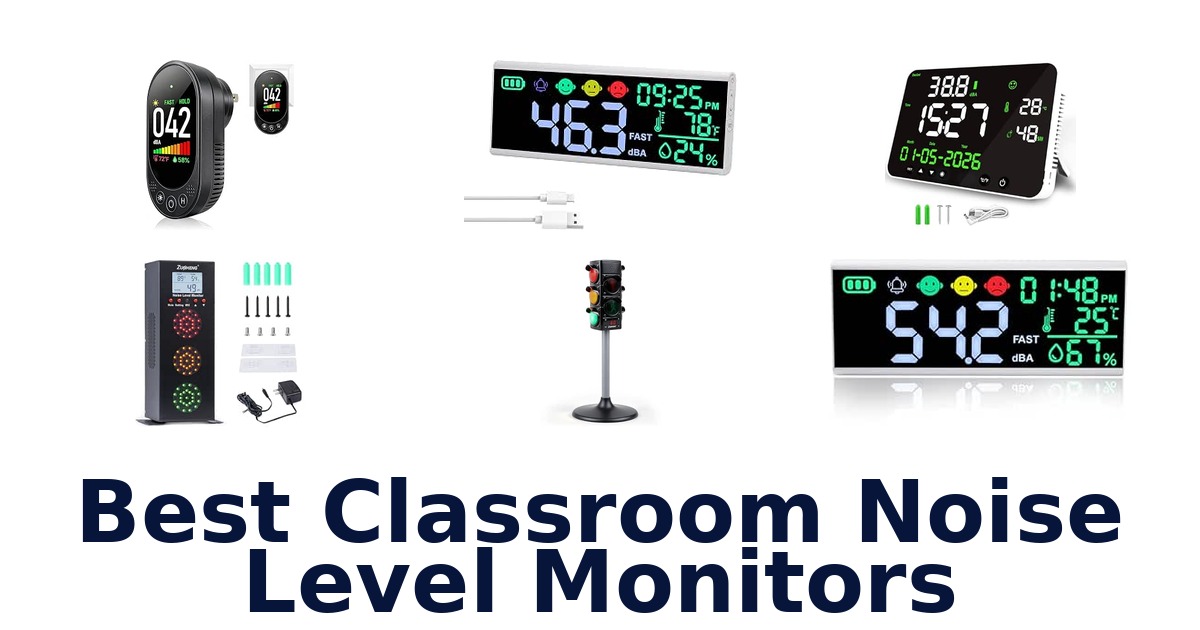
A strong classroom noise monitor makes sound levels easy for students to understand and gives teachers a practical way to set or signal when voices are too loud. The Best Classroom Noise Level Monitors include simple red-yellow-green traffic-light displays for younger learners and larger decibel meters for rooms where staff need numerical readings. Some also show temperature, humidity, or time, while certain models add audible alerts or data logging.
The right format depends on whether your priority is student self-correction, visibility across a large room, or tracking sound more precisely. This roundup compares ten options using their listed display features, alerts, measurement ranges, and dimensions.
Check power and placement details as well: a wall-mounted meter, a desktop device, and a traffic-light monitor suit different classroom layouts.
The Zuomeng Classroom Noise Level Monitor with LED Traffic Light Display is the best overall choice for classrooms focused on student self-correction. Its red, yellow, and green signals give children an immediate visual cue, and the double-sided display is described as providing 360° visibility. Teachers can place it on a desk or raise it with the extension rod and base.
It also offers selectable alert modes, with adapter power for voice alerts or three AAA batteries for visual monitoring; batteries are not included.
Our Top Picks
 Best Overall
Zuomeng Classroom Traffic Light
Red, yellow, and green signals give students clear cues, while the double-sided display offers 360° visibility and desk or raised placement.
View on Amazon Best Preset Thresholds
Teachers can preset a comfortable sound level, and its traffic-light signals and long-lasting LED lights suit classrooms and other shared spaces.
View on Amazon Best Voice Alerts
Combines traffic-light noise cues with adjustable thresholds from 50–100 dB and 15 voice-volume levels, plus temperature and humidity readings.
View on Amazon- Best Data Logging DANOPLUS Decibel Recorder
- Best Face Indicators Landtek Sound Decibel Meter
Compare classroom noise monitors by display, alerts, and data features
| # | Product | Weight | Buy |
|---|---|---|---|
| 1 | 1. Zuomeng Classroom Traffic LightBest Overall | 1.57 lb | View on Amazon |
| 2 | 2. Yacker Tracker Noise MonitorBest Preset Thresholds | — | View on Amazon |
| 3 | 3. Zuomeng Noise DetectorBest Voice Alerts | 3.34 lb | View on Amazon |
| 4 |  4. DANOPLUS Decibel RecorderBest Data Logging 4. DANOPLUS Decibel RecorderBest Data Logging | 2.66 lb | View on Amazon |
| 5 |  5. Landtek Sound Decibel MeterBest Face Indicators 5. Landtek Sound Decibel MeterBest Face Indicators | 1.89 lb | View on Amazon |
| 6 |  6. DANOPLUS 13-Inch Decibel MeterFor adjustable display and alarms 6. DANOPLUS 13-Inch Decibel MeterFor adjustable display and alarms | 14.88 oz | View on Amazon |
| 7 |  7. TEKCOPLUS Large LCD MeterFor classrooms needing room data 7. TEKCOPLUS Large LCD MeterFor classrooms needing room data | 1.89 lb | View on Amazon |
| 8 |  8. GOYERRNES Digital Sound MeterFor classrooms tracking room conditions 8. GOYERRNES Digital Sound MeterFor classrooms tracking room conditions | — | View on Amazon |
| 9 |  9. YIK TUNG 5-in-1 MeterFor desktop ambient-noise monitoring 9. YIK TUNG 5-in-1 MeterFor desktop ambient-noise monitoring | — | View on Amazon |
| 10 |  10. VETOUCH Plug-In MeterFor plug-in classroom monitoring 10. VETOUCH Plug-In MeterFor plug-in classroom monitoring | 2.72 oz | View on Amazon |
Detailed Reviews: Best Classroom Noise Level Monitors
#1 · Best Overall
1. Zuomeng Classroom Traffic Light
- Weight: 1.57 lb
Best for: For young learner voice cues.
Why it ranks #1: Red, yellow, and green signals give students clear cues, while the double-sided display offers 360° visibility and desk or raised placement.
Double-sided red, yellow, and green LEDs give young learners a visible cue to adjust their voices, with the display visible from 360 degrees. The traffic-light colors make noise levels easy to understand, while selectable alert modes let teachers choose reminders suited to the space and classroom routine.
Place the monitor on a desk for a lower-profile setup, or use the extension rod and base to raise it for a more visible position. The double-sided display helps students around the room see the color cues, while AUTO mode can activate flashing red lights and a “Quiet Please” reminder. Adapter power supports voice alerts; three AAA batteries, which are not included, can power visual monitoring when an outlet is not being used.
- Red, yellow, and green signals offer an at-a-glance classroom cue.
- Double-sided LED display provides 360-degree visibility.
- Desk placement or extension rod and base offer positioning choices.
- Adapter power supports voice alerts; AAA batteries support visual monitoring.
- The three AAA batteries for visual monitoring are not included.
Skip it if you need voice alerts while running on batteries; the listed battery option supports visual monitoring, while adapter power supports voice alerts.
This suits teachers introducing clear, visual voice-level cues to young learners, especially in rooms where students view the display from different angles. Choose a raised or desk position to suit sightlines, and plan on adapter power for voice alerts.
Full product details
| Brand | Zuomeng |
|---|---|
| Item Weight | 1.57 pounds |
| Manufacturer | Zuomeng |
| Package Dimensions | 8.86 x 8.82 x 5.98 inches |
Listed on Amazon as: Classroom Noise Level Monitor with LED Traffic Light Display
View on Amazon#2 · Best Preset Thresholds
2. Yacker Tracker Noise Monitor
Best for: For preset classroom sound thresholds.
Why it ranks #2: Teachers can preset a comfortable sound level, and its traffic-light signals and long-lasting LED lights suit classrooms and other shared spaces.
A teacher-set sound threshold makes the Yacker Tracker a practical visual reminder when classroom noise rises beyond the level an adult has chosen. Its red, yellow, and green traffic-light signals translate sound into an easy-to-read cue, and the 17-inch format is intended for shared rooms such as classrooms, cafeterias, and gyms.
Set the sound level to a preference that suits the activity, then let the visual signal remind students when the room gets too loud. The long-lasting LED lights make the traffic-light display the central cue, while a two-second delay precedes the siren sound, giving a brief pause before the audible reminder. It includes a 120-volt AC adapter, so the listed setup uses an outlet; optional face stickers are also included.
- Teacher or adult can preset the sound threshold.
- Red, yellow, and green signals are easy to interpret.
- Long-lasting LED lights provide a visual reminder.
- Two-second delay comes before the siren sound.
- The included power option is a 120-volt AC adapter, so it needs an outlet.
Skip it if you need a monitor that runs on batteries or displays temperature and humidity; the Yacker Tracker listing specifies an AC adapter and sound-level alerts.
This fits teachers who want a preset visual noise cue in classrooms or larger shared spaces, with an audible siren following a short delay. Its listed power setup is an AC adapter, so plan for access to an outlet.
Full product details
| Brand | Yacker Tracker |
|---|---|
| Color | Red/Yellow/Green |
| Included Components | One 120 Volt AC Adaptor and Optional Face Stickers included |
| Manufacturer | AGI Attention-Getters, Inc |
| Part Number | 3030 |
| Model Number | 3030 |
| Voltage | 120 volts |
| Additional Information | Important information Safety Information WARNING – Choking Hazard – Not for children under 3 |
Listed on Amazon as: Yacker Tracker Noise Level Monitor, LED, 17 Inches, Red/Yellow/Green
View on Amazon#3 · Best Voice Alerts
3. Zuomeng Noise Detector
- Weight: 3.34 lb
Best for: For adjustable voice-alert thresholds.
Why it ranks #3: Combines traffic-light noise cues with adjustable thresholds from 50–100 dB and 15 voice-volume levels, plus temperature and humidity readings.
A customizable voice alert with thresholds from 50 to 100 dB lets teachers set when this monitor responds to classroom noise. Red, yellow, and green lights give students a visual signal to self-adjust, while the built-in temperature and humidity readings add a quick view of room conditions.
Set the sound threshold to suit the activity, then choose among 15 voice-volume levels so the alert can match the room’s needs. The traffic-light display gives students a separate visual prompt, which can help keep the cue understandable without relying only on the voice alert. Temperature and humidity readings add environmental context, and the sturdy metal housing is listed for everyday use in classrooms and shared spaces such as libraries or waiting areas.
- Noise thresholds are adjustable from 50 to 100 dB.
- Offers 15 voice-volume levels.
- Red, yellow, and green lights provide a visual cue.
- Displays real-time temperature and humidity.
- Its adjustable noise thresholds begin at 50 dB, limiting settings below that level.
Skip it if you need to set a noise threshold below 50 dB; the TEKCOPLUS TK413PLUS lists an adjustable range starting at 30 dB.
This suits teachers who want adjustable voice prompts and a traffic-light cue, with temperature and humidity visible as well. Its threshold range starts at 50 dB, so check that the available settings fit your classroom routine.
Full product details
| Brand | Zuomeng |
|---|---|
| Item Weight | 3.34 pounds |
| Item model number | ZM-286 |
| Manufacturer | Zuomeng |
| Package Dimensions | 12.83 x 6.65 x 4.57 inches |
Listed on Amazon as: Noise Detector with Traffic Light Alert
View on Amazon#4 · Best Data Logging
4. DANOPLUS Decibel Recorder
- Weight: 2.66 lb
Best for: For classroom noise data logging.
Why it ranks #4: Records decibel data every two seconds and can store one year of data; its 13-inch screen and 16.4-foot sensor support room monitoring.
Recording decibel readings every two seconds and storing up to one year of data gives this DANOPLUS meter a record-keeping role beyond immediate classroom cues. Its 13-inch HD screen uses four-inch digits for visibility from farther away, while audible and visual alarms can call attention to noise thresholds.
The large digits make readings easier to check across a classroom, and the 16.4-foot sensor gives placement flexibility where the display and sound pickup need different positions. Data is recorded every two seconds, with real-time data available to display and export when connected to PC software; that workflow supports later analysis as well as live monitoring. The listed storage capacity is one year, making this a fit for ongoing tracking rather than only moment-to-moment reminders.
- Records decibel data every two seconds.
- Stores up to one year of data.
- 13-inch HD display has four-inch digits.
- 16.4-foot sensor supports flexible placement.
- Displaying and exporting real-time data for analysis requires connecting to PC software.
Skip it if you only need a quick visual classroom cue and do not need logged readings; the Yacker Tracker 3030 focuses on traffic-light signals and a sound reminder.
This fits teachers or facility staff who need classroom sound readings both during lessons and for later analysis. Its logging workflow depends on PC software for data display and export, so it suits buyers prepared to use that connected process.
Full product details
| Brand | DANOPLUS |
|---|---|
| Item Weight | 2.66 pounds |
| Manufacturer | DANOPLUS |
| Dimensions | 12.6 x 6.3 x 1.37 inches |
#5 · Best Face Indicators
5. Landtek Sound Decibel Meter
- Weight: 1.89 lb
Best for: For direct noise-color indicators.
Why it ranks #5: Its 13-inch display shows noise, time, temperature, and humidity, with green, yellow, and red face indicators keyed to stated decibel levels.
Color-coded face icons tied to specific decibel bands make this 13-inch Landtek meter especially straightforward for classroom noise cues: green below 60 dB, yellow from 60 to 85 dB, and red above 85 dB. The large screen also displays time, temperature, and humidity.
The 13-inch HD display puts sound level and room readings together, giving teachers a single screen to check during class. Three brightness levels let the display adapt to room lighting, while the face icons translate the stated decibel bands into colors students can recognize. Wall mounting or desktop placement is supported by the included USB Type-C cable and two screws with rubber stoppers, allowing the setup to suit available surfaces and sightlines.
- 13-inch HD screen displays noise, time, temperature, and humidity.
- Green, yellow, and red faces correspond to stated decibel bands.
- Three brightness levels are available.
- Includes USB Type-C cable and screws with rubber stoppers.
- The display offers three brightness levels.
Skip it if you need eight brightness settings to fine-tune the screen; GOYERRNES's GR-7000A lists eight adjustable brightness levels.
This suits teachers who want students to connect color cues directly with defined noise bands, while also keeping room readings visible. Its brightness offers three levels, so consider whether that range suits the classroom lighting.
Full product details
| Brand | Landtek |
|---|---|
| Included Components | 1 x Sound Noise Meter ,1 x USB Type-C Cable ,2 x Screw with rubber stopper |
| Item Weight | 1.89 pounds |
| Manufacturer | Landtek |
| Package Dimensions | 14.01 x 7.55 x 2.2 inches |
#6
6. DANOPLUS 13-Inch Decibel Meter
- Weight: 14.88 oz
Best for: For adjustable display and alarms.
Why it ranks #6: The 13-inch screen displays 30–130 dB, time, temperature, and humidity, with an adjustable-threshold buzzer that can also be disabled.
A 13-inch LED screen combines decibel level, time, temperature, and humidity, giving teachers several room readings in one place. Adjustable brightness and face icons make the display adaptable to classroom lighting and quick visual checks, while an adjustable-threshold buzzer can be opened or disabled.
The display covers 30–130 dB and shows time in AM/PM format, temperature in Celsius or Fahrenheit, and humidity from 0 to 100% RH. That combination lets a teacher consult sound and room conditions without switching devices. Face icons provide an additional visual indicator, while the buzzer’s adjustable threshold allows an audible prompt to be enabled or disabled. The included USB Type-C cable and two screws support the listed setup options, with a manual included for reference.
- 13-inch LED screen displays sound, time, temperature, and humidity.
- Brightness is adjustable.
- Buzzer threshold is adjustable and the alarm can be disabled.
- Includes a USB Type-C cable and two screws.
- The listed sound-level range is 30–130 dB.
Skip it if you need a documented sound-data logger for later analysis; DANOPLUS's B0CH3G2JGH lists two-second recording and PC data export.
This suits teachers who want a large, multi-reading display and control over whether an audible buzzer is active. Its listed features focus on live monitoring rather than data logging, so consider whether ongoing records are part of your workflow.
Full product details
| Brand | DANOPLUS |
|---|---|
| Included Components | 1x Decibel Meter, 1x USB Type-C Cable, 2x Screw, and English Manual |
| Item Dimensions W x H | 13"W x 13"H |
| Item Weight | 14.88 ounces |
| Manufacturer | DANOPLUS |
| Dimensions | 13"W x 13"H |
#7
7. TEKCOPLUS Large LCD Meter
- Weight: 1.89 lb
Best for: For classrooms needing room data.
Why it ranks #7: A 13-inch adjustable-brightness screen shows sound levels and environmental data, with a built-in alarm adjustable from 30–130 dB or switched off.
A 13-inch display puts sound level, time, temperature, and humidity together where a teacher can check them at a glance. The TEKCOPLUS meter also offers adjustable brightness and a buzzer alarm that can be set across a 30–130 dB range or turned off, supporting different classroom preferences.
Use the large screen to make readings easier to see from around a room, and adjust brightness to suit the lighting. Unlike a traffic-light-only cue, this meter also displays time, temperature, and humidity, so it can serve as a broader room monitor. Its alarm can be activated for sound levels above a chosen setting or disabled when an audible alert is not wanted. The listing describes it as compact and portable for use in different settings.
- 13-inch screen displays sound, time, temperature, and humidity.
- Adjustable brightness supports different room lighting.
- Buzzer threshold can be adjusted from 30 to 130 dB.
- Alarm can be turned off completely.
- Its listed sound monitoring range starts at 30 dB.
Skip it if you want students to read simple red, yellow, and green traffic-light cues; Zuomeng's B0H9XW4QG5 lists those colors explicitly.
This suits teachers who want a large, adjustable-brightness display that combines noise readings with time and room conditions. It is a data-oriented monitor rather than a listed traffic-light display, so consider which kind of cue students need.
Full product details
| Brand | TEKCOPLUS |
|---|---|
| Item Weight | 1.89 pounds |
| Item model number | TK413PLUS |
| Manufacturer | Tekcoplus Ltd |
| Dimensions | 14.02 x 7.56 x 2.2 inches |
#8
8. GOYERRNES Digital Sound Meter
Best for: For classrooms tracking room conditions.
Why it ranks #8: The 11-inch screen covers 30–130 dB and adds temperature, humidity, time, calendar, eight brightness levels, and visual prompts.
An 11-inch screen brings decibels, temperature, humidity, time, and calendar information together, giving teachers a broad room snapshot alongside noise monitoring. Eight brightness levels help tailor visibility, while smiley alerts and a dynamic decibel bar graph provide visual prompts instead of requiring students to interpret numbers alone.
The meter covers 30–130 dB and displays time in 24-hour format plus a calendar, so staff can see several readings on the wall-mounted screen. Smiley indicators change with temperature ranges, and color-coded temperature cues distinguish too-hot, too-cold, and ideal conditions. The decibel bar graph adds a changing visual representation of sound, while customizable alerts provide another way to flag levels. Eight brightness settings help adapt the display to different room lighting.
- 11-inch screen displays decibels, temperature, humidity, time, and calendar.
- Eight adjustable brightness levels.
- Dynamic decibel bar graph offers a visual sound cue.
- Temperature smileys distinguish too hot, too cold, and ideal ranges.
- The listed smiley-face cues correspond to temperature ranges, not noise levels.
Skip it if you want traffic-light faces tied directly to noise levels; Landtek's B0F24GYM9Q lists green, yellow, and red faces by decibel range.
This suits classrooms where teachers want noise readings alongside time, calendar, and environmental conditions. Its listed smiley faces respond to temperature, so choose it for the combined room overview rather than assuming those faces signal noise.
Full product details
| Brand | GOYERRNES |
|---|---|
| Color | White |
| Included Components | decibel meter |
| Manufacturer | GOYERRNES |
| Model | GR-7000A |
| Special Feature | Temperature Monitor, Humidity Monitor, Alarm, Customizable Alert |
| Style | Modern |
| Style Name | Modern |
#9
9. YIK TUNG 5-in-1 Meter
Best for: For desktop ambient-noise monitoring.
Why it ranks #9: Its 8.6-inch screen combines a 30–130 dB meter with temperature, humidity, and clock functions, but the listing does not emphasize classroom alerts.
An 8.6-inch high-definition screen combines an A-weighted sound meter with thermometer, hygrometer, and clock functions, giving a desktop classroom monitor several readings in one view. Its adjustable brightness supports visibility changes, and the 30–130 dB range covers a broad span of ambient sound levels.
The A-weighted SPL measurement is described as simulating the frequency characteristics of low-intensity human-ear noise, making the meter suited to ambient-noise detection. Its 30–130 dB range and stated ±1.5 accuracy provide defined measurement parameters, while the screen also shows temperature, humidity, and time. The listed humidity range is 20–85%, and temperature coverage is -10°C to 60°C. A desktop format suits placement on a surface for routine room checks.
- Combines noise meter, thermometer, hygrometer, and clock.
- 8.6-inch high-definition screen has adjustable brightness.
- A-weighted SPL meter is intended for ambient-noise detection.
- Measures 30–130 dB with stated ±1.5 accuracy.
- The listed humidity range is limited to 20–85%.
Skip it if you need wall-mounted installation hardware and a buzzer alarm; DANOPLUS's B0DWMHTFYP lists screws and an adjustable buzzer.
This fits teachers who prefer a desktop monitor for ambient sound and basic room readings on one screen. Its listed configuration emphasizes measurement and display, so choose it when a desktop placement suits your classroom routine.
Full product details
| Brand | YIK TUNG |
|---|---|
| Included Components | no |
| Manufacturer | YIK TUNG |
Listed on Amazon as: 5-in-1 Decibel Meter,Range 30-130dBA Desktop Sound Level Meter
View on Amazon#10
10. VETOUCH Plug-In Meter
- Weight: 2.72 oz
Best for: For plug-in classroom monitoring.
Why it ranks #10: This compact device measures 30–130 dBA and shows temperature and humidity, but its small plug-in format is less classroom-oriented than the other options.
Plug-in operation starts monitoring without complicated setup, making the VETOUCH a simple option for a classroom that has an outlet nearby. It combines 30–130 dBA sound readings with temperature and humidity, and selectable FAST or SLOW updates let users choose between quicker response and a slower refresh.
FAST mode updates every 0.125 seconds for real-time response, while SLOW mode refreshes every one second; choosing between them lets the display behavior suit the monitoring task. The compact 4.06-by-2.17-by-2.36-inch unit also shows temperature from -10°C to 50°C and humidity from 5% to 95% RH alongside sound readings. As a plug-in monitor, it avoids complicated setup, but its location depends on access to an outlet.
- Plug-in design starts monitoring without complicated setup.
- Measures sound from 30 to 130 dBA.
- FAST mode updates every 0.125 seconds; SLOW mode every second.
- Displays temperature and humidity with sound readings.
- Plug-in operation requires access to an outlet at the monitoring location.
Skip it if you need a large wall display visible across a room; Landtek's B0F24GYM9Q lists a 13-inch screen and wall-mounting hardware.
This suits teachers who want compact, plug-in monitoring with selectable refresh speed and temperature and humidity readings. It is a small unit rather than a large classroom display, and its placement needs access to an outlet.
Full product details
| Brand | VETOUCH |
|---|---|
| Color | white |
| Compatible Devices | Incompatible |
| Dimensions | 4.06"L x 2.17"W x 2.36"H |
| Item Weight | 2.72 ounces |
| Manufacturer | Shenzhen Zhituoxing Network Technology Co., Ltd. |
| Manufacturer Warranty Description | 2 |
| Model | L6101 |
| Model Number | L6101 |
| Size | Small |
Listed on Amazon as: Decibel Meter, Plug-in Sound Level Meter, 3-in-1 Sound Decibel Meter & Noise Decibel Meter, Decibel Meter Sound Level Reader for Wall, Apartment, Classroom, RV & Home, 30-130dBA
View on AmazonAvoid alert fatigue in a classroom
An alert that activates too often can distract students, so match the trigger to the room’s normal activity rather than choosing the loudest warning by default. The Yacker Tracker Noise Monitor lets an adult preset a comfortable noise level, while the Zuomeng Noise Detector offers thresholds from 50–100 dB and adjustable voice volume. Several large-screen meters also let users adjust or disable a buzzer, including the DANOPLUS 13-Inch Decibel Meter and TEKCOPLUS Large LCD Meter.
A visual-only cue may be preferable during independent work or lessons where repeated sound effects would interrupt instruction; a voice or buzzer can be more noticeable in a busy space. The product listings do not establish a single ideal classroom threshold, so teachers should choose one that fits the activity and confirm that students can understand the signal before relying on it.
Check visibility and placement before choosing
A monitor students cannot see from their seats may prompt more reminders instead of fewer. The Zuomeng Classroom Traffic Light is double-sided and can sit on a desk or use its extension rod and base for a higher position. Large-screen devices offer another approach: the DANOPLUS Decibel Recorder has a 13-inch display and a 16.4-foot sensor, while the GOYERRNES Digital Sound Meter has an 11-inch screen.
These formats can suit rooms where a numeric readout or wall placement is useful, but the listings do not give viewing-distance guidance, so screen size alone cannot guarantee legibility from every seat. Before buying, decide whether the device will sit on a teacher’s desk, hang on a wall, or have a sensor positioned separately.
Also check the listed power approach: some features depend on adapter power, while the Zuomeng traffic-light model can use batteries for visual monitoring.
How to Choose a Classroom Noise Monitor
Visual cues or numerical readings
Look first for a display students can interpret quickly or one that gives teachers a specific decibel reading. The Zuomeng Classroom Traffic Light and Yacker Tracker Noise Monitor use red, yellow, and green signals, while the Landtek Sound Decibel Meter adds face icons tied to stated levels: green below 60 dB, yellow from 60–85 dB, and red above 85 dB. Large-screen meters such as the DANOPLUS 13-Inch Decibel Meter show readings from 30–130 dB.
A simple color signal may suit younger students who need an immediate reminder; teachers who want to see the measured level may prefer a numerical display. Consider whether students or adults will use the information most.
Alert style and threshold control
Choose an alert that fits the classroom’s tolerance for interruptions and offers useful control over when it activates. The Yacker Tracker Noise Monitor can be preset to a comfortable noise level; the Zuomeng Noise Detector allows thresholds from 50–100 dB and has 15 voice-volume levels. The DANOPLUS 13-Inch Decibel Meter provides an adjustable-threshold buzzer that can be disabled, and the TEKCOPLUS Large LCD Meter lists an alarm adjustable from 30–130 dB or turned off.
Visual-only feedback may be better for quiet work, while a configurable audible alert may help in louder shared spaces. The listed threshold ranges differ, so compare the setting options with the activity you intend to monitor rather than assuming every device can be set identically.
Screen size and added measurements
Match screen size and extra readings to how far away the monitor will be viewed and what else you need to track. The YIK TUNG 5-in-1 Meter has an 8.6-inch screen, the GOYERRNES Digital Sound Meter an 11-inch screen, and several options, including the Landtek Sound Decibel Meter, list 13-inch displays. Many large-screen models also show time, temperature, or humidity; the GOYERRNES adds a calendar and eight brightness levels.
A smaller desktop device may suit a teacher’s nearby work area, while a larger display may be easier to notice across a room, though the listings do not specify viewing distances. Choose extra environmental readings only if they are useful for your classroom routine.
Which Classroom Noise Monitor Should You Choose?
For a student-friendly visual reminder, choose the Zuomeng Classroom Traffic Light: its red-yellow-green signals, double-sided display, and flexible placement suit shared classroom viewing. If you want a preset sound threshold with traffic-light cues, the Yacker Tracker Noise Monitor is a focused alternative. For adjustable voice prompts and environmental readings, the Zuomeng Noise Detector adds thresholds from 50–100 dB and 15 voice-volume levels.
Teachers who need recorded sound data should consider the DANOPLUS Decibel Recorder, which logs readings every two seconds and stores up to one year. For a large numeric display with sound and room-condition readings, the Landtek Sound Decibel Meter is a good fit.
Choose the DANOPLUS 13-Inch Decibel Meter if disabling its buzzer matters; the remaining meters suit buyers prioritizing broader readouts or compact plug-in monitoring.
Frequently Asked Questions
Where should a classroom noise monitor be placed for students to see it?
Place the monitor where students can see its display from the areas where they work, without blocking instruction or creating a distraction. Consider sightlines from shared seating and activity spaces. If the device supports more than one placement option, choose the position that makes its cues easiest for the class to notice.
Should a classroom noise monitor use visual alerts, audible alerts, or both?
Visual alerts are often a practical first choice because students can notice them without adding another sound to the room. Audible alerts may suit situations where students cannot easily see the display, but they can interrupt instruction. Choose a mode that supports self-correction and fits the classroom’s routines and needs.
How can teachers set a useful classroom noise threshold without interrupting lessons?
Set the threshold during a typical lesson or activity, then observe whether the monitor’s cue appears at a level that genuinely needs attention. Adjust it gradually during a natural break rather than stopping instruction. The aim is a reminder that prompts students to self-correct, not a signal triggered by ordinary classroom participation.
What features are useful when teachers want to review sound readings later?
Look for a meter that records readings and explains how often it logs them and how much data it stores. The listed DANOPLUS recorder, for example, logs readings every two seconds and stores up to one year. A recorded history can help teachers review sound patterns instead of relying only on a live display.
What should teachers compare when choosing between a simple display and a multi-reading meter?
Compare the information the class needs at a glance. A traffic-light display emphasizes an immediate visual cue, while some listed meters also show time, temperature, or humidity. Consider whether those extra readings are useful for the intended space, and whether a larger display, wall placement, or desktop use fits the classroom.
Final Words
For a classroom focused on student self-correction, the Zuomeng Classroom Noise Level Monitor is the clearest overall fit: its red, yellow, and green signals, double-sided display, and flexible placement support shared viewing. Choose Yacker Tracker for a preset sound threshold, the Zuomeng Noise Detector for adjustable voice prompts and readings, or DANOPLUS’s recorder when logged sound data matters. For other meters, prioritize the display and readings your classroom will actually use.