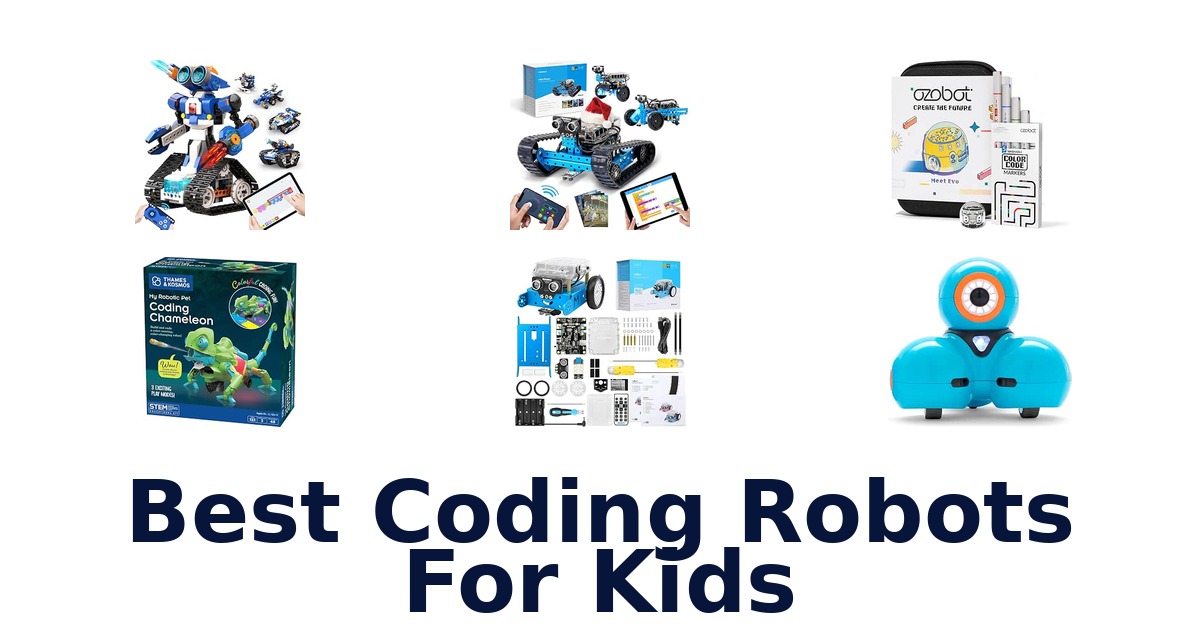
A strong coding robot makes programming tangible through activities that fit a child’s age, interests, and patience for setup. This roundup compares ready-to-use robots, screen-free color coding, app-based lessons, and kits that children assemble themselves. Wonder Workshop Dash leads as a ready-to-play option for ages 6 and up, with activities covering sequencing, loops, algorithms, and variables.
For younger beginners, Ozobot combines color-marker coding with Blockly; older makers can build toward Arduino with Makeblock mBot or explore Python with PYXEL. Several picks add a distinct hook, such as Apitor’s six build configurations or a chameleon that follows physical color cards.
Check age guidance, assembly demands, and whether a device needs an app before choosing; those differences shape how easily a robot fits into home or classroom learning.
Wonder Workshop Dash Robot is the Best Overall choice because it arrives ready to use without assembly and is designed for children ages 6–Its activities introduce sequencing, loops, algorithms, and variables, while the robot can sing, dance, navigate obstacles, and respond to voice commands. Choose Ozobot Evo for marker-based, screen-free color coding alongside Blockly, or Makeblock mBot if the child wants to build a robot and progress from Scratch toward Arduino.
Our Top Picks
 Best Overall
Ready to use with no assembly for ages 6–11; its activities cover sequencing, loops, algorithms, and variables, and it can navigate obstacles and respond to voice commands.
View on Amazon Best Screen-Free Start
Pairs screen-free Color Codes and five included markers with Ozobot Blockly, giving beginners two coding approaches in a kit recommended from age 5.
View on Amazon Best Buildable Starter
This age-8-and-up kit teaches electronics, robotics, and programming, with a stated build time of about 15 minutes and a path from Scratch to Arduino.
View on Amazon- Best Python Path Educational Insights PYXEL
- Most Build Configurations Apitor STEM Coding Robot
Compare coding robots by age, build style, and coding approach
| # | Product | Dimensions | Weight | Material Type | Buy |
|---|---|---|---|---|---|
| 1 | 1. Wonder Workshop Dash RobotBest Overall | 7.17 x 6.69 x 6.34 in | 0.7 kg | Plastic | View on Amazon |
| 2 | 2. Ozobot Evo Coding RobotBest Screen-Free Start | 8.5 x 6.5 x 1.8 in | 0.44 kg | Plastic | View on Amazon |
| 3 | 3. Makeblock mBotBest Buildable Starter | 6.69 x 3.54 x 7.87 in | 0.93 kg | Metal, Plastic | View on Amazon |
| 4 |  4. Educational Insights PYXELBest Python Path 4. Educational Insights PYXELBest Python Path | 8 x 12 x 8 in | — | Plastic | View on Amazon |
| 5 |  5. MatataStudio VinciBotCreative coding and AI exploration 5. MatataStudio VinciBotCreative coding and AI exploration | 8.46 x 7.28 x 2.95 in | — | Metal, Plastic | View on Amazon |
| 6 |  6. Apitor STEM Coding RobotMost Build Configurations 6. Apitor STEM Coding RobotMost Build Configurations | 12.01 x 8.27 x 2.48 in | — | Acrylonitrile Butadiene Styrene | View on Amazon |
| 7 |  7. Thames & Kosmos Coding ChameleonScreen-free coding with creature play 7. Thames & Kosmos Coding ChameleonScreen-free coding with creature play | 10 x 4.7 x 11 in | 0.69 kg | Plastic | View on Amazon |
| 8 |  8. Teach Tech Mech-5Hands-on mechanical coding beginners 8. Teach Tech Mech-5Hands-on mechanical coding beginners | 12.4 x 2.5 x 9.1 in | 16 oz | Plastic | View on Amazon |
| 9 |  9. Makeblock mBot RangerThree-form robotics builders 9. Makeblock mBot RangerThree-form robotics builders | 8.6 x 6.5 x 4.72 in | 1600 g | Durable,Sturdy and High Quality Aluminum | View on Amazon |
| 10 |  10. ELEGOO UNO R3 Robot CarProgrammable car project for makers 10. ELEGOO UNO R3 Robot CarProgrammable car project for makers | 8 x 7 x 6 in | 1.23 kg | Acrylic, Plastic | View on Amazon |
Detailed Reviews: Best Coding Robots For Kids
#1 · Best Overall
1. Wonder Workshop Dash Robot
- Dimensions: 7.17 x 6.69 x 6.34 in
- Weight: 0.7 kg
- Material Type: Plastic
Best for: Ready-to-code younger learners.
Why it ranks #1: Ready to use with no assembly for ages 6–11; its activities cover sequencing, loops, algorithms, and variables, and it can navigate obstacles and respond to voice commands.
Dash arrives with no assembly required, so children ages 6–11 can begin coding activities after charging and setting up one of its five compatible apps. The robot sings, dances, navigates obstacles, and responds to voice commands, linking playful actions with concepts such as sequencing, loops, algorithms, and variables.
The included USB charging cord supports setup, while apps for Apple iOS, Android OS, and Fire OS provide the listed ways to interact with Dash. Because it needs no assembly, the learning starts with activities rather than a build; free in-app challenges offer hundreds of hours of STEM learning. Two building-brick connectors are included, while drawing, carrying, and tossing are enabled by accessories sold separately or included in the Wonder Pack.
- No assembly is required to get started
- Works with five apps for Apple iOS, Android OS, and Fire OS
- Responds to voice commands and navigates obstacles
- Includes two building-brick connectors and a USB charging cord
- Drawing, carrying, and tossing require separately sold accessories or the Wonder Pack.
Skip it if you want physical color-code programming without apps; Ozobot Evo includes Color Code Markers for screen-free activities.
Dash suits ages 6–11 who want an immediately usable robot for app-based coding activities and responsive play. Account for charging and app setup, and note that drawing, carrying, and tossing need additional accessories.
Full product details
| Brand | Wonder Workshop |
|---|---|
| Color | Blue |
| Included Components | Dash Robot, Two Building Brick Connectors, USB Charging Cord |
| Item Dimensions | 7.17 x 6.69 x 6.34 inches |
| Item Weight | 0.7 kg |
| Manufacturer | Wonder Workshop |
| Part Number | DA01 |
| Manufacturer Warranty Description | 1 year warranty against manufacturer defects |
| Manufacturer recommended age | 6 years and up |
| Material | Plastic |
| Model Number | DA03 |
| Size | Dash Robot |
| Additional Information | Important information Safety Information Prop 65 Directions 1. Unbox Dash. 2. Charge Dash using the USB charging cable. 3. Download and use the five apps for Apple iOS, Android OS, and Fire OS to interact with Dash. |
Listed on Amazon as: Wonder Workshop Dash Robot – Coding Robots for Kids 6 and Older
View on Amazon#2 · Best Screen-Free Start
2. Ozobot Evo Coding Robot
- Dimensions: 8.5 x 6.5 x 1.8 in
- Weight: 0.44 kg
- Material Type: Plastic
Best for: Flexible screen-free coding practice.
Why it ranks #2: Pairs screen-free Color Codes and five included markers with Ozobot Blockly, giving beginners two coding approaches in a kit recommended from age 5.
Five dual-tip Color Code Markers let children program Ozobot Evo with screen-free color codes, while Ozobot Blockly offers an online coding route too. This pairing gives the kit a choice of hands-on or screen-based activities for a range of learning styles, with a robot, charging cable, activity materials, and zip case included.
The included markers support Color Code activities without a screen, and Ozobot Blockly provides an online alternative as skills develop. Get Started activities give families or educators a starting point, while the zip case keeps the small robot and markers together between sessions. The kit is listed for ages five and up and describes five skill levels, making it a flexible option for individual practice or small-to-medium classroom learning stations.
- Supports both screen-free Color Codes and online Ozobot Blockly
- Includes five dual-tip Color Code Markers
- Get Started activities provide a learning entry point
- Zip case stores the robot and kit accessories together
- The Blockly option requires online use, unlike the screen-free Color Code activities.
Skip it if you want coding entirely through a self-contained robot with no app or internet; Educational Insights PYXEL requires neither.
Evo fits children and educators seeking coding activities that can shift between markers and Blockly, with included supplies for getting started. Choose it for flexible practice, bearing in mind its online option is distinct from screen-free play.
Full product details
| Brand | Ozobot |
|---|---|
| Included Components | 1 Evo robot, Get Started activities, 1 Charging Cable, 5 Dual-Tip Color Code Markers, 1 Zip Case |
| Item Dimensions | 8.5 x 6.5 x 1.8 inches |
| Item Weight | 0.44 kg |
| Manufacturer | Ozobot |
| Part Number | 050110-01 |
| Manufacturer recommended age | 5 years and up |
| Material | Plastic |
| Size | Small |
| Additional Information | Important information Safety Information No warning applicable |
Listed on Amazon as: Ozobot Evo Coding Robot Kit | Ages 5-11 | STEM Coding for Kids & Teachers
View on Amazon#3 · Best Buildable Starter
3. Makeblock mBot
- Dimensions: 6.69 x 3.54 x 7.87 in
- Weight: 0.93 kg
- Material Type: Metal, Plastic
Best for: First coding kit for ages 8–12.
Why it ranks #3: This age-8-and-up kit teaches electronics, robotics, and programming, with a stated build time of about 15 minutes and a path from Scratch to Arduino.
A stated 15-minute build gets the Makeblock mBot from kit to learning project quickly, giving kids ages 8–12 a practical entry point into electronics, robotics, and programming. Its step-by-step path from Scratch to Arduino supports a gradual move from accessible coding toward a more advanced programming environment.
Clear building instructions help children assemble the robot, while the listed build time of about 15 minutes keeps the initial setup manageable for a family or classroom session. Once assembled, interactive software and learning resources connect the mBot to a progression from Scratch to Arduino. That combination gives beginners a defined starting point and a next step, rather than limiting the project to construction alone. Small parts mean it is not suitable for children under three.
- Build instructions support assembly in about 15 minutes
- Introduces electronics, robotics, and computer programming
- Learning path covers Scratch through Arduino
- Interactive software and learning resources are included in the approach
- The listed age guidance starts at eight, so it is not aimed at younger children.
Skip it if you want no-assembly play for a younger child; Wonder Workshop Dash is ready to use out of the box.
The mBot fits families seeking a first build-and-code project for ages 8–12, with room to progress from Scratch to Arduino. Its appeal depends on wanting assembly and software-supported learning, not instant unboxing play.
Full product details
| Brand | Makeblock |
|---|---|
| Included Components | Robot Kit |
| Item Dimensions | 6.69 x 3.54 x 7.87 inches |
| Item Weight | 0.93 kg |
| Manufacturer | Makeblock |
| Part Number | 90053 |
| Manufacturer recommended age | 8 years and up |
| Material | Metal, Plastic |
| Model Number | 90053 |
| Size | mBot Blue |
| Additional Information | Important information Safety Information CHOKING HAZARD–Small parts. Not for children under 3 years of age Directions Included |
Listed on Amazon as: Makeblock mBot STEM Coding Toys Robotics for Kids Ages 8-12
View on Amazon#4 · Best Python Path
4. Educational Insights PYXEL
- Dimensions: 8 x 12 x 8 in
- Material Type: Plastic
Best for: Self-guided Blockly and Python learners.
Why it ranks #4: Designed for ages 8–14, PYXEL supports Blockly and Python and includes built-in tutorials; its listed features say no internet connection or app is required.
Built-in tutorials guide children through Blockly and Python, letting beginner and advanced coders learn two programming languages with the PYXEL robotic pet. For ages eight to fourteen, it combines self-directed instruction with lights, sounds, colors, actions, and expressions, bringing coding practice into interactive play without requiring an app or internet connection.
The built-in tutorials support self-teaching, while Blockly and Python offer two routes into programming as skills develop. No app or internet connection is required, and the listed password-protected Wi-Fi feature adds a security detail for families considering connected use. PYXEL’s lights, sounds, changing colors, expressions, and tricks make program outcomes visible and playful, though the supplied information does not specify a construction activity or included accessories beyond the coding pet.
- Teaches coding in Blockly and Python
- Built-in tutorials support self-guided learning
- No internet connection or app is required
- Uses lights, sounds, colors, expressions, and actions in play
- The listed package includes the coding pet, with no construction kit specified.
Skip it if you want a robot-building project with multiple models; Apitor Robot J includes 480 blocks for six builds.
PYXEL suits ages 8–14 who want guided coding practice in Blockly and Python through a responsive robotic pet. It is a stronger fit for programming and interactive play than for children whose priority is assembling a robot.
Full product details
| Brand | Educational Insights |
|---|---|
| Color | Multi |
| Included Components | coding pet |
| Inner Material | Plastic |
| Item Dimensions | 8 x 12 x 8 inches |
| Dimensions | 12"L x 8"W x 8"H |
| Manufacturer | Educational Insights |
| Part Number | 1130 |
| Manufacturer recommended age | 8 – 14 years |
| Material | Plastic |
| Model | Pyxel Coding Pet |
| Model Number | 1130 |
| Model Series | PYXEL |
| Operation Mode | manual |
| Outer Material | Plastic |
| Recommended Uses | Robotic Programming & Learning |
| Size | One Size |
| Style | Modern |
| Sub Brand | learning,pyxel |
Listed on Amazon as: Educational Insights PYXEL A Coder's Best Friend
View on Amazon#5
5. MatataStudio VinciBot
- Dimensions: 8.46 x 7.28 x 2.95 in
- Material Type: Metal, Plastic
Best for: Creative coding and AI exploration.
Why it ranks #5: For ages 8 and up, it offers three preset modes, an IR remote, a line-follow map, and activities involving coding, AI, IoT, and TinyML.
Three preset modes let kids start VinciBot out of the box with activities including line following, creating an immediate entry point before exploring its broader coding options. For ages eight and up, the robot can recognize items, sing, dance, make light shows, and express moods through an LED matrix, tying coding to creative play.
The IR remote controller and line-following map support hands-on play with the preset modes, while the challenge booklet gives children activities to pursue. Its open programming is presented alongside opportunities to explore AI, IoT, TinyML, and coding, extending beyond the initial automatic functions. Music, dancing, and drawing support project-based play, so VinciBot suits children ready to experiment with both preset behavior and self-directed creative builds.
- Three preset modes offer an out-of-box starting point
- Can recognize items, sing, dance, and make light shows
- LED matrix displays moods
- Includes an IR remote, line-follow map, and challenge booklet
- The recommended minimum age is eight, so it is not aimed at younger beginners.
Skip it if you need a robot explicitly listed for ages five and up; Ozobot Evo has that age guidance and includes screen-free markers.
VinciBot suits children eight and up who want creative robot activities alongside broader coding and AI topics. Its preset modes ease the start, while its open programming and project activities reward interest in exploring beyond automatic play.
Full product details
| Brand | MatataStudio |
|---|---|
| Color | Orange |
| Included Components | Chanllenge Booklet, IR Remote Controller, Line follow Map, Vincibot Coding robot, Washable Marker |
| Item Dimensions | 8.46 x 7.28 x 2.95 inches |
| Manufacturer | MATATALAB |
| Part Number | Vincibot |
| Manufacturer recommended age | 8 years and up |
| Material | Metal, Plastic |
| Model Number | Vincibot |
| Operation Mode | automatic |
| Size | 3 x 7.3 x 8.5 inches |
| Additional Information | Important Information Toy Safety Our recommended age: Manufacturer's minimum age: 8 years not_suitable_under_3_years |
Listed on Amazon as: VinciBot Coding Robot for Kids 8-12, Scratch & Python STEM Toy
View on Amazon#6 · Most Build Configurations
6. Apitor STEM Coding Robot
- Dimensions: 12.01 x 8.27 x 2.48 in
- Material Type: Acrylonitrile Butadiene Styrene
Best for: Multi-model building and coding.
Why it ranks #6: Its 480 blocks form six models, and the kit includes a control module with two built-in motors; an icon-based app introduces coding concepts.
Six buildable models from 480 snap-together blocks make Apitor Robot J a changing construction project, giving children multiple robot forms to code from one kit. The icon-based app introduces loops and variables, while a control module with two built-in motors and multicolor LED lights brings the assembled creations into motion.
Blocks snap together without screws or tools, which keeps model changes focused on building rather than tool setup. The sorting tray helps organize the 480 pieces between projects, while instructions support construction across six models. After building, the app’s icon-based interface offers coding concepts such as loops and variables; the control module’s two motors and LED lights connect those programs to movement and visual effects.
- Builds six different models from 480 blocks
- Blocks snap together without screws or tools
- Icon-based app introduces loops and variables
- Includes a sorting tray, two-motor control module, and multicolor LED lights
- The 480-piece kit requires sorting and rebuilding between its different models.
Skip it if you want a robot ready without a block-building project; Wonder Workshop Dash requires no assembly.
Robot J fits ages 7–12 who enjoy constructing, changing models, and then coding the results through an icon-based app. Its multiple builds reward children comfortable organizing blocks and spending time on each assembly.
Full product details
| Brand | Apitor |
|---|---|
| Color | Blue |
| Included Components | 480 x Building Blocks, Building Instructions, User Guide, Control Module (with 2 built-in motors), Sorting Tray |
| Item Dimensions | 12.01 x 8.27 x 2.48 inches |
| Dimensions | 12"L x 8.3"W x 2.5"H |
| Manufacturer | Apitor |
| Part Number | APR021 |
| Manufacturer recommended age | 7 – 12 years |
| Material | Acrylonitrile Butadiene Styrene |
| Model | Robot J |
| Model Number | Robot J |
| Model Series | Robot J |
| Operation Mode | automatic |
| Outer Material | plastic |
| Recommended Uses | Educational and recreational use, promoting coding and STEM skills, creativity, and motor skills development |
| Size | 2.5 inches |
| Style | Robot J(Advanced-level) |
| Additional Information | Important information Safety Information Not for children under 3 years or any individuals who have a tendency to place inedible objects in their mouths. |
Listed on Amazon as: Apitor STEM Coding Robot Toy 6-in-1 Building Kit for Boys 8-12 480 Blocks
View on Amazon#7
7. Thames & Kosmos Coding Chameleon
- Dimensions: 10 x 4.7 x 11 in
- Weight: 0.69 kg
- Material Type: Plastic
Best for: Screen-free coding with creature play.
Why it ranks #7: Ages 8–12 can build a 15-inch robotic chameleon that uses physical color action cards, a color sensor, infrared sensor, and RGB LEDs.
A color sensor reads physical colored action cards, letting children program the 15-inch robotic chameleon without relying on a screen for its coding lessons. The built reptile also responds to gestures, changes colors, and automatically fires and retracts its tongue, joining hands-on construction with interactive pretend play for ages eight and up.
The color sensor, infrared sensor, and RGB LEDs support unplugged coding lessons through colored cards, giving children a tangible way to direct the robot. Articulated eyes, torso, and leg joints add movement to the 15-inch model, while three play modes connect programming with gesture response and color changes. Plastic building parts and a manual make construction part of the activity, so this is a build-and-play project rather than an out-of-box robot experience.
- Uses physical colored action cards for unplugged coding
- Includes color and infrared sensors plus RGB LEDs
- Responds to gestures and changes colors
- Articulated eyes, torso, and leg joints add movement
- Children must assemble the robotic chameleon before play.
Skip it if you want app-based challenges without building a robot; Wonder Workshop Dash needs no assembly.
This chameleon fits children eight and up who enjoy building a creature and exploring screen-free coding through physical cards. Choose it for sensor-driven pretend play, while allowing time for construction before the interactive activities begin.
Full product details
| Brand | Thames & Kosmos |
|---|---|
| Color | Green |
| Included Components | Plastic building parts, manual |
| Item Dimensions | 10 x 4.7 x 11 inches |
| Dimensions | 10"L x 4.8"W x 11"H |
| Item Weight | 0.69 kg |
| Manufacturer | Thames & Kosmos |
| Part Number | 620507 |
| Manufacturer recommended age | 8 – 12 years |
| Material | Plastic |
| Model | My Robotic Pet: Coding Chameleon |
| Model Number | 620507 |
| Operation Mode | manual and automatic |
| Outer Material | Plastic |
| Recommended Uses | learning, pretend play, interactive gaming, classroom, desk, birthday, Christmas |
| Size | 15 inches |
| Style | realistic |
| Sub Brand | Robotics & Programming |
#8
8. Teach Tech Mech-5
- Dimensions: 12.4 x 2.5 x 9.1 in
- Weight: 16 oz
- Material Type: Plastic
Best for: Hands-on mechanical coding beginners.
Why it ranks #8: Ages 10 and up assemble this mechanical robot and program actions by snapping coding buttons onto a wheel; it can throw, lift, kick, and draw.
Snap-on coding buttons set Mech-5’s movement sequence, letting kids make a built robot throw, lift, kick, or draw without starting with a screen-based programming workflow. The mission-based kit pairs basic coding concepts with mechanical engineering, making the act of assembling and then directing a machine central to the learning experience.
This is an in-depth building project rather than a preassembled robot, so the step-by-step instructions and assembly parts make construction part of the lesson. After assembly, children snap coding buttons onto the coding wheel to direct actions, connecting a physical sequence to visible movement. Its entry-level, mission-based approach suits future engineers ages 10 and up who want to learn by doing; the small-parts warning and hands-on assembly make adult guidance appropriate for younger builders.
- Coding wheel uses snap-on buttons to program movement
- Can throw, lift, kick, and draw
- Combines mechanical engineering principles with coding basics
- Includes assembly parts and step-by-step instructions
- Requires hands-on assembly before the robot can be coded.
Skip it if you want a robot ready to use without construction; Wonder Workshop Dash requires no assembly.
Mech-5 suits age-10-plus builders who want mechanical engineering and coding to meet in a hands-on project. Choose it when assembly is part of the appeal, and allow time to follow the detailed build instructions.
Full product details
| Brand | Teach Tech |
|---|---|
| Included Components | Assembly Parts, Instruction Manual in English |
| Item Dimensions | 12.4 x 2.5 x 9.1 inches |
| Item Weight | 16 ounces |
| Manufacturer | Elenco Electronics LLC |
| Part Number | TTC-895 |
| Manufacturer Warranty Description | 1 Year Warranty Against Manufacturer Defects |
| Manufacturer recommended age | 10 years and up |
| Material | Plastic |
| Model Number | TTC-895 |
| Size | 9 Inch |
| Sub Brand | Snap Circuits |
Listed on Amazon as: TEACH TECH Mech-5 STEM Coding Robot Building Kit for Kids Ages 10+
View on Amazon#9
9. Makeblock mBot Ranger
- Dimensions: 8.6 x 6.5 x 4.72 in
- Weight: 1600 g
- Material Type: Durable,Sturdy and High Quality Aluminum
Best for: Three-form robotics builders.
Why it ranks #9: This age-10-and-up build kit converts into three forms: a tank, a self-balancing robot, or a three-wheel racing car, with app control.
One kit converts into three robot shapes: a Land Raider tank, self-balancing Nervous Bird, and three-wheel Dashing Raptor. That range gives older builders different movement challenges within a single construction project, while the Makeblock App provides a way to control the robots and connect building with coding.
Switching among the Land Raider, Nervous Bird, and Dashing Raptor changes the project from all-terrain tank play to balancing or racing-car movement. The included aluminum components and encoder motors form part of a substantial build, making assembly a central activity rather than a quick setup step. Makeblock App control links those forms to robotics and coding projects, with the supplied video guide supporting setup for families starting the build.
- Three robot forms are included in one kit
- Land Raider is described for all-terrain play
- Nervous Bird uses self-balancing movement
- Makeblock App can control the robotics kit
- Changing among the three forms requires rebuilding the robot.
Skip it if you want several models without rebuilding a metal-component project; Apitor Robot J offers six snap-together models with no screws or tools.
The mBot Ranger fits older builders seeking a substantial robotics project with distinct tank, balancing, and racing-car forms. Choose it if rebuilding is part of the fun, rather than expecting to switch modes instantly.
Full product details
| Brand | Makeblock |
|---|---|
| Color | Blue |
| Included Components | 180 encoder motor(2), 62T Wheel Without Step(4), 62T Wheel(2), 90T Tyre(2), 90T Wheel(2), Battery Holder(1), Beam0824-112(2), Beam0824-48(1), Bracket 3X3(1), Bracket U1(1), Brass Stud M4x30+6(1), Copper Bush 4X8X4mm(8), Me Auriga(1), Plastic Spacer 4X7X10(4), Plate 135o(2), Plate T-type(1), Plate032 |
| Item Dimensions | 8.6 x 6.5 x 4.72 inches |
| Item Weight | 1600 g |
| Manufacturer | Makeblock |
| Part Number | 90092 |
| Manufacturer Warranty Description | 1 Year Warranty Against Manufacturer Defects |
| Manufacturer recommended age | 10 years and up |
| Material | Durable,Sturdy and High Quality Aluminum |
| Model Number | MBR-K01-01 |
| Operation Mode | Automatic |
| Size | Large |
Listed on Amazon as: Makeblock mBot Ranger 3 in 1 Coding Robot Building Kit for Kids Ages 10+
View on Amazon#10
10. ELEGOO UNO R3 Robot Car
- Dimensions: 8 x 7 x 6 in
- Weight: 1.23 kg
- Material Type: Acrylic, Plastic
Best for: Programmable car project for makers.
Why it ranks #10: The Arduino-compatible car kit is recommended for ages 12 and up and includes a camera, app or IR remote control, line tracking, and obstacle avoidance.
An onboard camera provides live FPV video, giving this programmable robot car a visual driving perspective alongside line tracking and obstacle avoidance. The ELEGOO kit is for ages 12 and up and centers on assembling, coding, and driving a working vehicle, with app or IR-remote control for hands-on electronics and robotics projects.
The camera’s live FPV video adds a view of the car’s movement, while the ultrasonic sensor supports obstacle avoidance and the car can follow black lines. App and IR-remote control provide two listed ways to drive it, connecting programming and electronics with visible operation. Because this is an assembly kit aimed at ages 12 and up, it fits older learners, coding clubs, and maker projects better than younger children seeking a ready-to-play robot.
- Onboard camera provides live FPV video
- Ultrasonic sensor supports obstacle avoidance
- Can follow black lines
- Control options include the ELEGOO app and IR remote
- The kit is recommended for ages 12 and up, limiting its fit for younger children.
Skip it if you need a robot for ages six to eleven; Wonder Workshop Dash is listed for that age range and needs no assembly.
The ELEGOO car suits older kids and makers who want a buildable vehicle with camera viewing, sensor-guided movement, and remote control. Its age-12-plus recommendation makes it a less suitable choice for younger beginners.
Full product details
| Brand | ELEGOO |
|---|---|
| Item Dimensions | 8 x 7 x 6 inches |
| Item Weight | 1.23 kg |
| Manufacturer | ELEGOO |
| Part Number | US-EL-KIT-012 |
| Manufacturer Warranty Description | Half year |
| Manufacturer recommended age | 12 years and up |
| Material | Acrylic, Plastic |
| Model Number | US-EL-KIT-012 |
| Size | 7 x 8 x 6 inches |
| Sub Brand | ELEGOO |
| Additional Information | Important information Safety Information Samll parts not for baby |
Listed on Amazon as: ELEGOO UNO R3 Smart Robot Car Kit V4 with Camera, Compatible with Arduino
View on AmazonAvoid the app and device compatibility trap
A robot’s app requirements can determine whether it is usable in your home or classroom, so verify the needed device before choosing. Dash uses five apps for Apple iOS, Android OS, and Fire OS, while Makeblock mBot describes interactive software and learning resources. Ozobot offers two routes—Color Codes with markers and Ozobot Blockly—so screen-free activities are part of its listed approach.
PYXEL’s features state that no internet connection or app is required, although its listed coding languages are Blockly and Python. These differences matter more than a broad label such as “coding robot”: a child may need access to a compatible device for one robot’s activities, while another offers physical coding tools.
The product data does not list exact operating-system versions or device models, so check the current product instructions before buying if compatibility is a concern.
Match the build to the child’s patience
Assembly can be the first challenge, not just a route to learning, and these products span ready-to-play robots to substantial construction projects. Dash needs no assembly, whereas mBot says it can be built in about 15 minutes. Mech-5 is explicitly an in-depth, hands-on build, and the mBot Ranger includes a large assortment of structural and electronic parts.
Apitor uses 480 snap-together blocks and allows six models, making rebuilding part of its appeal. The chameleon is also a construction kit, with articulated parts and sensors.
A mismatch can mean a child gives up before reaching the coding activity, or an adult ends up doing most of the build. For a quick first session, consider a ready-to-use or short-build option; choose a construction-heavy kit when assembling, modifying, and rebuilding are part of the goal.
How to Choose a Coding Robot for Kids
Age and coding progression
Look for an age range that matches the child’s current confidence, then consider whether the robot offers a next step. These products range from Ozobot, recommended from age 5, and Dash, designed for ages 6–11, to Mech-5 at 10 and up and ELEGOO at 12 and up. The coding paths also vary: mBot moves from Scratch toward Arduino, while PYXEL lists Blockly and Python.
Age labels are guidance, not a guarantee of readiness, and product data does not establish a single difficulty scale. A younger beginner may suit Ozobot or Dash; a child ready to explore text-based coding may prefer PYXEL, while older makers interested in electronics can consider mBot or ELEGOO.
Screen-free or app-based coding
Choose the coding interface based on how the child will actually use the robot. Ozobot includes five dual-tip markers for Color Codes and also supports Blockly; the Coding Chameleon uses physical colored action cards. Mech-5 uses coding buttons snapped onto a wheel, while Dash relies on apps and PYXEL lists Blockly and Python with no app or internet connection required.
Makeblock mBot’s progression uses Scratch and Arduino. Screen-free options suit families seeking physical programming activities, while app or software routes may better fit children who want digital challenges or a progression into coding environments.
Confirm any device requirements directly before purchase, since the supplied product details do not specify compatible device models or operating-system versions.
Build effort and play variety
Decide whether building is a feature the child wants or an obstacle between them and play. Dash needs no assembly, and mBot says its kit can be built in about 15 minutes. At the more involved end, Mech-5 is described as an in-depth build; Apitor includes 480 blocks for six models, while mBot Ranger makes three robot forms from one kit.
The chameleon is a 15-inch build with articulated joints and sensors. A child who wants to start coding quickly may be better served by Dash or Ozobot, which is supplied as a robot with markers.
A patient maker who likes construction and repeat projects may get more from Apitor, mBot Ranger, or Mech-5.
Which Coding Robot Should You Choose?
For a ready-to-use first robot, choose Wonder Workshop Dash Robot: it needs no assembly and introduces several coding concepts through activities. For a younger child or a screen-free-and-digital mix, Ozobot Evo Coding Robot includes markers for Color Codes as well as Blockly. If building is part of the fun, Makeblock mBot has a stated build time of about 15 minutes and a Scratch-to-Arduino path; choose Apitor STEM Coding Robot for six block-built models.
For a child asking to try Python, Educational Insights PYXEL offers Python and Blockly with built-in tutorials. Prefer physical, screen-free programming cards and a themed build?
Thames & Kosmos Coding Chameleon fits that brief. Older electronics enthusiasts can look at Teach Tech Mech-5 or ELEGOO UNO R3 Robot Car, while Makeblock mBot Ranger suits builders drawn to its three different robot forms.
Frequently Asked Questions
Do kids need a phone or tablet to use a coding robot?
It depends on the robot and activity. The Chameleon is described as screen-free, while Ozobot Evo supports marker-based Color Codes as well as Blockly. The supplied product information does not specify device requirements for every model, so check the individual instructions before choosing if avoiding a phone or tablet is important.
How much adult help do coding robot kits need during setup?
Setup needs vary with the product and a child’s experience. Dash arrives ready to use without assembly, while the mBot has a stated build time of about 15 minutes. For building kits, an adult may need to help with assembly or instructions; check the specific kit details to gauge the support needed.
Can one coding robot keep a child interested as their skills grow?
Some offer a path into more advanced coding. The mBot moves from Scratch toward Arduino, and PYXEL offers Blockly and Python with built-in tutorials. Dash introduces sequencing, loops, algorithms, and variables through activities.
Consider the child’s current interests and which next steps the robot supports.
Which options support screen-free coding?
The Chameleon uses physical programming cards and is described as screen-free. Ozobot Evo also offers marker-based Color Codes, alongside Blockly for digital coding. These choices suit different preferences: the Chameleon centers on physical cards, while Ozobot offers both a marker-based approach and Blockly.
Which robots are options for a child interested in Python?
PYXEL offers Python and Blockly with built-in tutorials, while the VinciBot title lists Scratch and Python. For a child specifically asking to try Python, compare those two options and consider whether tutorials or a Scratch-to-Python combination better matches their learning interests.
Final Words
For a straightforward first choice, Dash arrives ready to use without assembly and introduces several coding concepts through activities. Choose Ozobot Evo when marker-based, screen-free coding alongside Blockly is appealing, or mBot when building and a Scratch-to-Arduino path matter. For other interests, consider PYXEL for Python, the Chameleon for physical screen-free coding cards, or a multi-form kit for a child who enjoys building.