
A student working on homework, a shop owner managing records, or a designer creating digital artwork—many daily tasks today involve a computer. While most people use computers regularly, they may not always know the names of the different parts that make the system work.
From the monitor that displays information to the keyboard used for typing, each component has a specific role. Learning these names can be useful not only for language development but also for improving basic computer knowledge.
This worksheet introduces commonly used computer parts and their Malayalam names, helping learners build technology-related vocabulary that can be applied in school, work, and everyday life.
Why Learning Computer Parts Names in Malayalam Matters
Technology has become a major part of education and communication. Students attend online classes, professionals work on digital platforms, and families use computers for information and entertainment. Understanding the Malayalam names of computer parts helps learners discuss technology more confidently.
For students, these words often appear in textbooks, computer lab sessions, assignments, and examinations. Learning them in Malayalam can improve comprehension and make technology-related lessons easier to follow.
Computer vocabulary is also practical because learners can immediately identify and interact with the objects they are studying. Unlike many theoretical topics, these words relate directly to devices that people use regularly.
Benefits of Learning Malayalam Computer Parts Names
- Builds useful technology-related vocabulary.
- Helps learners identify computer components in Malayalam.
- Supports reading and speaking activities.
- Improves word recognition and pronunciation.
- Makes computer lessons easier to understand.
- Helps students follow classroom instructions.
- Expands digital and technical vocabulary.
- Supports worksheets and educational projects.
- Creates opportunities for practical language use.
- Connects language learning with modern technology.
- Encourages confidence when discussing computers.
- Makes technology education more accessible.
Another advantage is that learners can practice these words while sitting in front of a computer, making vocabulary review simple and convenient.
Inside a Computer Setup: Important Parts to Know
A computer is made up of several connected components that work together to perform different tasks. The list below includes commonly used computer parts along with their Malayalam names, helping learners become more familiar with the devices they use every day.

Computer
കമ്പ്യൂട്ടർ
Syllable: കം-പ്യൂ-ട്ടർ
Pronunciation: Kampyootar
- I use a computer every day. – ഞാൻ എല്ലാ ദിവസവും ഒരു കമ്പ്യൂട്ടർ ഉപയോഗിക്കുന്നു.
- The computer is fast. – കമ്പ്യൂട്ടർ വേഗത്തിലാണ്.
- Please turn on the computer. – ദയവായി കമ്പ്യൂട്ടർ ഓണാക്കൂ.

Monitor
മോണിറ്റർ
Syllable: മോ-ണി-റ്റർ
Pronunciation: Monitor
- The monitor displays images. – മോണിറ്റർ ചിത്രങ്ങൾ പ്രദർശിപ്പിക്കുന്നു.
- My monitor is large. – എന്റെ മോണിറ്റർ വലുതാണ്.
- Clean the monitor carefully. – മോണിറ്റർ ശ്രദ്ധയോടെ വൃത്തിയാക്കുക.

Keyboard
കീബോർഡ്
Syllable: കീ-ബോർഡ്
Pronunciation: Keyboard
- I type using a keyboard. – ഞാൻ കീബോർഡ് ഉപയോഗിച്ച് ടൈപ്പ് ചെയ്യുന്നു.
- The keyboard has many keys. – കീബോർഡിൽ നിരവധി കീകൾ ഉണ്ട്.
- This keyboard works well. – ഈ കീബോർഡ് നന്നായി പ്രവർത്തിക്കുന്നു.

Mouse
മൗസ്
Syllable: മൗ-സ്
Pronunciation: Mouse
- The mouse moves the cursor. – മൗസ് കർസർ നീക്കുന്നു.
- I bought a new mouse. – ഞാൻ ഒരു പുതിയ മൗസ് വാങ്ങി.
- The mouse is wireless. – ഈ മൗസ് വയർലെസ് ആണ്.
CPU
സിപിയു
Syllable: സി-പി-യു
Pronunciation: CPU
- The CPU processes data. – സിപിയു വിവരങ്ങൾ പ്രോസസ്സ് ചെയ്യുന്നു.
- This CPU is powerful. – ഈ സിപിയു ശക്തമാണ്.
- The CPU is inside the computer. – സിപിയു കമ്പ്യൂട്ടറിനുള്ളിലാണ്.

Motherboard
മദർബോർഡ്
Syllable: മ-ദർ-ബോർഡ്
Pronunciation: Motherboard
- The motherboard connects components. – മദർബോർഡ് എല്ലാ ഘടകങ്ങളെയും ബന്ധിപ്പിക്കുന്നു.
- The motherboard is important. – മദർബോർഡ് വളരെ പ്രധാനമാണ്.
- He replaced the motherboard. – അവൻ മദർബോർഡ് മാറ്റി.
RAM
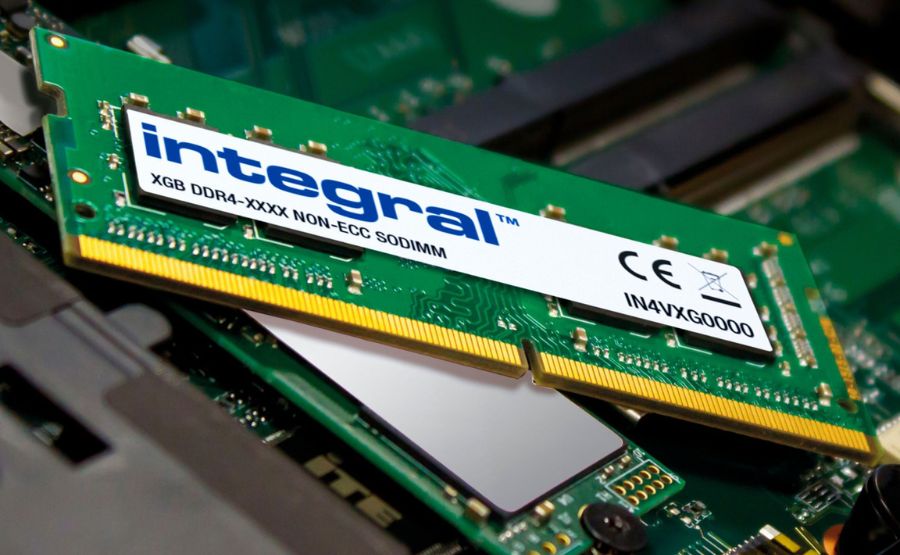
റാം
Syllable: റാം
Pronunciation: RAM
- RAM stores temporary data. – റാം താൽക്കാലിക വിവരങ്ങൾ സൂക്ഷിക്കുന്നു.
- My computer has 16 GB RAM. – എന്റെ കമ്പ്യൂട്ടറിന് 16 ജിബി റാം ഉണ്ട്.
- More RAM improves speed. – കൂടുതൽ റാം വേഗത വർധിപ്പിക്കുന്നു.

Hard Disk
ഹാർഡ് ഡിസ്ക്
Syllable: ഹാർഡ് ഡി-സ്ക്
Pronunciation: Hard Disk
- The hard disk stores files. – ഹാർഡ് ഡിസ്ക് ഫയലുകൾ സൂക്ഷിക്കുന്നു.
- I saved the document on the hard disk. – ഞാൻ രേഖ ഹാർഡ് ഡിസ്കിൽ സേവ് ചെയ്തു.
- The hard disk is almost full. – ഹാർഡ് ഡിസ്ക് ഏകദേശം നിറഞ്ഞിരിക്കുന്നു.

SSD
എസ്എസ്ഡി
Syllable: എസ്-എസ്-ഡി
Pronunciation: SSD
- An SSD is very fast. – എസ്എസ്ഡി വളരെ വേഗത്തിലാണ്.
- My laptop uses an SSD. – എന്റെ ലാപ്ടോപ്പിൽ എസ്എസ്ഡി ഉണ്ട്.
- SSDs improve performance. – എസ്എസ്ഡികൾ പ്രകടനം മെച്ചപ്പെടുത്തുന്നു.

Power Supply Unit
പവർ സപ്ലൈ യൂണിറ്റ്
Syllable: പ-വർ സ-പ്ലൈ യൂ-ണി-റ്റ്
Pronunciation: Power Supply Unit
- The power supply provides electricity. – പവർ സപ്ലൈ യൂണിറ്റ് വൈദ്യുതി നൽകുന്നു.
- The PSU is working properly. – പിഎസ്യു ശരിയായി പ്രവർത്തിക്കുന്നു.
- Check the power supply first. – ആദ്യം പവർ സപ്ലൈ പരിശോധിക്കുക.
Cabinet
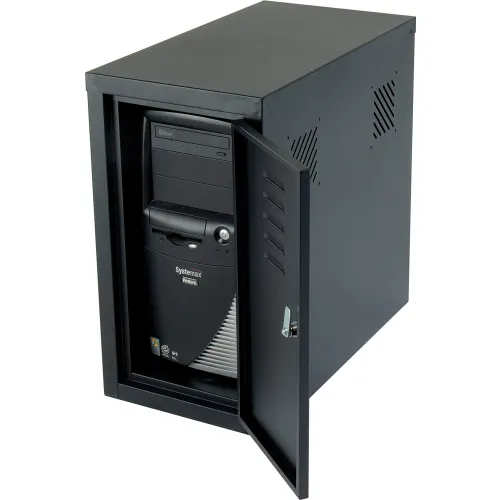
കാബിനറ്റ്
Syllable: കാ-ബി-നറ്റ്
Pronunciation: Cabinet
- The cabinet holds computer parts. – കാബിനറ്റിൽ കമ്പ്യൂട്ടറിന്റെ ഭാഗങ്ങൾ അടങ്ങിയിരിക്കുന്നു.
- The cabinet is black. – കാബിനറ്റ് കറുത്ത നിറത്തിലാണ്.
- Open the cabinet carefully. – കാബിനറ്റ് ശ്രദ്ധയോടെ തുറക്കുക.

Speaker
സ്പീക്കർ
Syllable: സ്പീ-ക്കർ
Pronunciation: Speaker
- The speaker produces sound. – സ്പീക്കർ ശബ്ദം പുറപ്പെടുവിക്കുന്നു.
- I connected new speakers. – ഞാൻ പുതിയ സ്പീക്കറുകൾ ബന്ധിപ്പിച്ചു.
- The speaker volume is high. – സ്പീക്കറിന്റെ ശബ്ദം കൂടുതലാണ്.

Microphone
മൈക്രോഫോൺ
Syllable: മൈ-ക്രോ-ഫോൺ
Pronunciation: Microphone
- The microphone records sound. – മൈക്രോഫോൺ ശബ്ദം റെക്കോർഡ് ചെയ്യുന്നു.
- Please speak into the microphone. – ദയവായി മൈക്രോഫോണിൽ സംസാരിക്കുക.
- The microphone is connected. – മൈക്രോഫോൺ ബന്ധിപ്പിച്ചിരിക്കുന്നു.
Webcam
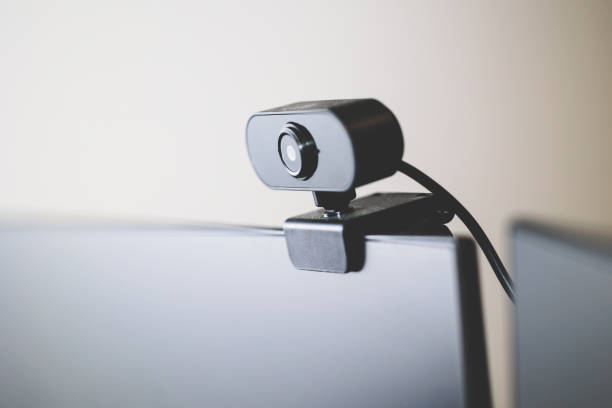
വെബ്ക്യാം
Syllable: വെബ്-ക്യാം
Pronunciation: Webcam
- The webcam captures video. – വെബ്ക്യാം വീഡിയോ പകർത്തുന്നു.
- I use a webcam for meetings. – ഞാൻ മീറ്റിംഗുകൾക്കായി വെബ്ക്യാം ഉപയോഗിക്കുന്നു.
- The webcam image is clear. – വെബ്ക്യാമിലെ ചിത്രം വ്യക്തമാണ്.

Printer
പ്രിന്റർ
Syllable: പ്രിൻ-റ്റർ
Pronunciation: Printer
- The printer prints documents. – പ്രിന്റർ രേഖകൾ അച്ചടിക്കുന്നു.
- The printer needs paper. – പ്രിന്ററിന് പേപ്പർ വേണം.
- I printed a report. – ഞാൻ ഒരു റിപ്പോർട്ട് അച്ചടിച്ചു.

Scanner
സ്കാനർ
Syllable: സ്കാ-നർ
Pronunciation: Scanner
- The scanner copies documents digitally. – സ്കാനർ രേഖകൾ ഡിജിറ്റലായി പകർത്തുന്നു.
- I scanned the photo. – ഞാൻ ഫോട്ടോ സ്കാൻ ചെയ്തു.
- The scanner works quickly. – സ്കാനർ വേഗത്തിൽ പ്രവർത്തിക്കുന്നു.

USB Flash Drive
യുഎസ്ബി ഫ്ലാഷ് ഡ്രൈവ്
Syllable: യു-എസ്-ബി ഫ്ലാഷ് ഡ്രൈവ്
Pronunciation: USB Flash Drive
- I saved the files on a USB flash drive. – ഞാൻ ഫയലുകൾ യുഎസ്ബി ഫ്ലാഷ് ഡ്രൈവിൽ സൂക്ഷിച്ചു.
- The USB flash drive is portable. – യുഎസ്ബി ഫ്ലാഷ് ഡ്രൈവ് എളുപ്പത്തിൽ കൊണ്ടുപോകാം.
- Insert the USB flash drive carefully. – യുഎസ്ബി ഫ്ലാഷ് ഡ്രൈവ് ശ്രദ്ധയോടെ ചേർക്കുക.

DVD Drive
ഡിവിഡി ഡ്രൈവ്
Syllable: ഡി-വി-ഡി ഡ്രൈവ്
Pronunciation: DVD Drive
- The DVD drive reads discs. – ഡിവിഡി ഡ്രൈവ് ഡിസ്കുകൾ വായിക്കുന്നു.
- My computer has a DVD drive. – എന്റെ കമ്പ്യൂട്ടറിൽ ഡിവിഡി ഡ്രൈവ് ഉണ്ട്.
- The DVD drive is not working. – ഡിവിഡി ഡ്രൈവ് പ്രവർത്തിക്കുന്നില്ല.

Graphics Card
ഗ്രാഫിക്സ് കാർഡ്
Syllable: ഗ്രാ-ഫിക്സ് കാർഡ്
Pronunciation: Graphics Card
- The graphics card improves visuals. – ഗ്രാഫിക്സ് കാർഡ് ദൃശ്യ ഗുണനിലവാരം മെച്ചപ്പെടുത്തുന്നു.
- Gamers need a powerful graphics card. – ഗെയിമർമാർക്ക് ശക്തമായ ഗ്രാഫിക്സ് കാർഡ് ആവശ്യമാണ്.
- I upgraded my graphics card. – ഞാൻ എന്റെ ഗ്രാഫിക്സ് കാർഡ് അപ്ഗ്രേഡ് ചെയ്തു.

Laptop
ലാപ്ടോപ്പ്
Syllable: ലാപ്-ടോപ്പ്
Pronunciation: Laptop
- I carry my laptop to work. – ഞാൻ ജോലി സ്ഥലത്തേക്ക് ലാപ്ടോപ്പ് കൊണ്ടുപോകുന്നു.
- The laptop battery is low. – ലാപ്ടോപ്പിന്റെ ബാറ്ററി കുറവാണ്.
- This laptop is lightweight. – ഈ ലാപ്ടോപ്പ് ഭാരം കുറഞ്ഞതാണ്.

Touchpad
ടച്ച്പാഡ്
Syllable: ടച്ച്-പാഡ്
Pronunciation: Touchpad
- The touchpad controls the cursor. – ടച്ച്പാഡ് കർസർ നിയന്ത്രിക്കുന്നു.
- My touchpad is very sensitive. – എന്റെ ടച്ച്പാഡ് വളരെ സെൻസിറ്റീവ് ആണ്.
- Clean the touchpad regularly. – ടച്ച്പാഡ് സ്ഥിരമായി വൃത്തിയാക്കുക.

Battery
ബാറ്ററി
Syllable: ബാ-റ്റ-റി
Pronunciation: Battery
- The battery powers the laptop. – ബാറ്ററി ലാപ്ടോപ്പിന് വൈദ്യുതി നൽകുന്നു.
- Charge the battery fully. – ബാറ്ററി പൂർണ്ണമായി ചാർജ് ചെയ്യുക.
- The battery lasts all day. – ബാറ്ററി മുഴുവൻ ദിവസം നിലനിൽക്കും.

Router
റൗട്ടർ
Syllable: റൗ-ട്ടർ
Pronunciation: Router
- The router provides internet access. – റൗട്ടർ ഇന്റർനെറ്റ് സൗകര്യം നൽകുന്നു.
- Restart the router if needed. – ആവശ്യമെങ്കിൽ റൗട്ടർ പുനരാരംഭിക്കുക.
- The router is in the living room. – റൗട്ടർ ഹാളിലാണ്.

Modem
മോഡം
Syllable: മോ-ഡം
Pronunciation: Modem
- The modem connects to the internet. – മോഡം ഇന്റർനെറ്റിലേക്ക് ബന്ധിപ്പിക്കുന്നു.
- The modem lights are blinking. – മോഡത്തിലെ ലൈറ്റുകൾ മിന്നുന്നു.
- Check the modem connection. – മോഡത്തിന്റെ കണക്ഷൻ പരിശോധിക്കുക.

Network Card
നെറ്റ്വർക്ക് കാർഡ്
Syllable: നെറ്റ്-വർക്ക് കാർഡ്
Pronunciation: Network Card
- The network card enables connectivity. – നെറ്റ്വർക്ക് കാർഡ് കണക്റ്റിവിറ്റി നൽകുന്നു.
- My network card supports Wi-Fi. – എന്റെ നെറ്റ്വർക്ക് കാർഡ് വൈ-ഫൈ പിന്തുണയ്ക്കുന്നു.
- The network card was replaced. – നെറ്റ്വർക്ക് കാർഡ് മാറ്റി സ്ഥാപിച്ചു.

Projector
പ്രൊജക്ടർ
Syllable: പ്രൊ-ജക്ടർ
Pronunciation: Projector
- The projector displays presentations. – പ്രൊജക്ടർ അവതരണങ്ങൾ പ്രദർശിപ്പിക്കുന്നു.
- We used a projector in class. – ഞങ്ങൾ ക്ലാസിൽ പ്രൊജക്ടർ ഉപയോഗിച്ചു.
- The projector image is bright. – പ്രൊജക്ടറിലെ ചിത്രം തെളിച്ചമുള്ളതാണ്.

Headphones
ഹെഡ്ഫോൺ
Syllable: ഹെഡ്-ഫോൺ
Pronunciation: Headphones
- I listen to music with headphones. – ഞാൻ ഹെഡ്ഫോൺ ഉപയോഗിച്ച് സംഗീതം കേൾക്കുന്നു.
- These headphones sound great. – ഈ ഹെഡ്ഫോണിന്റെ ശബ്ദം മികച്ചതാണ്.
- My headphones are wireless. – എന്റെ ഹെഡ്ഫോണുകൾ വയർലെസ് ആണ്.
Pen Drive
പെൻ ഡ്രൈവ്
Syllable: പെൻ ഡ്രൈവ്
Pronunciation: Pen Drive
- The pen drive contains my documents. – പെൻ ഡ്രൈവിൽ എന്റെ രേഖകൾ ഉണ്ട്.
- I copied the files to the pen drive. – ഞാൻ ഫയലുകൾ പെൻ ഡ്രൈവിലേക്ക് പകർത്തി.
- The pen drive is small and useful. – പെൻ ഡ്രൈവ് ചെറുതും ഉപകാരപ്രദവുമാണ്.

Joystick
ജോയ്സ്റ്റിക്ക്
Syllable: ജോയ്-സ്റ്റിക്ക്
Pronunciation: Joystick
- The joystick is used for gaming. – ജോയ്സ്റ്റിക്ക് ഗെയിമിംഗിനായി ഉപയോഗിക്കുന്നു.
- He bought a new joystick. – അവൻ പുതിയ ജോയ്സ്റ്റിക്ക് വാങ്ങി.
- The joystick responds quickly. – ജോയ്സ്റ്റിക്ക് വേഗത്തിൽ പ്രതികരിക്കുന്നു.

Barcode Scanner
ബാർകോഡ് സ്കാനർ
Syllable: ബാർ-കോഡ് സ്കാ-നർ
Pronunciation: Barcode Scanner
- The barcode scanner reads product codes. – ബാർകോഡ് സ്കാനർ ഉൽപ്പന്ന കോഡുകൾ വായിക്കുന്നു.
- The cashier uses a barcode scanner. – കാഷിയർ ബാർകോഡ് സ്കാനർ ഉപയോഗിക്കുന്നു.
- This barcode scanner is accurate. – ഈ ബാർകോഡ് സ്കാനർ കൃത്യമാണ്.

UPS
യുപിഎസ്
Syllable: യു-പി-എസ്
Pronunciation: UPS
- The UPS provides backup power. – യുപിഎസ് ബാക്കപ്പ് വൈദ്യുതി നൽകുന്നു.
- The UPS saved my work. – യുപിഎസ് എന്റെ ജോലി സംരക്ഷിച്ചു.
- Check the UPS battery regularly. – യുപിഎസ് ബാറ്ററി സ്ഥിരമായി പരിശോധിക്കുക.
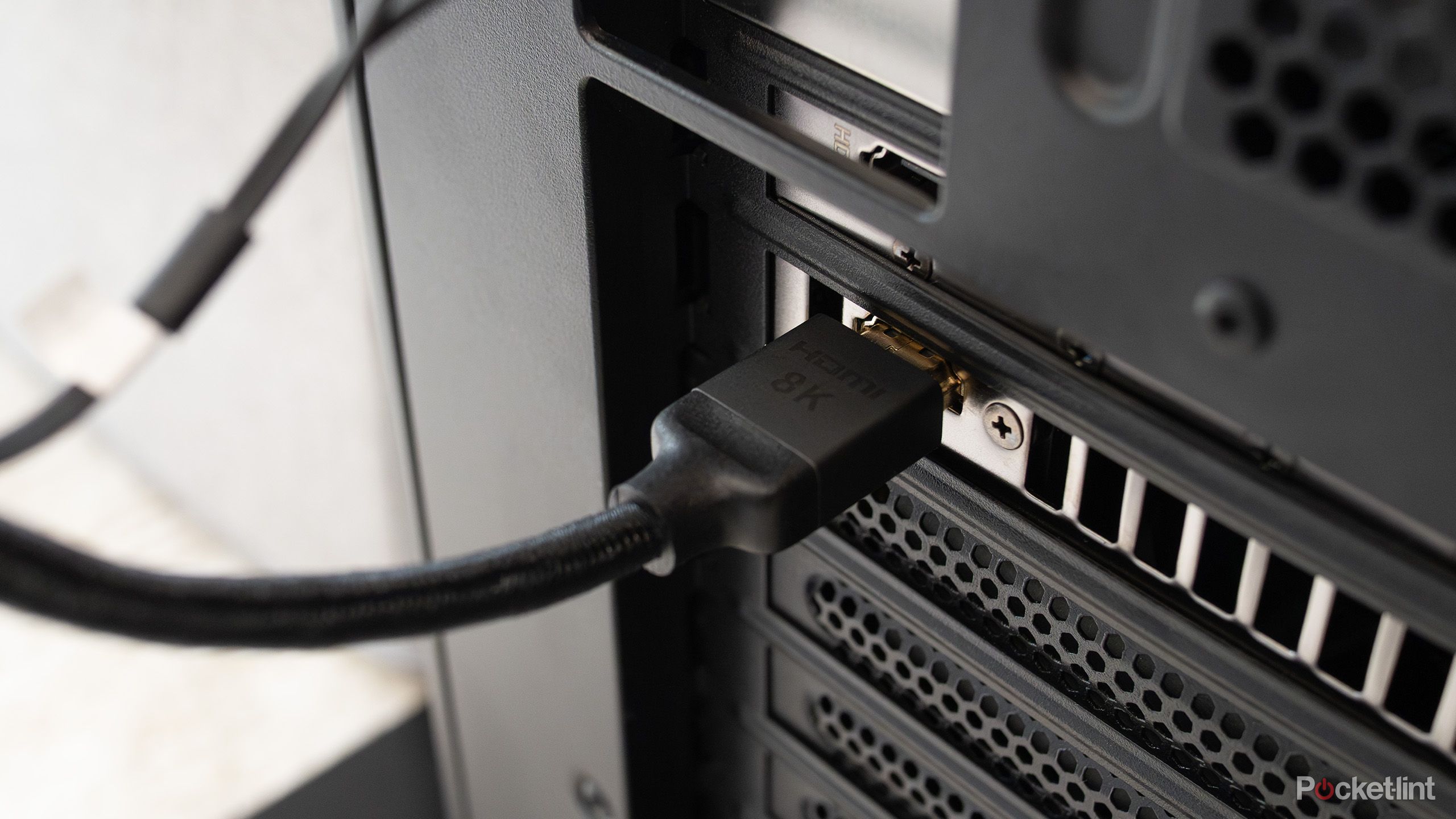
HDMI Cable
എച്ച്ഡിഎംഐ കേബിൾ
Syllable: എച്ച്-ഡി-എം-ഐ കേ-ബിൾ
Pronunciation: HDMI Cable
- The HDMI cable connects the monitor. – എച്ച്ഡിഎംഐ കേബിൾ മോണിറ്ററിനെ ബന്ധിപ്പിക്കുന്നു.
- I need a longer HDMI cable. – എനിക്ക് കൂടുതൽ നീളമുള്ള എച്ച്ഡിഎംഐ കേബിൾ വേണം.
- The HDMI cable supports high quality video. – എച്ച്ഡിഎംഐ കേബിൾ ഉയർന്ന ഗുണമേന്മയുള്ള വീഡിയോ പിന്തുണയ്ക്കുന്നു.

Ethernet Cable
ഇഥർനെറ്റ് കേബിൾ
Syllable: ഇ-ഥർ-നെറ്റ് കേ-ബിൾ
Pronunciation: Ethernet Cable
- The Ethernet cable provides a stable connection. – ഇഥർനെറ്റ് കേബിൾ സ്ഥിരമായ കണക്ഷൻ നൽകുന്നു.
- Connect the router with an Ethernet cable. – റൗട്ടറിനെ ഇഥർനെറ്റ് കേബിൾ ഉപയോഗിച്ച് ബന്ധിപ്പിക്കുക.
- The Ethernet cable is damaged. – ഇഥർനെറ്റ് കേബിൾ കേടായിരിക്കുന്നു.
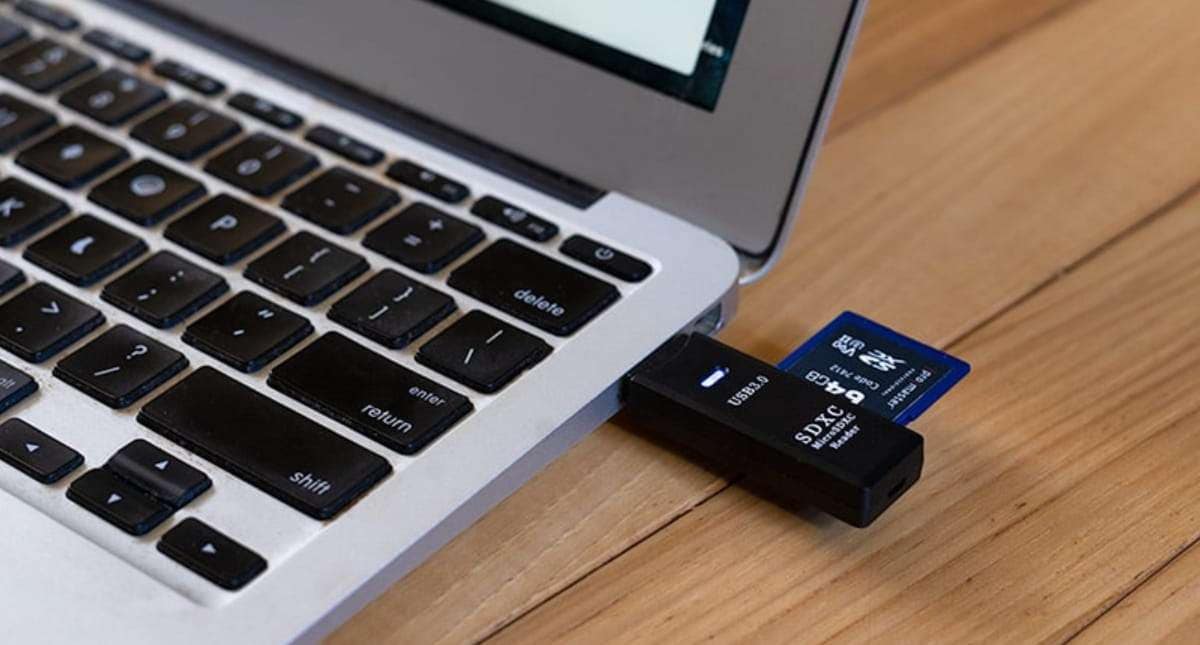
SD Card
എസ്ഡി കാർഡ്
Syllable: എസ്-ഡി കാർഡ്
Pronunciation: SD Card
- The SD card stores photos. – എസ്ഡി കാർഡ് ഫോട്ടോകൾ സൂക്ഷിക്കുന്നു.
- I inserted the SD card into the camera. – ഞാൻ എസ്ഡി കാർഡ് ക്യാമറയിൽ ചേർത്തു.
- The SD card has enough space. – എസ്ഡി കാർഡിൽ മതിയായ സ്ഥലം ഉണ്ട്.

Fingerprint Scanner
വിരലടയാള സ്കാനർ
Syllable: വി-ര-ല-ട-യാ-ള സ്കാ-നർ
Pronunciation: Viraladayaala Scanner
- The fingerprint scanner verifies identity. – വിരലടയാള സ്കാനർ വ്യക്തിത്വം സ്ഥിരീകരിക്കുന്നു.
- Unlock the device with the fingerprint scanner. – വിരലടയാള സ്കാനർ ഉപയോഗിച്ച് ഉപകരണം തുറക്കുക.
- The fingerprint scanner is secure. – വിരലടയാള സ്കാനർ സുരക്ഷിതമാണ്.
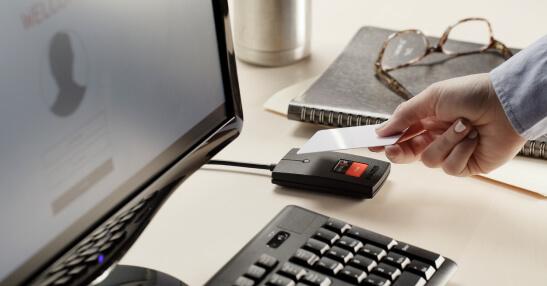
Card Reader
കാർഡ് റീഡർ
Syllable: കാർഡ് റീ-ഡർ
Pronunciation: Card Reader
- The card reader reads memory cards. – കാർഡ് റീഡർ മെമ്മറി കാർഡുകൾ വായിക്കുന്നു.
- I connected the card reader to my laptop. – ഞാൻ കാർഡ് റീഡർ ലാപ്ടോപ്പിൽ ബന്ധിപ്പിച്ചു.
- The card reader is very useful. – കാർഡ് റീഡർ വളരെ ഉപകാരപ്രദമാണ്.
Easy Ways to Remember Malayalam Computer Parts Names
A practical way to learn computer vocabulary is to identify each part while using it. For example, learners can say the Malayalam name of the keyboard while typing or identify the monitor while viewing information on the screen.
Visual aids such as labeled diagrams and computer charts can also help reinforce learning. Seeing the part and its name together makes it easier to create long-term memory associations.
Some learners find it useful to study computer parts according to their function. Input devices, output devices, storage devices, and accessories can be learned in separate groups before reviewing them together.
Simple Practice Ideas
- Label computer parts with Malayalam names.
- Use picture flashcards for revision.
- Learn a few new terms each week.
- Draw a computer setup and label each component.
- Watch Malayalam educational videos about computers.
- Create a notebook for technology vocabulary.
- Match pictures with their Malayalam names.
- Practice pronunciation aloud.
- Use computer terms in simple sentences.
- Review previously learned words regularly.
- Identify parts while working on a computer.
- Ask friends or family members to quiz you.
Regular exposure and hands-on practice can make technology-related vocabulary easier to remember.
Computer Parts Names in Malayalam At a Glance
| # | English Name | Malayalam Name | Pronunciation |
|---|---|---|---|
| 1 | Computer | കമ്പ്യൂട്ടർ | Kampyootar |
| 2 | Monitor | മോണിറ്റർ | Monitor |
| 3 | Keyboard | കീബോർഡ് | Keyboard |
| 4 | Mouse | മൗസ് | Mouse |
| 5 | CPU | സിപിയു | CPU |
| 6 | Motherboard | മദർബോർഡ് | Motherboard |
| 7 | RAM | റാം | RAM |
| 8 | Hard Disk | ഹാർഡ് ഡിസ്ക് | Hard Disk |
| 9 | SSD | എസ്എസ്ഡി | SSD |
| 10 | Power Supply Unit | പവർ സപ്ലൈ യൂണിറ്റ് | Power Supply Unit |
| 11 | Cabinet | കാബിനറ്റ് | Cabinet |
| 12 | Speaker | സ്പീക്കർ | Speaker |
| 13 | Microphone | മൈക്രോഫോൺ | Microphone |
| 14 | Webcam | വെബ്ക്യാം | Webcam |
| 15 | Printer | പ്രിന്റർ | Printer |
| 16 | Scanner | സ്കാനർ | Scanner |
| 17 | USB Flash Drive | യുഎസ്ബി ഫ്ലാഷ് ഡ്രൈവ് | USB Flash Drive |
| 18 | DVD Drive | ഡിവിഡി ഡ്രൈവ് | DVD Drive |
| 19 | Graphics Card | ഗ്രാഫിക്സ് കാർഡ് | Graphics Card |
| 20 | Laptop | ലാപ്ടോപ്പ് | Laptop |
| 21 | Touchpad | ടച്ച്പാഡ് | Touchpad |
| 22 | Battery | ബാറ്ററി | Battery |
| 23 | Router | റൗട്ടർ | Router |
| 24 | Modem | മോഡം | Modem |
| 25 | Network Card | നെറ്റ്വർക്ക് കാർഡ് | Network Card |
| 26 | Projector | പ്രൊജക്ടർ | Projector |
| 27 | Headphones | ഹെഡ്ഫോൺ | Headphones |
| 28 | Pen Drive | പെൻ ഡ്രൈവ് | Pen Drive |
| 29 | Joystick | ജോയ്സ്റ്റിക്ക് | Joystick |
| 30 | Barcode Scanner | ബാർകോഡ് സ്കാനർ | Barcode Scanner |
| 31 | UPS | യുപിഎസ് | UPS |
| 32 | HDMI Cable | എച്ച്ഡിഎംഐ കേബിൾ | HDMI Cable |
| 33 | Ethernet Cable | ഇഥർനെറ്റ് കേബിൾ | Ethernet Cable |
| 34 | SD Card | എസ്ഡി കാർഡ് | SD Card |
| 35 | Fingerprint Scanner | വിരലടയാള സ്കാനർ | Viraladayaala Scanner |
| 36 | Card Reader | കാർഡ് റീഡർ | Card Reader |
Malayalam Computer Parts Quiz
Practice Malayalam computer parts vocabulary with this interactive multiple-choice quiz.
Building Digital Vocabulary in Malayalam
Computer-related words are becoming increasingly important as technology continues to influence education, communication, and work. Learning these names in Malayalam helps learners understand both language and technology in a more connected way.
As you continue exploring Malayalam vocabulary, technology topics can introduce many practical words used in modern life. Which computer part do you use the most every day?
Was there a Malayalam term in the list that was completely new to you? Share your thoughts in the comments and compare your answers with other learners.