Computers have become a regular part of modern life. Students use them for assignments, teachers prepare lessons on them, businesses manage records through them, and families rely on them for communication and entertainment. While many people use computers every day, they may not always know the names of the individual parts that make these machines work.
From the monitor that displays information to the mouse that helps users navigate the screen, each component has a specific purpose. Learning these names in Odia can help learners understand technology-related discussions more confidently.
This worksheet introduces common computer parts names in Odia, helping students and language learners build practical vocabulary connected to technology and digital learning.
Why Learning Computer Parts Names in Odia Matters
Technology-related vocabulary is becoming increasingly important in education and everyday life. Students encounter computer terms in classrooms, online lessons, assignments, and examinations. Learning these words in Odia can improve understanding and make learning more accessible.
Unlike many abstract vocabulary topics, computer parts can be seen and used directly. Learners can identify a keyboard, monitor, printer, or speaker while learning its Odia name, creating a stronger connection between the word and the object.
Computer vocabulary also prepares learners for broader technology-related topics. Understanding the names of basic components makes it easier to explore software, networking, digital communication, and other areas of technology.
Benefits of Learning Odia Computer Parts Names
- Builds useful technology-related vocabulary.
- Helps learners identify computer components in Odia.
- Supports reading and speaking activities.
- Improves pronunciation and word recognition.
- Makes computer lessons easier to understand.
- Helps students follow classroom instructions.
- Expands digital and technical vocabulary.
- Supports worksheets and educational projects.
- Creates opportunities for practical language use.
- Connects language learning with modern technology.
- Encourages confidence when discussing computers.
- Makes technology education more approachable.
Since computers are widely used in schools and homes, learners can regularly practice these words in real-world situations.
The Key Components Behind Every Computer
A computer system is made up of several devices that work together to process, display, and store information. The list below includes commonly used computer parts along with their Odia names, helping learners become familiar with important technology-related terms.

Computer
କମ୍ପ୍ୟୁଟର
Syllable: କମ୍-ପ୍ୟୁ-ଟର
Pronunciation: Kampyutar
- The computer is on the table. – କମ୍ପ୍ୟୁଟରଟି ଟେବୁଲ ଉପରେ ଅଛି।
- I use a computer every day. – ମୁଁ ପ୍ରତିଦିନ କମ୍ପ୍ୟୁଟର ବ୍ୟବହାର କରେ।
- The computer works fast. – କମ୍ପ୍ୟୁଟର ଶୀଘ୍ର କାମ କରେ।

Monitor
ମନିଟର
Syllable: ମ-ନି-ଟର
Pronunciation: Manitar
- The monitor displays images. – ମନିଟର ଛବି ଦେଖାଏ।
- My monitor is large. – ମୋ ମନିଟର ବଡ଼ ଅଟେ।
- The monitor is clear. – ମନିଟରର ଚିତ୍ର ସ୍ପଷ୍ଟ ଅଟେ।

Keyboard
କୀବୋର୍ଡ
Syllable: କୀ-ବୋର୍ଡ
Pronunciation: Kibord
- I type on the keyboard. – ମୁଁ କୀବୋର୍ଡରେ ଟାଇପ କରେ।
- The keyboard has many keys. – କୀବୋର୍ଡରେ ଅନେକ କୀ ଅଛି।
- This keyboard is comfortable. – ଏହି କୀବୋର୍ଡ ବ୍ୟବହାର କରିବା ସହଜ।

Mouse
ମାଉସ
Syllable: ମା-ଉ-ସ
Pronunciation: Mausa
- The mouse controls the cursor. – ମାଉସ କର୍ସରକୁ ନିୟନ୍ତ୍ରଣ କରେ।
- My mouse is wireless. – ମୋ ମାଉସ ୱାୟାରଲେସ ଅଟେ।
- I clicked the mouse button. – ମୁଁ ମାଉସ ବଟନ ଦବାଇଲି।
CPU
ସିପିଉ
Syllable: ସି-ପି-ଉ
Pronunciation: CPU
- The CPU processes data. – ସିପିଉ ତଥ୍ୟ ପ୍ରକ୍ରିୟାକରଣ କରେ।
- The CPU is very important. – ସିପିଉ ବହୁତ ଗୁରୁତ୍ୱପୂର୍ଣ୍ଣ।
- My CPU is powerful. – ମୋ ସିପିଉ ଶକ୍ତିଶାଳୀ ଅଟେ।

Motherboard
ମଦରବୋର୍ଡ
Syllable: ମ-ଦର-ବୋର୍ଡ
Pronunciation: Madarbord
- The motherboard connects components. – ମଦରବୋର୍ଡ ସମସ୍ତ ଅଂଶକୁ ଯୋଡ଼େ।
- The motherboard is inside the computer. – ମଦରବୋର୍ଡ କମ୍ପ୍ୟୁଟର ଭିତରେ ରହେ।
- A good motherboard improves performance. – ଭଲ ମଦରବୋର୍ଡ କାର୍ଯ୍ୟକ୍ଷମତା ବଢ଼ାଏ।
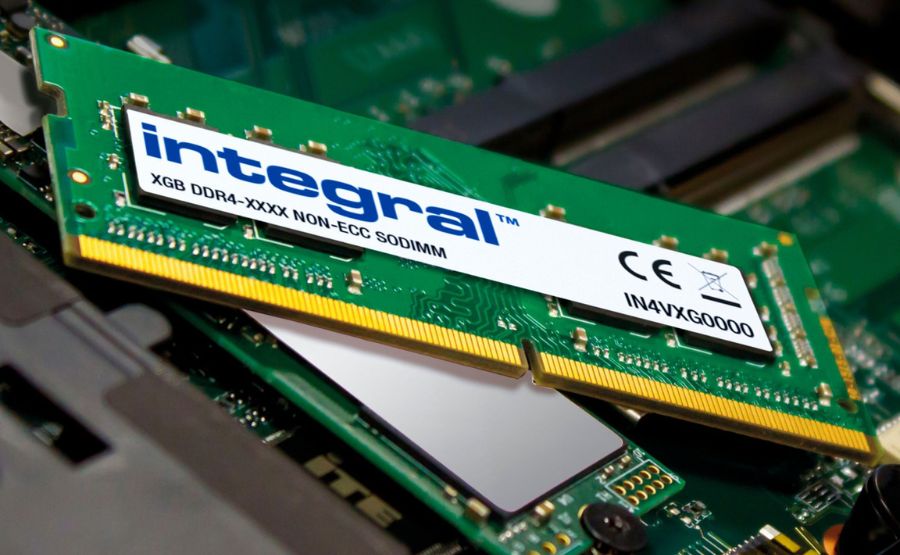
RAM
ରାମ
Syllable: ରା-ମ
Pronunciation: RAM
- RAM stores temporary data. – ରାମ ଅସ୍ଥାୟୀ ତଥ୍ୟ ସଂରକ୍ଷଣ କରେ।
- More RAM makes the computer faster. – ଅଧିକ ରାମ କମ୍ପ୍ୟୁଟରକୁ ଶୀଘ୍ର କରେ।
- My computer has 16 GB RAM. – ମୋ କମ୍ପ୍ୟୁଟରରେ ୧୬ GB ରାମ ଅଛି।

Hard Disk
ହାର୍ଡ ଡିସ୍କ
Syllable: ହାର୍ଡ-ଡିସ୍କ
Pronunciation: Hard Disk
- The hard disk stores files. – ହାର୍ଡ ଡିସ୍କ ଫାଇଲ ସଂରକ୍ଷଣ କରେ।
- My hard disk is almost full. – ମୋ ହାର୍ଡ ଡିସ୍କ ପ୍ରାୟ ଭରିଯାଇଛି।
- I saved the document on the hard disk. – ମୁଁ ଦଲିଲକୁ ହାର୍ଡ ଡିସ୍କରେ ସଂରକ୍ଷଣ କଲି।

SSD
ଏସଏସଡି
Syllable: ଏସ-ଏସ-ଡି
Pronunciation: SSD
- An SSD loads programs quickly. – ଏସଏସଡି ପ୍ରୋଗ୍ରାମକୁ ଶୀଘ୍ର ଖୋଲେ।
- My laptop uses an SSD. – ମୋ ଲ୍ୟାପଟପରେ ଏସଏସଡି ଅଛି।
- SSD is faster than a hard disk. – ଏସଏସଡି ହାର୍ଡ ଡିସ୍କଠାରୁ ଶୀଘ୍ର।

Power Supply Unit
ପାୱର ସପ୍ଲାଇ ୟୁନିଟ
Syllable: ପା-ୱର ସ-ପ୍ଲା-ଇ ୟୁ-ନି-ଟ
Pronunciation: Power Supply Unit
- The power supply provides electricity. – ପାୱର ସପ୍ଲାଇ ବିଦ୍ୟୁତ ଯୋଗାଏ।
- The power supply is working properly. – ପାୱର ସପ୍ଲାଇ ଠିକ୍ ଭାବେ କାମ କରୁଛି।
- The computer needs a power supply. – କମ୍ପ୍ୟୁଟରକୁ ପାୱର ସପ୍ଲାଇ ଆବଶ୍ୟକ।
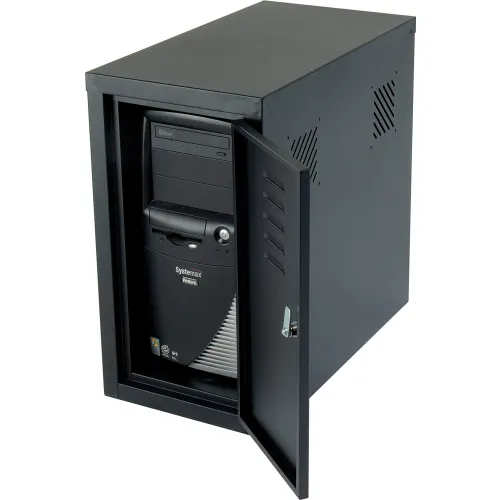
Cabinet
କ୍ୟାବିନେଟ
Syllable: କ୍ୟା-ବି-ନେ-ଟ
Pronunciation: Kyabinet
- The cabinet protects computer parts. – କ୍ୟାବିନେଟ କମ୍ପ୍ୟୁଟର ଅଂଶଗୁଡ଼ିକୁ ସୁରକ୍ଷା କରେ।
- The cabinet is black. – କ୍ୟାବିନେଟ କଳା ରଙ୍ଗର।
- I cleaned the cabinet today. – ମୁଁ ଆଜି କ୍ୟାବିନେଟ ସଫା କଲି।

Speaker
ସ୍ପିକର
Syllable: ସ୍ପି-କର
Pronunciation: Spikar
- The speaker plays sound. – ସ୍ପିକର ଶବ୍ଦ ଚଳାଏ।
- I bought new speakers. – ମୁଁ ନୂଆ ସ୍ପିକର କିଣିଲି।
- The speaker volume is high. – ସ୍ପିକରର ଶବ୍ଦ ଉଚ୍ଚ ଅଟେ।

Microphone
ମାଇକ୍ରୋଫୋନ
Syllable: ମା-ଇ-କ୍ରୋ-ଫୋନ
Pronunciation: Maikrofon
- The microphone records voice. – ମାଇକ୍ରୋଫୋନ ସ୍ୱର ରେକର୍ଡ କରେ।
- I spoke into the microphone. – ମୁଁ ମାଇକ୍ରୋଫୋନରେ କଥା କହିଲି।
- The microphone is sensitive. – ମାଇକ୍ରୋଫୋନ ବହୁତ ସଂବେଦନଶୀଳ।
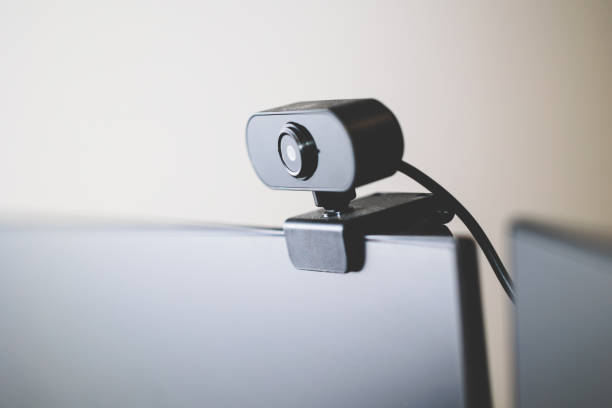
Webcam
ୱେବକ୍ୟାମ
Syllable: ୱେବ-କ୍ୟାମ
Pronunciation: Webkyam
- The webcam shows live video. – ୱେବକ୍ୟାମ ସଜୀବ ଭିଡିଓ ଦେଖାଏ।
- I use a webcam for meetings. – ମୁଁ ମିଟିଂ ପାଇଁ ୱେବକ୍ୟାମ ବ୍ୟବହାର କରେ।
- The webcam image is clear. – ୱେବକ୍ୟାମର ଚିତ୍ର ସ୍ପଷ୍ଟ ଅଟେ।

Printer
ପ୍ରିଣ୍ଟର
Syllable: ପ୍ରିଣ୍-ଟର
Pronunciation: Printer
- The printer prints documents. – ପ୍ରିଣ୍ଟର ଦଲିଲ ଛାପେ।
- I printed my homework. – ମୁଁ ମୋ ଗୃହକାର୍ଯ୍ୟ ଛାପିଲି।
- The printer needs ink. – ପ୍ରିଣ୍ଟରକୁ ଶାଇ ଆବଶ୍ୟକ।

Scanner
ସ୍କାନର
Syllable: ସ୍କା-ନର
Pronunciation: Skanar
- The scanner copies documents digitally. – ସ୍କାନର ଦଲିଲକୁ ଡିଜିଟାଲ ରୂପ ଦିଏ।
- I scanned an old photo. – ମୁଁ ଏକ ପୁରୁଣା ଫଟୋ ସ୍କାନ କଲି।
- The scanner works well. – ସ୍କାନର ଭଲ କାମ କରୁଛି।

USB Flash Drive
ୟୁଏସବି ଫ୍ଲାଶ ଡ୍ରାଇଭ
Syllable: ୟୁ-ଏସ-ବି ଫ୍ଲାଶ-ଡ୍ରାଇଭ
Pronunciation: USB Flash Drive
- I saved the file on a USB flash drive. – ମୁଁ ଫାଇଲକୁ ୟୁଏସବି ଫ୍ଲାଶ ଡ୍ରାଇଭରେ ସଂରକ୍ଷଣ କଲି।
- The USB flash drive is portable. – ୟୁଏସବି ଫ୍ଲାଶ ଡ୍ରାଇଭ ବହନ କରିବାକୁ ସହଜ।
- This USB drive has enough space. – ଏହି ୟୁଏସବି ଡ୍ରାଇଭରେ ପର୍ଯ୍ୟାପ୍ତ ସ୍ଥାନ ଅଛି।

DVD Drive
ଡିଭିଡି ଡ୍ରାଇଭ
Syllable: ଡି-ଭି-ଡି ଡ୍ରାଇଭ
Pronunciation: DVD Drive
- The DVD drive reads discs. – ଡିଭିଡି ଡ୍ରାଇଭ ଡିସ୍କ ପଢ଼େ।
- My computer has a DVD drive. – ମୋ କମ୍ପ୍ୟୁଟରରେ ଡିଭିଡି ଡ୍ରାଇଭ ଅଛି।
- The DVD drive is working properly. – ଡିଭିଡି ଡ୍ରାଇଭ ଠିକ୍ ଭାବେ କାମ କରୁଛି।

Graphics Card
ଗ୍ରାଫିକ୍ସ କାର୍ଡ
Syllable: ଗ୍ରା-ଫିକ୍ସ କାର୍ଡ
Pronunciation: Grafiks Card
- The graphics card improves visuals. – ଗ୍ରାଫିକ୍ସ କାର୍ଡ ଚିତ୍ର ଗୁଣବତ୍ତା ବଢ଼ାଏ।
- Gamers need a powerful graphics card. – ଖେଳାଳିମାନଙ୍କୁ ଶକ୍ତିଶାଳୀ ଗ୍ରାଫିକ୍ସ କାର୍ଡ ଆବଶ୍ୟକ।
- My graphics card runs smoothly. – ମୋ ଗ୍ରାଫିକ୍ସ କାର୍ଡ ଭଲ ଭାବେ କାମ କରେ।

Laptop
ଲ୍ୟାପଟପ
Syllable: ଲ୍ୟାପ-ଟପ
Pronunciation: Lyaptop
- I use a laptop for work. – ମୁଁ କାମ ପାଇଁ ଲ୍ୟାପଟପ ବ୍ୟବହାର କରେ।
- My laptop is lightweight. – ମୋ ଲ୍ୟାପଟପ ହାଲୁକା ଅଟେ।
- The laptop battery lasts long. – ଲ୍ୟାପଟପର ବ୍ୟାଟେରି ଦୀର୍ଘ ସମୟ ଚାଲେ।

Touchpad
ଟଚପ୍ୟାଡ
Syllable: ଟଚ-ପ୍ୟାଡ
Pronunciation: Touchpad
- The touchpad controls the cursor. – ଟଚପ୍ୟାଡ କର୍ସରକୁ ନିୟନ୍ତ୍ରଣ କରେ।
- I moved my finger on the touchpad. – ମୁଁ ଟଚପ୍ୟାଡ ଉପରେ ଆଙ୍ଗୁଠି ଘୁଞ୍ଚାଇଲି।
- The touchpad is very sensitive. – ଟଚପ୍ୟାଡ ବହୁତ ସଂବେଦନଶୀଳ।

Battery
ବ୍ୟାଟେରି
Syllable: ବ୍ୟା-ଟେ-ରି
Pronunciation: Byateri
- The battery powers the laptop. – ବ୍ୟାଟେରି ଲ୍ୟାପଟପକୁ ଶକ୍ତି ଯୋଗାଏ।
- My battery is fully charged. – ମୋ ବ୍ୟାଟେରି ସମ୍ପୂର୍ଣ୍ଣ ଚାର୍ଜ ଅଛି।
- The battery needs replacement. – ବ୍ୟାଟେରି ବଦଳାଇବା ଆବଶ୍ୟକ।

Router
ରାଉଟର
Syllable: ରା-ଉ-ଟର
Pronunciation: Rautar
- The router provides internet access. – ରାଉଟର ଇଣ୍ଟରନେଟ ସୁବିଧା ଯୋଗାଏ।
- My router is connected. – ମୋ ରାଉଟର ସଂଯୁକ୍ତ ଅଛି।
- The router signal is strong. – ରାଉଟରର ସିଗ୍ନାଲ ଶକ୍ତିଶାଳୀ ଅଟେ।

Modem
ମୋଡେମ
Syllable: ମୋ-ଡେମ
Pronunciation: Modem
- The modem connects to the internet. – ମୋଡେମ ଇଣ୍ଟରନେଟ ସହ ଯୋଡ଼ାଯାଏ।
- The modem is working well. – ମୋଡେମ ଭଲ କାମ କରୁଛି।
- I restarted the modem today. – ମୁଁ ଆଜି ମୋଡେମକୁ ପୁନଃଚାଳନ କଲି।

Network Card
ନେଟୱର୍କ କାର୍ଡ
Syllable: ନେଟ-ୱର୍କ କାର୍ଡ
Pronunciation: Network Card
- The network card enables connectivity. – ନେଟୱର୍କ କାର୍ଡ ସଂଯୋଗ ସୁବିଧା ଦିଏ।
- My computer has a network card. – ମୋ କମ୍ପ୍ୟୁଟରରେ ନେଟୱର୍କ କାର୍ଡ ଅଛି।
- The network card works efficiently. – ନେଟୱର୍କ କାର୍ଡ ଦକ୍ଷତାର ସହ କାମ କରେ।

Projector
ପ୍ରୋଜେକ୍ଟର
Syllable: ପ୍ରୋ-ଜେକ୍-ଟର
Pronunciation: Projector
- The projector displays presentations. – ପ୍ରୋଜେକ୍ଟର ପ୍ରସ୍ତୁତିକରଣ ଦେଖାଏ।
- We used a projector in class. – ଆମେ ଶ୍ରେଣୀରେ ପ୍ରୋଜେକ୍ଟର ବ୍ୟବହାର କଲୁ।
- The projector image is bright. – ପ୍ରୋଜେକ୍ଟରର ଚିତ୍ର ଉଜ୍ଜ୍ୱଳ ଅଟେ।

Headphones
ହେଡଫୋନ
Syllable: ହେଡ-ଫୋନ
Pronunciation: Headphone
- I listen to music with headphones. – ମୁଁ ହେଡଫୋନରେ ସଙ୍ଗୀତ ଶୁଣେ।
- My headphones have good sound quality. – ମୋ ହେଡଫୋନର ଶବ୍ଦ ଗୁଣବତ୍ତା ଭଲ।
- The headphones are comfortable. – ହେଡଫୋନ ପିନ୍ଧିବାକୁ ସୁବିଧାଜନକ।
Pen Drive
ପେନ ଡ୍ରାଇଭ
Syllable: ପେନ-ଡ୍ରାଇଭ
Pronunciation: Pen Drive
- I carry files in a pen drive. – ମୁଁ ପେନ ଡ୍ରାଇଭରେ ଫାଇଲ ନେଇଯାଏ।
- The pen drive is small and useful. – ପେନ ଡ୍ରାଇଭ ଛୋଟ ଏବଂ ଉପଯୋଗୀ।
- I copied data to the pen drive. – ମୁଁ ପେନ ଡ୍ରାଇଭକୁ ତଥ୍ୟ କପି କଲି।

Joystick
ଜୟଷ୍ଟିକ
Syllable: ଜୟ-ଷ୍ଟିକ
Pronunciation: Joystick
- The joystick is used for games. – ଜୟଷ୍ଟିକ ଖେଳ ପାଇଁ ବ୍ୟବହୃତ ହୁଏ।
- My joystick works perfectly. – ମୋ ଜୟଷ୍ଟିକ ଠିକ୍ ଭାବେ କାମ କରେ।
- I enjoy racing games with a joystick. – ମୁଁ ଜୟଷ୍ଟିକ ସହ ରେସିଂ ଖେଳ ଖେଳିବାକୁ ଭଲପାଏ।

Barcode Scanner
ବାରକୋଡ ସ୍କାନର
Syllable: ବାର-କୋଡ ସ୍କା-ନର
Pronunciation: Barcode Scanner
- The barcode scanner reads codes. – ବାରକୋଡ ସ୍କାନର କୋଡ ପଢ଼େ।
- The cashier used a barcode scanner. – କ୍ୟାଶିଅର ବାରକୋଡ ସ୍କାନର ବ୍ୟବହାର କଲେ।
- The scanner works quickly. – ସ୍କାନର ଶୀଘ୍ର କାମ କରେ।

UPS
ୟୁପିଏସ
Syllable: ୟୁ-ପି-ଏସ
Pronunciation: UPS
- The UPS provides backup power. – ୟୁପିଏସ ବିକଳ୍ପ ବିଦ୍ୟୁତ ଯୋଗାଏ।
- My UPS protects the computer. – ମୋ ୟୁପିଏସ କମ୍ପ୍ୟୁଟରକୁ ସୁରକ୍ଷା କରେ।
- The UPS started during a power cut. – ବିଦ୍ୟୁତ ବନ୍ଦ ସମୟରେ ୟୁପିଏସ ଚାଲୁ ହେଲା।
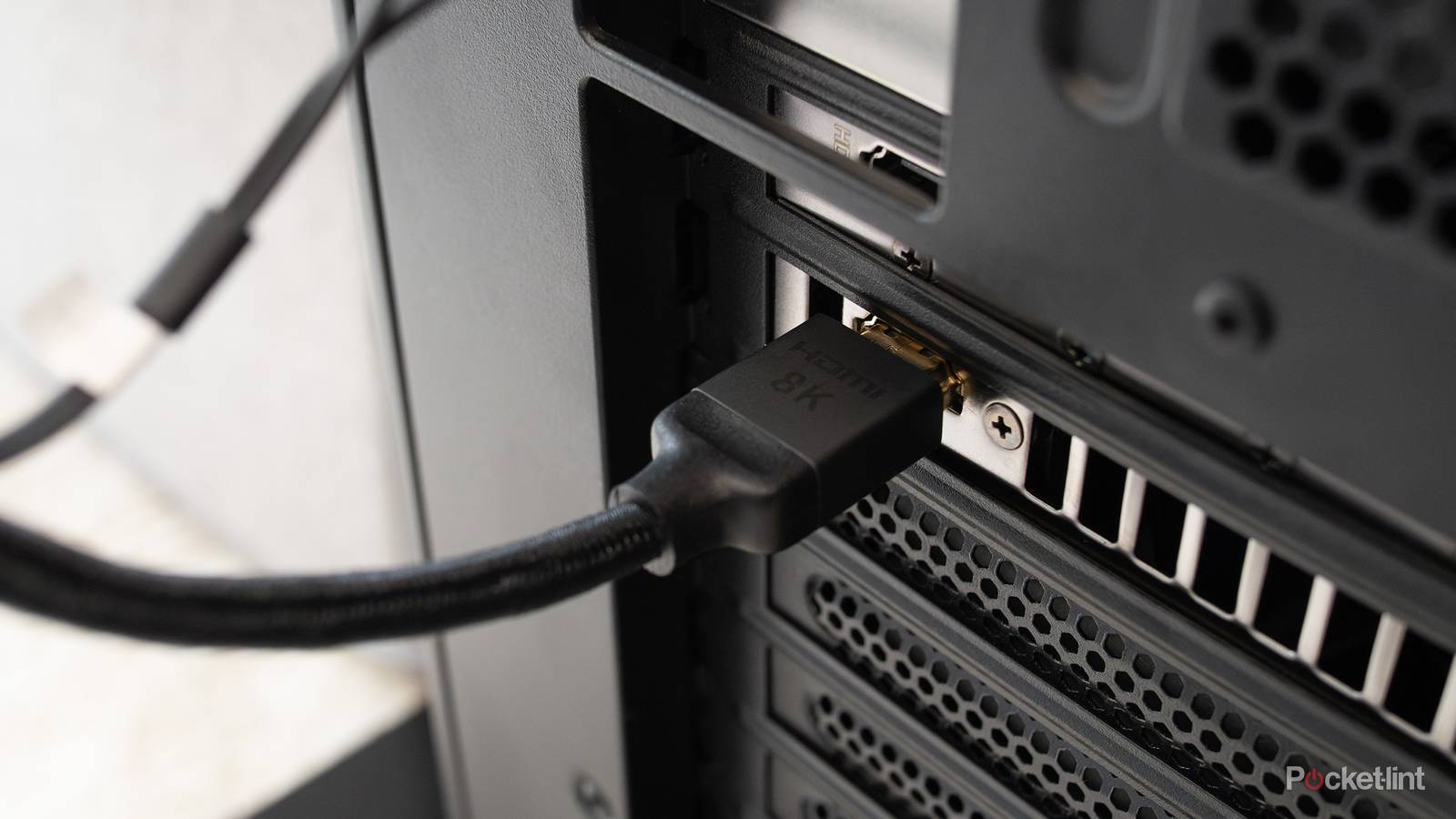
HDMI Cable
ଏଚଡିଏମଆଇ କେବୁଲ
Syllable: ଏଚ-ଡି-ଏମ-ଆଇ କେ-ବୁଲ
Pronunciation: HDMI Cable
- The HDMI cable connects devices. – ଏଚଡିଏମଆଇ କେବୁଲ ଉପକରଣଗୁଡ଼ିକୁ ଯୋଡ଼େ।
- I connected the monitor with an HDMI cable. – ମୁଁ ମନିଟରକୁ ଏଚଡିଏମଆଇ କେବୁଲରେ ଯୋଡ଼ିଲି।
- The HDMI cable transmits video clearly. – ଏଚଡିଏମଆଇ କେବୁଲ ସ୍ପଷ୍ଟ ଭିଡିଓ ପଠାଏ।

Ethernet Cable
ଇଥରନେଟ କେବୁଲ
Syllable: ଇ-ଥର-ନେଟ କେ-ବୁଲ
Pronunciation: Ethernet Cable
- The Ethernet cable provides network access. – ଇଥରନେଟ କେବୁଲ ନେଟୱର୍କ ସଂଯୋଗ ଦିଏ।
- I plugged in the Ethernet cable. – ମୁଁ ଇଥରନେଟ କେବୁଲ ଲଗାଇଲି।
- The Ethernet connection is stable. – ଇଥରନେଟ ସଂଯୋଗ ସ୍ଥିର ଅଟେ।
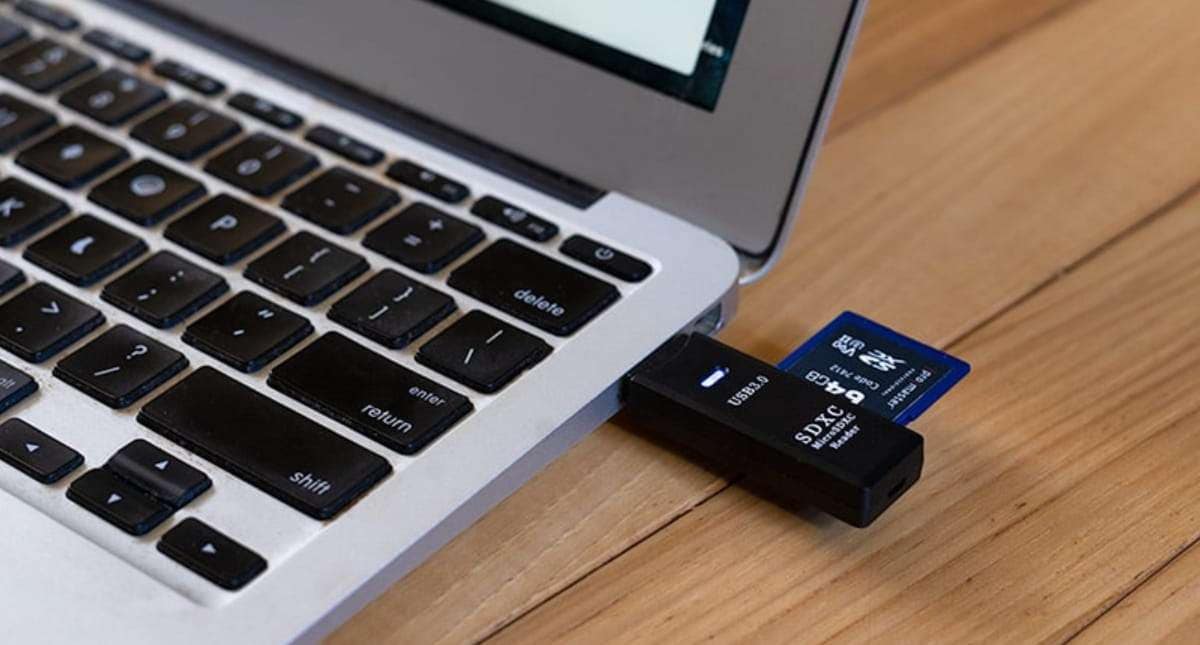
SD Card
ଏସଡି କାର୍ଡ
Syllable: ଏସ-ଡି କାର୍ଡ
Pronunciation: SD Card
- The SD card stores photos. – ଏସଡି କାର୍ଡ ଫଟୋ ସଂରକ୍ଷଣ କରେ।
- My camera uses an SD card. – ମୋ କ୍ୟାମେରାରେ ଏସଡି କାର୍ଡ ବ୍ୟବହୃତ ହୁଏ।
- The SD card has enough memory. – ଏସଡି କାର୍ଡରେ ପର୍ଯ୍ୟାପ୍ତ ମେମୋରି ଅଛି।

Fingerprint Scanner
ଅଙ୍ଗୁଠିଛାପ ସ୍କାନର
Syllable: ଅଙ୍-ଗୁ-ଠି-ଛାପ ସ୍କା-ନର
Pronunciation: Anguthichhap Scanner
- The fingerprint scanner verifies identity. – ଅଙ୍ଗୁଠିଛାପ ସ୍କାନର ପରିଚୟ ଯାଞ୍ଚ କରେ।
- I unlocked the device with my fingerprint. – ମୁଁ ଅଙ୍ଗୁଠିଛାପରେ ଉପକରଣ ଖୋଲିଲି।
- The scanner is very secure. – ଏହି ସ୍କାନର ବହୁତ ସୁରକ୍ଷିତ।
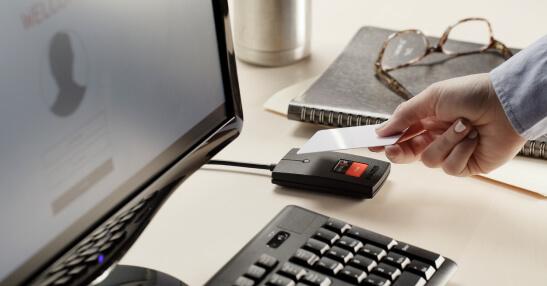
Card Reader
କାର୍ଡ ରିଡର
Syllable: କାର୍ଡ ରି-ଡର
Pronunciation: Card Reader
- The card reader reads memory cards. – କାର୍ଡ ରିଡର ମେମୋରି କାର୍ଡ ପଢ଼େ।
- I inserted the SD card into the card reader. – ମୁଁ ଏସଡି କାର୍ଡକୁ କାର୍ଡ ରିଡରରେ ଲଗାଇଲି।
- The card reader transferred files quickly. – କାର୍ଡ ରିଡର ଶୀଘ୍ର ଫାଇଲ ସ୍ଥାନାନ୍ତର କଲା।
Easy Ways to Remember Odia Computer Parts Names
One practical approach is to learn vocabulary while using a computer. Learners can identify the keyboard while typing, the monitor while reading information, and the mouse while navigating the screen. Associating words with actions often improves memory.
Labeled diagrams and computer charts can also help. Seeing the part and its Odia name together makes vocabulary easier to understand and remember.
Another useful method is grouping computer parts by function. Input devices, output devices, storage devices, and accessories can be studied separately before reviewing them as a complete set.
Simple Practice Ideas
- Label computer parts with their Odia names.
- Use flashcards with computer images.
- Learn a few new terms every week.
- Draw a computer setup and label each component.
- Watch Odia educational videos about computers.
- Create a notebook for technology vocabulary.
- Match pictures with their Odia names.
- Practice pronunciation aloud.
- Use computer terms in simple sentences.
- Review older vocabulary regularly.
- Identify parts while working on a computer.
- Ask family members or friends to test your knowledge.
Consistent exposure and hands-on practice can help learners remember computer vocabulary more effectively.
Computer Parts Names in Odia At a Glance
| # | English Name | Odia Name | Pronunciation |
|---|---|---|---|
| 1 | Computer | କମ୍ପ୍ୟୁଟର | Kampyutar |
| 2 | Monitor | ମନିଟର | Manitar |
| 3 | Keyboard | କୀବୋର୍ଡ | Kibord |
| 4 | Mouse | ମାଉସ | Mausa |
| 5 | CPU | ସିପିଉ | CPU |
| 6 | Motherboard | ମଦରବୋର୍ଡ | Madarbord |
| 7 | RAM | ରାମ | RAM |
| 8 | Hard Disk | ହାର୍ଡ ଡିସ୍କ | Hard Disk |
| 9 | SSD | ଏସଏସଡି | SSD |
| 10 | Power Supply Unit | ପାୱର ସପ୍ଲାଇ ୟୁନିଟ | Power Supply Unit |
| 11 | Cabinet | କ୍ୟାବିନେଟ | Kyabinet |
| 12 | Speaker | ସ୍ପିକର | Spikar |
| 13 | Microphone | ମାଇକ୍ରୋଫୋନ | Maikrofon |
| 14 | Webcam | ୱେବକ୍ୟାମ | Webkyam |
| 15 | Printer | ପ୍ରିଣ୍ଟର | Printer |
| 16 | Scanner | ସ୍କାନର | Skanar |
| 17 | USB Flash Drive | ୟୁଏସବି ଫ୍ଲାଶ ଡ୍ରାଇଭ | USB Flash Drive |
| 18 | DVD Drive | ଡିଭିଡି ଡ୍ରାଇଭ | DVD Drive |
| 19 | Graphics Card | ଗ୍ରାଫିକ୍ସ କାର୍ଡ | Grafiks Card |
| 20 | Laptop | ଲ୍ୟାପଟପ | Lyaptop |
| 21 | Touchpad | ଟଚପ୍ୟାଡ | Touchpad |
| 22 | Battery | ବ୍ୟାଟେରି | Byateri |
| 23 | Router | ରାଉଟର | Rautar |
| 24 | Modem | ମୋଡେମ | Modem |
| 25 | Network Card | ନେଟୱର୍କ କାର୍ଡ | Network Card |
| 26 | Projector | ପ୍ରୋଜେକ୍ଟର | Projector |
| 27 | Headphones | ହେଡଫୋନ | Headphone |
| 28 | Pen Drive | ପେନ ଡ୍ରାଇଭ | Pen Drive |
| 29 | Joystick | ଜୟଷ୍ଟିକ | Joystick |
| 30 | Barcode Scanner | ବାରକୋଡ ସ୍କାନର | Barcode Scanner |
| 31 | UPS | ୟୁପିଏସ | UPS |
| 32 | HDMI Cable | ଏଚଡିଏମଆଇ କେବୁଲ | HDMI Cable |
| 33 | Ethernet Cable | ଇଥରନେଟ କେବୁଲ | Ethernet Cable |
| 34 | SD Card | ଏସଡି କାର୍ଡ | SD Card |
| 35 | Fingerprint Scanner | ଅଙ୍ଗୁଠିଛାପ ସ୍କାନର | Anguthichhap Scanner |
| 36 | Card Reader | କାର୍ଡ ରିଡର | Card Reader |
Odia Computer Parts Quiz
Strengthening Odia Skills in a Technology-Driven World
Computer parts names are valuable because they connect language learning with tools that people use every day. These words help learners participate in educational activities, understand digital environments, and communicate more confidently about technology.
As you continue expanding your Odia vocabulary, technology-related topics can introduce many useful modern terms. Which computer part do you use most often during the day?
Did you discover an Odia computer term that was completely new to you? Share your thoughts in the comments and compare your answers with other learners.